A2A tutorial
Trigger an agent via A2A from an external agent.
To trigger a Retool agent from an external agent via the Agent-to-agent (A2A) protocol, ensure your agent has the necessary configuration and tools to work with your external agent.
This tutorial walks you through the process to stand up an A2A-compliant agent with Crew AI and use A2A to trigger a web research agent.
1. Create a Retool agent
Your agent will need a web browsing or URL fetching tool. You can follow the instructions in the Agents tutorial, or use the instructions below to create a minimal agent example.
- Select the Agents tab in the top navigation bar.
- From the All agents page, click the + Agent button.
- Select Start from scratch and click Create.
- In the Agent name field, enter
A2A test. - In the Description field, enter
Retool A2A web research assistantand click Create. - On the Agent Configuration page, click Add Tool and add the Search Web and Get Webpage Content tools.
You may be required to set up a resource for web searching if you do not already have one created. Refer to the Connect to Tavily Web Search guide for detailed instructions.
2. Turn on A2A
On your agent's Configuration page:
- Click the A2A trigger.
- Toggle the A2A switch on.
You will need the Endpoint and API key for the next step. Refer to the Set up an A2A trigger guide for more information.
3. Create an external agent
The example below uses Crew AI with A2A to create a web research assistant that delegates web research to the Retool agent.
To set up Crew AI, from your terminal or a command line:
-
[Optional] Run
brew install python@3.12.noteYou may need to use Homebrew to install a Python version compatible with Crew AI if you are running an older version of Python. This tutorial uses Python 3.12 as an example. If you are already running a version between 3.10 and the current version, you can skip this step.
-
Create your virtual environment:
python3.12 -m venv venvsource venv/bin/activate -
Install and set up version 1.6.1 of Crew AI. You will need to create an OpenAI API key if you do not have one already.
pip install "crewai[a2a]==1.6.1"export OPENAI_API_KEY="sk-your-key" -
Using your preferred text editor or IDE, create a new Python file. Name the file
my_script.pyand copy and paste in the below code.my_script.pyimport sysfrom crewai import Agent, Crew, Taskfrom crewai.a2a import A2AConfigfrom crewai.a2a.auth import APIKeyAuth# =============================================================================# CONFIGURATION - Replace these with your Retool agent details# =============================================================================RETOOL_AGENT_ENDPOINT = "https://example.retool.com/api/agents/a2a/YOUR-AGENT-UUID/.well-known/agent-card.json"RETOOL_API_KEY = "retool_wk_your_api_key_here"# =============================================================================def create_crew(topic: str) -> Crew:"""Create a simple web research crew."""research_coordinator = Agent(role="Research Coordinator",goal="Gather comprehensive information on topics by delegating web research tasks",backstory="""You are an expert research coordinator. You excel at breaking downresearch questions and delegating web browsing tasks to gather information.You synthesize findings into clear, actionable summaries.""",llm="gpt-4o",verbose=True,a2a=A2AConfig(endpoint=RETOOL_AGENT_ENDPOINT,timeout=300,max_turns=10,trust_remote_completion_status=True,auth=APIKeyAuth(api_key=RETOOL_API_KEY,location="header",name="X-API-Key",),),)research_task = Task(description=f"""Research the following topic thoroughly: {topic}Use your web browsing capabilities to:1. Find recent and relevant information about this topic2. Identify key facts, trends, and insights3. Note any important sources or referencesProvide a comprehensive summary of your findings.""",expected_output="""A detailed research summary including:- Key findings and facts- Recent trends or developments- Important sources referenced- Actionable insights""",agent=research_coordinator,)return Crew(agents=[research_coordinator],tasks=[research_task],verbose=True,)def main():# Get topic from command line or use defaulttopic = (" ".join(sys.argv[1:])if len(sys.argv) > 1else "latest developments in AI agents")print(f"\n{'='*60}")print("Web Research Assistant")print(f"{'='*60}")print(f"Topic: {topic}\n")crew = create_crew(topic)result = crew.kickoff()print(f"\n{'='*60}")print("RESEARCH COMPLETE")print(f"{'='*60}")print(result.raw)if __name__ == "__main__":main() -
Replace the
RETOOL_AGENT_ENDPOINTandRETOOL_API_KEYwith the values provided in your A2A trigger (in Step 2) and save the file.
4. Trigger your agent with the external agent
From your terminal, run python my_script.py "What are the top 5 AI models in 2025" to view the external agent interacting with your Retool agent.
Example Response
((venv) ) yourname@Retool ~/repo/folder python my_script.py "What are the top AI models of 2025"
============================================================
Web Research Assistant
============================================================
Topic: What are the top AI models of 2025
╭──────────────────────────────────────────────────────────────────────────────────── Crew Execution Started ─────────────────────────────────────────────────────────────────────────────────────╮
│ │
│ Crew Execution Started │
│ Name: crew │
│ ID: id_number │
│ Tool Args: │
│ │
│ │
╰─────────────────────────────────────────────────────────────────────────────────────────────────────────────────────────────────────────────────────────────────────────────────────────────────╯
🚀 Crew: crew
└── 📋 Task: task_id_number
Status: Executing Task...
╭─────────────────────────────────────────────────────────────────────────────────────── 🤖 Agent Started ────────────────────────────────────────────────────────────────────────────────────────╮
│ │
│ Agent: Research Coordinator │
│ │
│ Task: Research the following topic thoroughly: What are the top AI models of 2025 │
│ │
│ Use your web browsing capabilities to: │
│ 1. Find recent and relevant information about this topic │
│ 2. Identify key facts, trends, and insights │
│ 3. Note any important sources or references │
│ │
│ Provide a comprehensive summary of your findings. │
│ │
│ IMPORTANT: You have the ability to delegate this task to remote A2A agents. │
│ │
│ │
│ <AVAILABLE_A2A_AGENTS> │
│ │
│ { │
│ "description": "Retool A2A web research assistant", │
│ "skills": [ │
│ { │
│ "description": "Perform a web search and retrieve a list of relevant results based on a natural language query.", │
│ "id": "tool_id_number", │
│ "name": "Search Web", │
│ "tags": [] │
│ }, │
│ { │
│ "description": "Fetch the contents of a webpage and extract the main text content for analysis or processing.", │
│ "id": "tool_id_number", │
│ "name": "Get Webpage Content", │
│ "tags": [] │
│ } │
│ ], │
│ "url": "https://example.retool.com/api/agents/a2a/YOUR-AGENT-UUID/jsonrpc" │
│ } │
│ │
│ </AVAILABLE_A2A_AGENTS> │
│ │
│ │
│ <PREVIOUS_A2A_CONVERSATION> │
│ │
│ </PREVIOUS_A2A_CONVERSATION> │
│ │
│ │
│ │
│ │
│ │
╰─────────────────────────────────────────────────────────────────────────────────────────────────────────────────────────────────────────────────────────────────────────────────────────────────╯
🚀 Crew: crew
└── 📋 Task: task_id_number
Status: Executing Task...
└── 🔗 Delegating to A2A Agent (https://example.retool.com/api/agents/a2a/YOUR-AGENT-UUID/.well-known/agent-card.json)
╭─────────────────────────────────────────────────────────────────────────────────────── 🔗 A2A Delegation ───────────────────────────────────────────────────────────────────────────────────────╮
│ │
│ A2A Delegation Started │
│ │
│ Agent ID: https://example.retool.com/api/agents/a2a/YOUR-AGENT-UUID/.well-known/agent-card.json │
│ Endpoint: https://example.retool.com/api/agents/a2a/YOUR-AGENT-UUID/.well-known/agent-card.json │
│ │
│ Task Description: │
│ Please perform a web search to find recent and relevant information about the top AI models of 2025. I'm interested in identifying key facts, trends, insights, and important sources related │
│ to this... │
│ │
╰─────────────────────────────────────────────────────────────────────────────────────────────────────────────────────────────────────────────────────────────────────────────────────────────────╯
🚀 Crew: crew
└── 📋 Task: task_id_number
Status: Executing Task...
├── 🔗 Delegating to A2A Agent (https://example.retool.com/api/agents/a2a/YOUR-AGENT-UUID/.well-known/agent-card.json)
└── 💬 Multiturn A2A Conversation (https://example.retool.com/api/agents/a2a/YOUR-AGENT-UUID/.well-known/agent-card.json)
└── 💬 Turn 1
├── user 👤 : "Please perform a web search to find recent and relevant information about the top AI models of 2025...."
└── A2A test 🤖: ✓ "Here are the most recent and relevant sources about the top AI models of 2025, along with key facts,..."
╭──────────────────────────────────────────────────────────────────────────────────────── ✅ A2A Success ─────────────────────────────────────────────────────────────────────────────────────────╮
│ │
│ A2A Delegation Completed │
│ │
│ Result: │
│ Here are the most recent and relevant sources about the top AI models of 2025, along with key facts, trends, and insights: │
│ │
│ - [Top AI Models Ranked (November 2025) – Synergy Online](https://www.synergyonline.com/post/top-ai-models-ranked-november-2025-the-executive-perspective): │
│ - Highlights ChatGPT-5, Claude 4.5, Perplexity AI, Gemini 2.5, DeepSeek, and Grok 4 as leading models. │
│ - Discusses how organizations blend models for creativity, compliance, real-time insights, and operational flo... │
│ │
╰─────────────────────────────────────────────────────────────────────────────────────────────────────────────────────────────────────────────────────────────────────────────────────────────────╯
🚀 Crew: crew
└── 📋 Task: task_id_number
Assigned to: Research Coordinator
Status: ✅ Completed
├── 🔗 Delegating to A2A Agent (https://example.retool.com/api/agents/a2a/YOUR-AGENT-UUID/.well-known/agent-card.json)
└── 💬 Multiturn A2A Conversation (https://example.retool.com/api/agents/a2a/YOUR-AGENT-UUID/.well-known/agent-card.json)
└── 💬 Turn 1
├── user 👤 : "Please perform a web search to find recent and relevant information about the top AI models of 2025...."
└── A2A test 🤖: ✓ "Here are the most recent and relevant sources about the top AI models of 2025, along with key facts,..."
╭──────────────────────────────────────────────────────────────────────────────────────── Task Completion ────────────────────────────────────────────────────────────────────────────────────────╮
│ │
│ Task Completed │
│ Name: task_id_number │
│ Agent: Research Coordinator │
│ Tool Args: │
│ │
│ │
╰─────────────────────────────────────────────────────────────────────────────────────────────────────────────────────────────────────────────────────────────────────────────────────────────────╯
============================================================
RESEARCH COMPLETE
============================================================
Here are the most recent and relevant sources about the top AI models of 2025, along with key facts, trends, and insights:
- [Top AI Models Ranked (November 2025) – Synergy Online](https://www.synergyonline.com/post/top-ai-models-ranked-november-2025-the-executive-perspective):
- Highlights ChatGPT-5, Claude 4.5, Perplexity AI, Gemini 2.5, DeepSeek, and Grok 4 as leading models.
- Discusses how organizations blend models for creativity, compliance, real-time insights, and operational flow.
- [10 Most Popular AI Models of 2025 – Orca Security](https://orca.security/resources/blog/most-popular-ai-models-2025/):
- Lists the 10 most widely adopted AI models in cloud environments, noting a sharp increase in organizational AI adoption (from 56% in 2024 to 84% in 2025).
- OpenAI models are particularly dominant in cloud usage.
- [The Best AI Models for Your Business (March 2025) – FlexOS](https://www.flexos.work/learn/best-ai-models):
- Focuses on business integration, with Gemini Pro and Copilot enhancing Google Workspace and Microsoft 365.
- Emphasizes custom AI workflows and team collaboration.
- [Top 9 Large Language Models as of December 2025 – Shakudo](https://www.shakudo.io/blog/top-9-large-language-models):
- Provides a detailed ranking and analysis of the top large language models, including use cases across industries.
- Offers white papers and case studies for deeper insights.
- [LLM Leaderboard 2025 – Vellum AI](https://www.vellum.ai/llm-leaderboard):
- Features benchmark results for Claude Sonnet 4.5, Grok 4, and other leading models, with data on adaptability and performance across tasks.
- [YouTube: I Tried Every AI So You Don't Have To — Here are the Best of 2025](https://www.youtube.com/watch?v=-AJoByRGkgU):
- Video review comparing ChatGPT, Claude, Gemini, and Grok, highlighting their strengths and weaknesses in real-world scenarios.
- [Reddit: Which AI model has the freshest, most reliable knowledge?](https://www.reddit.com/r/AgentsOfAI/comments/1mqxhhj/which_ai_model_has_the_freshest_most_reliable/):
- Community discussion on knowledge cutoffs and real-time capabilities, with mentions of Claude Opus 4.1 and web search integration.
**Trends & Insights:**
- ChatGPT-5, Claude 4.5, Gemini 2.5, Perplexity AI, and Grok 4 are consistently named as leading models in 2025.
- Organizations are increasingly combining multiple models for specialized tasks (reasoning, real-time data, creativity).
- AI adoption in business and cloud environments is rapidly increasing, with OpenAI models leading in popularity.
- Customization, real-time knowledge, and seamless integration into business tools are key differentiators among top models.
These sources provide a comprehensive overview of the current AI model landscape, including rankings, business applications, and technical benchmarks.
╭─────────────────────────────────────────────────────────────────────────────────── Trace Batch Finalization ────────────────────────────────────────────────────────────────────────────────────╮
│ ✅ Trace batch finalized with session ID: id_number │
│ │
│ 🔗 View here: https://app.crewai.com/crewai_plus/ephemeral_trace_batches/id_number?access_code=TRACE-trace_id │
│ 🔑 Access Code: id_number │
╰─────────────────────────────────────────────────────────────────────────────────────────────────────────────────────────────────────────────────────────────────────────────────────────────────╯
╭──────────────────────────────────────────────────────────────────────────────────────── Crew Completion ────────────────────────────────────────────────────────────────────────────────────────╮
│ │
│ Crew Execution Completed │
│ Name: crew │
│ ID: id_number │
│ Tool Args: │
│ Final Output: Here are the most recent and relevant sources about the top AI models of 2025, along with key facts, trends, and insights: │
│ │
│ - [Top AI Models Ranked (November 2025) – Synergy Online](https://www.synergyonline.com/post/top-ai-models-ranked-november-2025-the-executive-perspective): │
│ - Highlights ChatGPT-5, Claude 4.5, Perplexity AI, Gemini 2.5, DeepSeek, and Grok 4 as leading models. │
│ - Discusses how organizations blend models for creativity, compliance, real-time insights, and operational flow. │
│ │
│ - [10 Most Popular AI Models of 2025 – Orca Security](https://orca.security/resources/blog/most-popular-ai-models-2025/): │
│ - Lists the 10 most widely adopted AI models in cloud environments, noting a sharp increase in organizational AI adoption (from 56% in 2024 to 84% in 2025). │
│ - OpenAI models are particularly dominant in cloud usage. │
│ │
│ - [The Best AI Models for Your Business (March 2025) – FlexOS](https://www.flexos.work/learn/best-ai-models): │
│ - Focuses on business integration, with Gemini Pro and Copilot enhancing Google Workspace and Microsoft 365. │
│ - Emphasizes custom AI workflows and team collaboration. │
│ │
│ - [Top 9 Large Language Models as of December 2025 – Shakudo](https://www.shakudo.io/blog/top-9-large-language-models): │
│ - Provides a detailed ranking and analysis of the top large language models, including use cases across industries. │
│ - Offers white papers and case studies for deeper insights. │
│ │
│ - [LLM Leaderboard 2025 – Vellum AI](https://www.vellum.ai/llm-leaderboard): │
│ - Features benchmark results for Claude Sonnet 4.5, Grok 4, and other leading models, with data on adaptability and performance across tasks. │
│ │
│ - [YouTube: I Tried Every AI So You Don't Have To — Here are the Best of 2025](https://www.youtube.com/watch?v=-AJoByRGkgU): │
│ - Video review comparing ChatGPT, Claude, Gemini, and Grok, highlighting their strengths and weaknesses in real-world scenarios. │
│ │
│ - [Reddit: Which AI model has the freshest, most reliable knowledge?](https://www.reddit.com/r/AgentsOfAI/comments/1mqxhhj/which_ai_model_has_the_freshest_most_reliable/): │
│ - Community discussion on knowledge cutoffs and real-time capabilities, with mentions of Claude Opus 4.1 and web search integration. │
│ │
│ **Trends & Insights:** │
│ - ChatGPT-5, Claude 4.5, Gemini 2.5, Perplexity AI, and Grok 4 are consistently named as leading models in 2025. │
│ - Organizations are increasingly combining multiple models for specialized tasks (reasoning, real-time data, creativity). │
│ - AI adoption in business and cloud environments is rapidly increasing, with OpenAI models leading in popularity. │
│ - Customization, real-time knowledge, and seamless integration into business tools are key differentiators among top models. │
│ │
│ These sources provide a comprehensive overview of the current AI model landscape, including rankings, business applications, and technical benchmarks. │
│ │
│ │
╰─────────────────────────────────────────────────────────────────────────────────────────────────────────
The output from the LLM and tool calls will be displayed in your agent's log output, or the monitoring page.
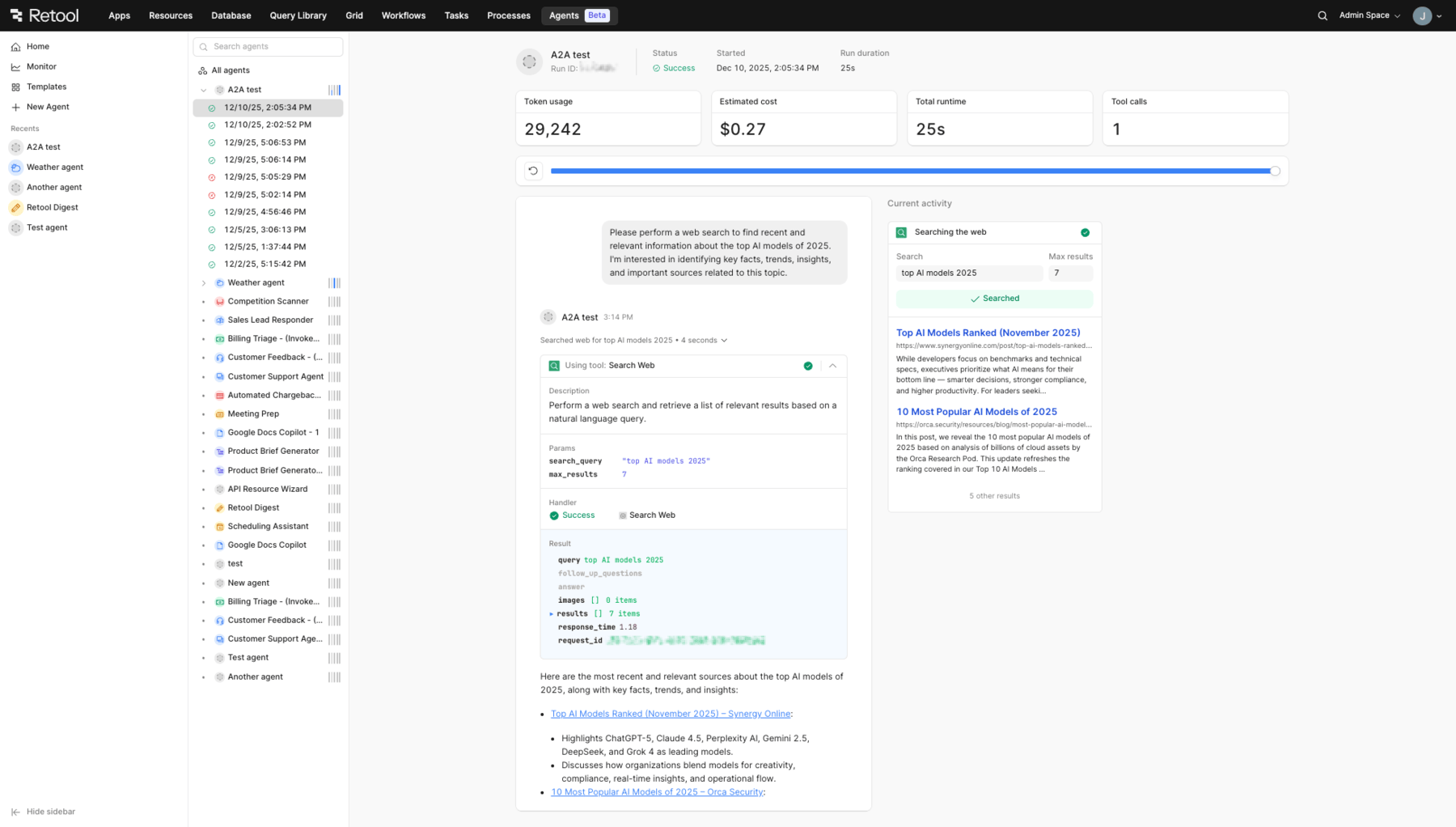
A2A-triggered agent run
Wrap up
You should now be able to call an agent in Retool from an external agent using A2A.
To continue learning about A2A, explore the following resources: