Connect to Tavily Web Search
Connect Tavily to Retool and search the web for real-time information from apps, workflows, and agents.
Tavily is a search API built for AI applications that returns relevant, up-to-date web results.
What you can do with Tavily Web Search in Retool
After you create a Tavily resource in Retool, you can:
- Search the web for real-time information from apps, workflows, and agent tools.
- Filter results to specific topics, such as general search or news.
- Restrict searches to a set of allowed or blocked domains.
- Give agents access to live web search as a tool.
Before you begin
To connect Tavily to Retool, you need the following:
- Cloud
- Self-hosted
- Tavily API key (optional): Cloud organizations can use Retool's managed API key with no setup, or bring your own Tavily API key for higher rate limits.
- Retool permissions: Edit all permissions for resources in your organization.
- Tavily API key: A Tavily API key to bring your own key. Self-hosted instances don't have access to Retool's managed API key.
- Retool permissions: Edit all permissions for resources in your organization.
Create a Tavily resource
Follow these steps to create a Tavily resource in Retool.
1. Create a new resource
In your Retool organization, navigate to Resources in the main navigation and click Create new → Resource. Search for "Tavily" and click the Tavily Web Search tile to begin configuration.
2. Configure resource credentials
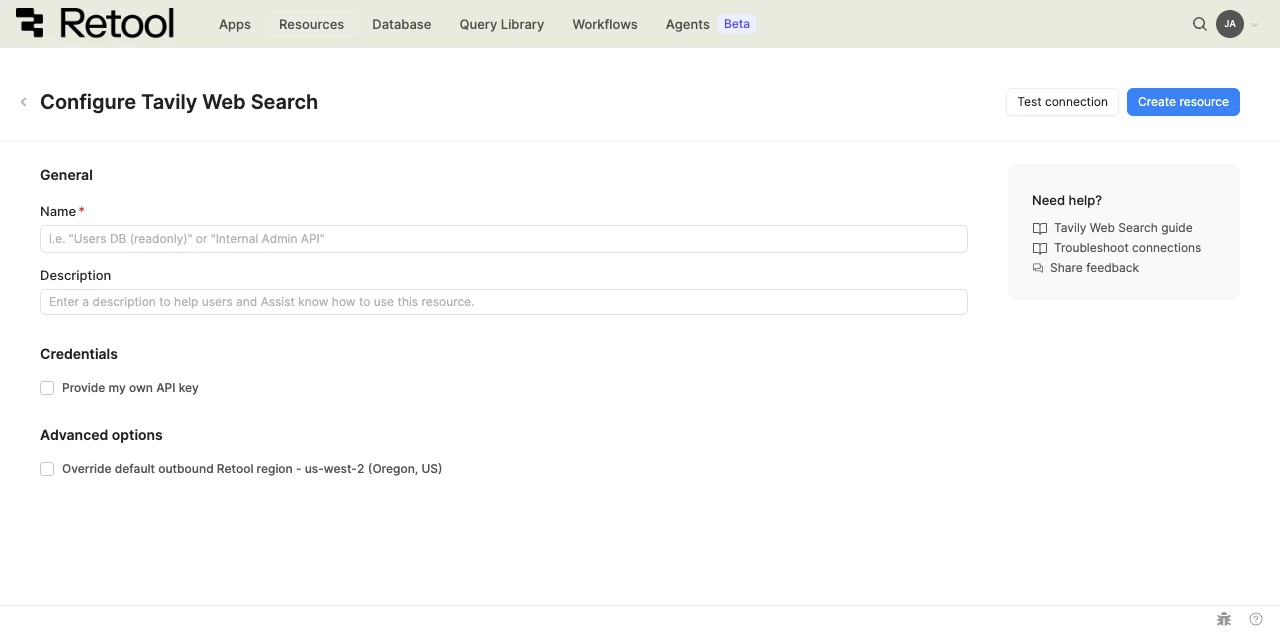
Tavily Web Search resource configuration form.
- Cloud
- Self-hosted
By default, Retool uses a managed Tavily API key on your behalf, subject to a rate limit of 10 requests per minute and 100 requests per 24 hours per organization.
To bring your own key and avoid this rate limit, enable Provide my own API key and enter your key in the Custom API Key field that appears.
Custom API key
Your Tavily API key. Required only if Provide my own API key is enabled.
Self-hosted instances must bring their own Tavily API key. Enable Provide my own API key and enter your key in the Custom API Key field that appears.
Custom API key
Your Tavily API key. Required.
3. Configure advanced options
- Cloud
Outbound region
If your organization uses outbound regions, select the region that should be used for requests to Tavily. This controls which geographic region your requests originate from.
4. Test the connection
Click Test connection to verify Retool can reach Tavily. If the test succeeds, you see a success message. If it fails, check the following:
- Custom API key validity: If Provide my own API key is enabled, confirm the key is correct and hasn't been revoked.
- Rate limits: If you're using Retool's managed key, confirm your organization hasn't exceeded the shared rate limit.
5. Save the resource
Click Create resource to save your Tavily resource. The resource is now available to use in apps, workflows, and agent tools across your Retool organization.
Interact with Tavily data
Once you've created a Tavily resource, you can interact with Tavily data using Retool. To search the web in a classic app, workflow, or agent, write a resource query. Refer to the Tavily query tutorial to learn more.
Best practices
Follow these best practices to maintain the security of your Tavily resource.
- Bring your own key for production use: Retool's managed API key is subject to organization-wide rate limits. Provide your own Tavily API key to avoid sharing that limit with other resources in your organization.
- Rotate credentials regularly: Follow Tavily's recommendations for API key rotation and management.
- Use resource environments: Organizations on an Enterprise plan can configure multiple resource environments to use different Tavily API keys for production, staging, and development.
- Apply least privilege: Use a Tavily API key scoped to only the access your use case requires, and store it as the resource's Custom API Key rather than in a query or app.
Related resources
Tavily query tutorial
Learn how to query Tavily and search the web from Retool.
Create a resource
Learn how to create and manage resources in Retool.
Resource environments
Configure separate credentials for production and non-production environments.
Agent tools
Give agents access to resources and functions as tools.
Retool community: Tavily
Community discussions and solutions for Tavily integrations.
Tavily documentation
Official Tavily API documentation.