Connect to Oracle AI Database
Connect Oracle AI Database to Retool and query and manage data in your database.
Oracle AI Database is a relational database management system widely used for enterprise applications and transaction processing. In Retool, this resource is labeled OracleDB.
What you can do with Oracle AI Database in Retool
After you create an OracleDB resource in Retool, you can:
- Read and display data with SQL queries.
- Insert, update, and delete records using GUI mode.
- Build admin panels and dashboards backed by your database.
- Automate data workflows against your Oracle AI Database instance.
Before you begin
To connect Oracle AI Database to Retool, you need the following:
- Cloud
- Self-hosted
- Oracle AI Database instance: A running Oracle AI Database instance.
- Credentials: A database username and password with appropriate permissions.
- Network access: Your Oracle AI Database instance must accept connections from Retool's IP addresses.
- Retool permissions: Ability to create and manage resources in your organization.
- Oracle AI Database instance: A running Oracle AI Database instance.
- Credentials: A database username and password with appropriate permissions.
- Network access: Your Oracle AI Database instance must be reachable from your Retool instance.
- Retool permissions: Ability to create and manage resources in your organization.
Create an Oracle AI Database resource
Follow these steps to create an Oracle AI Database resource in your Retool organization.
Create a new resource
In your Retool organization, navigate to Resources in the main navigation and click Create new → Resource. Search for "OracleDB" and click the OracleDB tile to begin configuration.
Use folders to organize your resources by team, environment, or resource type. This helps keep your resource list manageable as your organization grows.
Configure general settings
Specify a name and description for the resource that indicates which database it connects to.
| Example name | Example description |
|---|---|
| Orders database | Oracle AI Database instance containing order and shipment records. |
| Analytics database (read only) | Read-only Oracle AI Database instance used for reporting dashboards. |
Connector version
Select the Connector version to use for this resource. Version 2.0 is the default for new resources and uses the connection string authentication documented in this guide. Version 1.0 is a legacy option that configures the connection using separate host, port, and database name fields instead of a connection string.
Configure resource credentials
Configure the connection settings for your OracleDB resource. The fields available depend on the Connector version you selected.
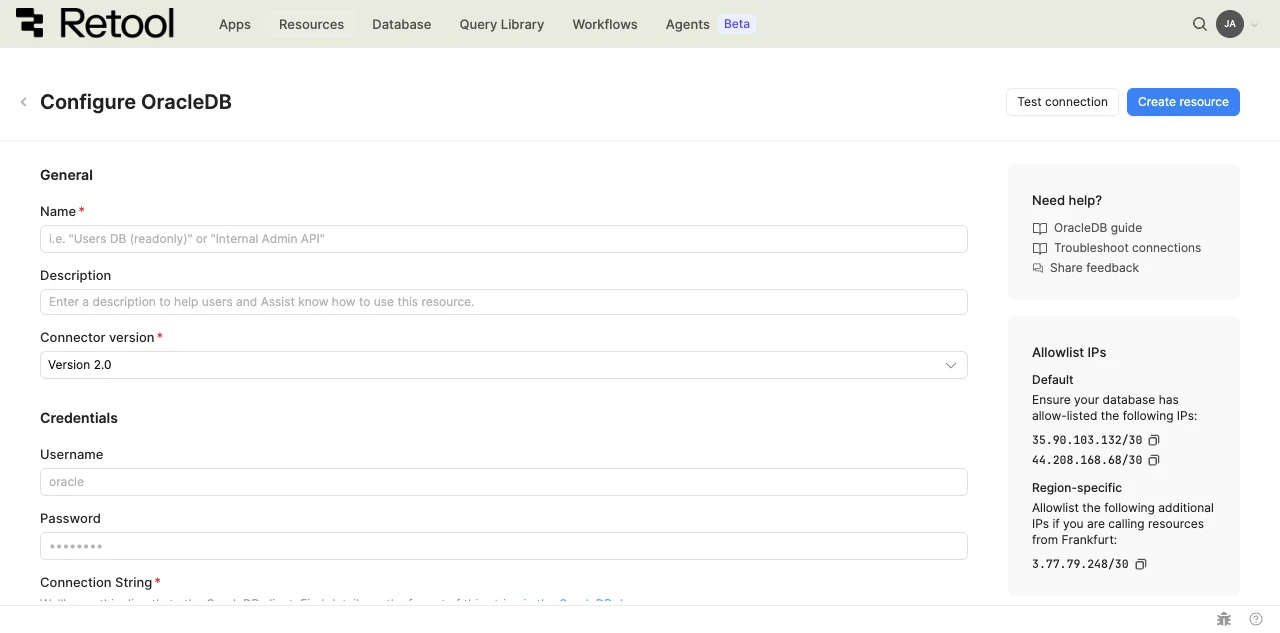
OracleDB resource configuration form.
- Version 2.0
- Version 1.0
Username and password
Enter the Username and Password for your Oracle AI Database instance.
Connection string
The database connection string. Retool passes this directly to the OracleDB client.
mydbmachine.example.com:1984/orclpdb1
Refer to the OracleDB connection string documentation for the full format reference.
Oracle AI Database resources authenticate with a username and password by default. You can optionally add mutual TLS (mTLS) authentication using an Oracle wallet for an additional layer of security.
Configure mTLS with a wallet key
Enable Configure mTLS with Wallet Key to require an Oracle wallet in addition to your username and password.
- Upload your Wallet Key file.
- Enter the Wallet Password for the wallet file.
Refer to your Oracle administrator to obtain a wallet file and its password.
Host, port, and database name
Enter the Host, Port, and Database Name for your Oracle AI Database instance.
If your database identifies itself using a SID rather than a service name, enable Treat Database Name field as SID and enter the SID in the Database Name field.
Database username and password
Enter the Database Username and Database Password for your Oracle AI Database instance.
Version 1.0 doesn't support mTLS wallet-key authentication. To use mTLS, switch to Version 2.0.
Configure advanced options
Configure optional settings available under the Advanced options section of the resource configuration form.
Disable converting queries to prepared statements
Retool converts queries to prepared statements by default to improve performance and prevent SQL injection. Enable this option only if your use case requires disabling that behavior.
Show write GUI mode only
Enable this to hide SQL mode from query writers, restricting them to GUI mode for write operations. Use this to reduce the risk of unintended data modifications.
- Cloud
Outbound region
If your organization uses outbound regions, select the region that should be used for requests to Oracle AI Database. This controls which geographic region your requests originate from.
Test the connection
Click Test connection to verify Retool can connect to Oracle AI Database. If the test fails, check the following:
- Network access: Ensure your Oracle AI Database instance accepts connections from Retool's IP addresses (cloud) or your Retool instance's network (self-hosted).
- Credentials: Verify the username and password are correct and the user has access to the specified database.
- Connection string or host details: For Version 2.0, confirm the connection string format matches your Oracle AI Database instance's host, port, and service name or SID. For Version 1.0, confirm the Host, Port, and Database Name fields are correct, and that Treat Database Name field as SID is enabled if your database identifies itself using a SID.
- Wallet configuration: If using mTLS (Version 2.0 only), confirm the wallet file and password are correct and haven't expired.
After testing the connection, click View in console to open the Debug Tools console. The console displays the test query executed, its response, execution time, and error details if the test fails. This information is helpful for troubleshooting connection issues.
Save the resource
Click Create resource to save your OracleDB resource. You can now use it in queries across your Retool apps and automations.
Interact with Oracle AI Database data
Once you've created an OracleDB resource, you can interact with Oracle AI Database data using Retool.
Retool recommends using the new app builder so you can use natural language to build React-based apps using AI.
- To use Oracle AI Database data in the app builder, reference the resource in the prompt with
@, such as@Orders database. Refer to the data and functions documentation to learn more. - For classic apps, workflows, and agents, refer to the SQL queries documentation to learn how to write a resource query.
Best practices
Follow these best practices to maintain the security of your OracleDB resource.
- Apply least privilege: Grant database users only the minimum permissions needed. Use read-only credentials for resources used only for reading data.
- Use mTLS for sensitive environments: Configure mTLS with a wallet key in addition to username and password authentication when connecting to production or other sensitive Oracle AI Database instances.
- Use resource environments: Configure multiple resource environments to maintain separate Oracle AI Database instances or credentials for production, staging, and development.
Related resources
Create a resource
Learn how to create and manage resources in Retool.
Resource environments
Configure separate credentials for production and non-production environments.
Connect to JDBC
Connect to any database using a JDBC driver.
Retool community: OracleDB
Community discussions and solutions for connecting resources to Retool.
Oracle AI Database documentation
Official Oracle AI Database documentation.