Resource authentication
Learn about supported authentication methods for resources.
Retool supports a number of authentication methods for authorizing connections to your data sources. As you create a new resource, you can select one of the methods available and provide the necessary credentials.
The information you provide to configure authentication varies depending on the resource type and supported authentication methods. Only fields applicable to the authentication method for the specified resource are configurable.
API keys and tokens
Certain integrations may require you to provide additional credentials with an API key or token, such as a user ID.
Authentication is performed using an API key or token. You must be able to obtain and provide these credentials to create the resource.
API Key: 1234567890abcdef1234567890abcdef
Auth0
Authentication is performed using an Auth0 client application. You must create this application and then provide the details.
| Credential | Description |
|---|---|
| Domain | The domain URL. |
| Client ID | The client ID. |
| Client secret | The client secret. |
| Audience | The audience URL (optional). |
Domain: your-app.auth0.com
Client ID: eKf3N2Bsdke3N5Bjf7JsK2dne
Client Secret: 8e2b1f5d3a4c7b9e1f6d5c3a7b8e9f4d
AWS security credentials
Authentication is performed using the provided AWS security credentials. You must be able to obtain and provide these credentials to create the resource.
| Credential | Description |
|---|---|
| Access Key ID | The access key ID with which to authenticate. |
| Secret Access Key | The secret access key with which to authenticate. |
| Role | A different role to use for accessing the API. |
Region
The AWS Region with which to connect (e.g., us-east-1). This is often part of the base URL.
| Region | Location |
|---|---|
| us-east-1 | US East (N. Virginia) |
| us-east-2 | US East (Ohio) |
| us-west-1 | US West (N. California) |
| us-west-2 | US West (Oregon) |
| af-south-1 | Africa (Cape Town) |
| ap-east-1 | Asia Pacific (Hong Kong) |
| ap-northeast-1 | Asia Pacific (Tokyo) |
| ap-northeast-2 | Asia Pacific (Seoul) |
| ap-northeast-3 | Asia Pacific (Osaka) |
| ap-south-1 | Asia Pacific (Mumbai) |
| ap-south-2 | Asia Pacific (Hyderabad) |
| ap-southeast-1 | Asia Pacific (Singapore) |
| ap-southeast-2 | Asia Pacific (Sydney) |
| ap-southeast-3 | Asia Pacific (Jakarta) |
| ap-southeast-4 | Asia Pacific (Melbourne) |
| ca-central-1 | Canada (Central) |
| eu-central-1 | Europe (Frankfurt) |
| eu-central-2 | Europe (Zurich) |
| eu-north-1 | Europe (Stockholm) |
| eu-south-1 | Europe (Milan) |
| eu-south-2 | Europe (Spain) |
| eu-west-1 | Europe (Ireland) |
| eu-west-2 | Europe (London) |
| eu-west-3 | Europe (Paris) |
| me-central-1 | Middle East (UAE) |
| me-south-1 | Middle East (Bahrain) |
| sa-east-1 | South America (São Paulo) |
| us-gov-east-1 | AWS GovCloud (US-East) |
| us-gov-west-1 | AWS GovCloud (US-West) |
AWS Access Key ID: AKIAIOSFODNN7EXAMPLE
AWS Secret Access Key: wJalrXUtnFEMI/K7MDENG/bPxRfiCYEXAMPLEKEY
Region: us-west-2
Role ARN: arn:aws:iam::123456789012:role/SampleRole
Basic
Authentication is performed using Basic HTTP authentication with a username and password. You must be able to obtain and provide these credentials to create the resource.
Username: sampleUser
Password: samplePass123
Bearer
Authentication is performed using Bearer HTTP authentication with a token. Retool automatically includes the Authorization header when interacting with the resource.
Bearer Token: eyJhbGciOiJIUzI1NiIsInR5cCI6IkpXVCJ9.e30.y5T-dGVzZKjT6xZc2Z-s_hN5e_BjWe_u6nZ1P3Alw
Custom authorization header
Authentication is performed by sending a raw value in the Authorization header, without Retool applying a scheme prefix (such as Bearer or Basic). Use this method when an API expects a custom or nonstandard Authorization header value.
| Credential | Description |
|---|---|
| Authorization header | The raw value to send in the Authorization header. |
Authorization header: Token abcd1234efgh5678ijkl9012mnop3456
Digest
Authentication is performed using Digest HTTP authentication with a username and password. You must be able to obtain and provide these credentials to create the resource.
Username: sampleUser
Password: samplePass123
Google service account
Authenticate with a service account tied to a Google Cloud project. This method allows users to give Retool access to certain APIs or data with the service account's email address.
Retool recommends using service account authentication when you need to share credentials across users but limit Retool's access to a subset of data. This authentication flow restricts Retool's access to APIs or data shared with the service account email address only.
Refer to Google's service account documentation to learn more.
{
  "type": "service_account",
  "project_id": "sample-project-id",
  "private_key_id": "abcd1234efgh5678ijkl9012mnop3456qrst7890",
  "private_key": "-----BEGIN PRIVATE KEY-----\nMIIEvgIBADANBgkqhkiG9w0BAQEFAASCBKkwggSlAgEAAoIBAQChK.......\n-----END PRIVATE KEY-----\n",
  "client_email": "sample-account@sample-project.iam.gserviceaccount.com",
  "client_id": "12345678901234567890",
  "auth_uri": "https://accounts.google.com/o/oauth2/auth",
  "token_uri": "https://oauth2.googleapis.com/token",
  "auth_provider_x509_cert_url": "https://www.googleapis.com/oauth2/v1/certs",
  "client_x509_cert_url": "https://www.googleapis.com/robot/v1/metadata/x509/sample-account%40sample-project.iam.gserviceaccount.com"
}
OAuth 1.0
Authentication is performed using an OAuth 1.0 client application. You must create this application and then provide the details.
| Credential | Description |
|---|---|
| Consumer key | The consumer key with which to authenticate. |
| Consumer secret | The consumer secret with which to authenticate. |
| Access token | The access token with which to authenticate. |
| Token secret | The access token secret. |
| Realm | The realm to use. |
| Signature method | The signature method to use. Either HMAC-SHA1, HMAC-SHA256, or PLAINTEXT. |
Consumer Key: xvz1evFS4wEEPTGEFPHBog
Consumer Secret: L8qq9PZyRg6ieKGEKhZolGC0vJZ3Q1z0a4B6A8Zw
Access Token: 370773112-tk5k8d2gOUH2KB8f75xzG3Vr9P9fNrA3nURFPb11
Token Secret: kYjzVBB8Y0mklWf8bFS1C9Ln4J4reF9nnJj6lfF5
OAuth 2.0
Authentication is performed using OAuth 2.0. Your users are redirected to sign in and authorize Retool to access data.
Some integrations, such as Google Sheets, include an option to share user credentials across an organization, allowing all users to interact with the resource as the user. This is known as shared user credentials.
- Per-user credentials
- Shared user credentials
OAuth-based authentication with individual user credentials. Each user is prompted to authenticate with Google using an OAuth flow, and API calls from Retool are made on behalf of the logged-in user. When using apps built using authenticated Google resources, users can only interact with APIs and data to which they have access.
For example, cloud-hosted Retool organizations can grant Retool either Read and write or Read only access to your Google Sheets data. This option determines the scopes passed with the OAuth request. Retool recommends Read and write so that Retool can read and write spreadsheet data (e.g., create new sheets or update cell rows).
To create other Google API resources, or to use Retool's Google integrations with self-hosted instances, you create Google Cloud projects and OAuth 2.0 credentials with scopes you define.
OAuth-based authentication with shared user credentials. The user creating the resource is prompted to authenticate with Google using an OAuth authentication flow, and subsequent API calls from Retool are made on behalf of the user that completed authentication. When building apps on top of Google Sheets, all users in a Retool organization can access and edit sheets that have been shared with the user who completed the authentication process.
OAuth 2.0 custom application
Authentication is performed using a custom OAuth 2.0 client app. You must create this client and then provide its credentials. Once configured, your users are redirected to sign in and authorize Retool to access data.
OAuth apps typically require the following values during creation:
- OAuth callback URL: The URL to which users are redirected once they have successfully signed in.
- Scopes : The permissions granted to Retool. Each scope defines a specific set of permissions (e.g.,
messages:readto read messagesusers:writeto create new users). You must ensure that any scopes defined in your OAuth app match the scopes you specify when configuring the resource.
Once you've created an OAuth app you can obtain its credentials, such as the Client ID and Client secret. You then provide these to configure Retool for OAuth authentication.
OAuth flow
Choose the OAuth 2.0 flow that matches your OAuth app's configuration.
| Flow | When to use |
|---|---|
| Authorization Code Grant | Standard OAuth flow. Requires a client secret. Use when your OAuth app is configured for confidential clients. |
| Client Credentials | Server-to-server authentication without user login. Requires a client secret. |
| Authorization Code Grant with PKCE | Uses Proof Key for Code Exchange (PKCE). Doesn't require a client secret. Use for public clients or when your OAuth app supports PKCE. |
When you select Authorization Code Grant with PKCE, Retool hides the Client secret field since PKCE doesn't require one.
| Field | Description |
|---|---|
| Authorization URL | The URL with which to authenticate. |
| Access Token URL | The access token URL. |
| Client ID | The client application ID with which to authenticate. |
| Client Secret | The client application secret with which to authenticate. |
| Scopes | Scopes govern what permissions Retool has once you connect your account authenticates. For some integrations, Retool automatically populates a set of recommended scopes to make full use of the integration. In some cases, you may need to specify the scopes for Retool to use. |
| Audience | The OAuth 2.0 audience. |
| Resource | The resource indicator (RFC 8707) to send with the OAuth 2.0 token request. Retool includes this only in the token exchange and refresh requests, not in the authorization redirect. Some identity providers require this to scope the access token to a specific API. |
| Token request headers | Custom headers to send with OAuth 2.0 token exchange and refresh requests, such as a tenant ID or API version header required by your OAuth provider. Retool sends these headers only with the token request itself, not with subsequent API calls made using the access token. |
Client ID: 1234567890-abcdefghijklmnopqrstuvwxyz.apps.googleusercontent.com
Client Secret: ABCDEFGHIJKLMNOPQRSTUVWXYZ123456
Auth URL: https://accounts.google.com/o/oauth2/auth
Token URL: https://oauth2.googleapis.com/token
Redirect URI: https://yourapp.com/oauth2/callback
Scopes: ["https://www.googleapis.com/auth/userinfo.email", "https://www.googleapis.com/auth/userinfo.profile"]
Prompt
The type of prompt when users authenticate.
| Value | Description |
|---|---|
| None | Attempt to authorize silently without using a prompt. |
| Consent | Prompt the user to consent. |
| Login | Require the user to sign in with the provider, regardless of whether they are already signed in. |
| Select account | Require the user to select an account if they could be signed into multiple accounts. |
| No prompt | Do not display a prompt. |
Enable an auth verification endpoint
Whether to use a custom authentication verification URL.
If enabled, you can provide an endpoint that will return a response code in the range 200-299 when the user is authenticated, and a non-2xx status code (e.g., 401 Unauthorized) when the user is not authenticated.
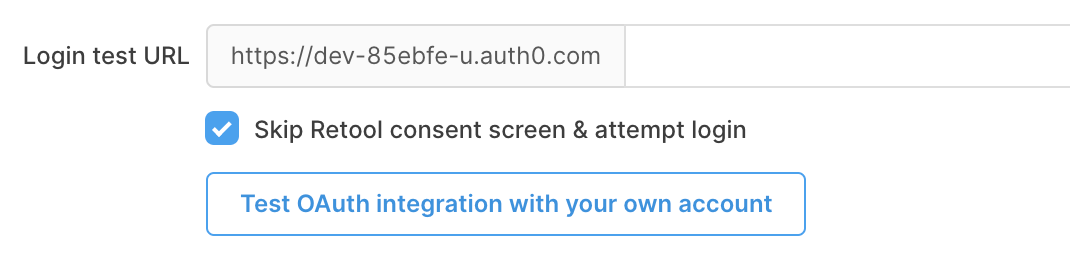
Skip the Retool consent screen
Whether to skip the Retool consent screen at the start of the authentication flow.
Starting an OAuth2 flow redirects the user to Retool's consent screen first, then to the identity provider's consent screen. If you're self-hosting Retool, you can disable Retool's consent screen for a particular resource by toggling Run this custom auth flow without prompting the user.
This is equivalent to sending an authorization request with the ?prompt=none URL parameter set. If this request returns any error, Retool falls back to a consent-based flow.
At runtime, Retool substitutes the OAUTH2_TOKEN string with the OAuth Access Token. This is how you tell Retool how to use the access token in order to authenticate with your API. Similarly, you can use the OAUTH2_ID_TOKEN to substitute for the OAuth ID token when the openid scope is specified and sharing OAuth credentials between users is disabled.
Token lifespan
The lifespan of the access token before it expires.
Include Authorization header with OAuth requests
You can also choose to include the client ID and client secret as a Base64-encoded string in the Authorization header.
Session-based
Session-based authentication has been deprecated. Use an alternative authentication method, if available.
Authentication is performed using session-based authentication. You must be able to obtain and provide these credentials to create the resource.
| Credential | Description |
|---|---|
| Cookies to forward | The cookies to forward. |
| Enable an auth verification endpoint | Whether to use a verification endpoint to determine if the user needs to authenticate. |
| URL to link to for logging in | The URL with which users can authenticate. |