Scale
Learn how to scale your Retool organization and processes.
This guide provides administrative best practices to scale your Retool use across your organization.
Prerequisites
Before you begin, read about governance in Retool and how to put the right controls in place to allow new teams to efficiently and safely use Retool. If you're self-hosting Retool, you should also understand Retool's deployment model and how it can be scaled to support new use cases in Retool.
Set up a hub and spoke model
The hub and spoke model is an organizational model that can set up your teams to implement and scale Retool effectively. Under this model, a centralized group of platform administrators manage Retool and:
- Configure organizational setup like Spaces, SSO and Source Control
- Delegate permissions and oversee organizational access
- Perform maintenance and upgrades
- Help onboard new teams and provide best practices for using Retool
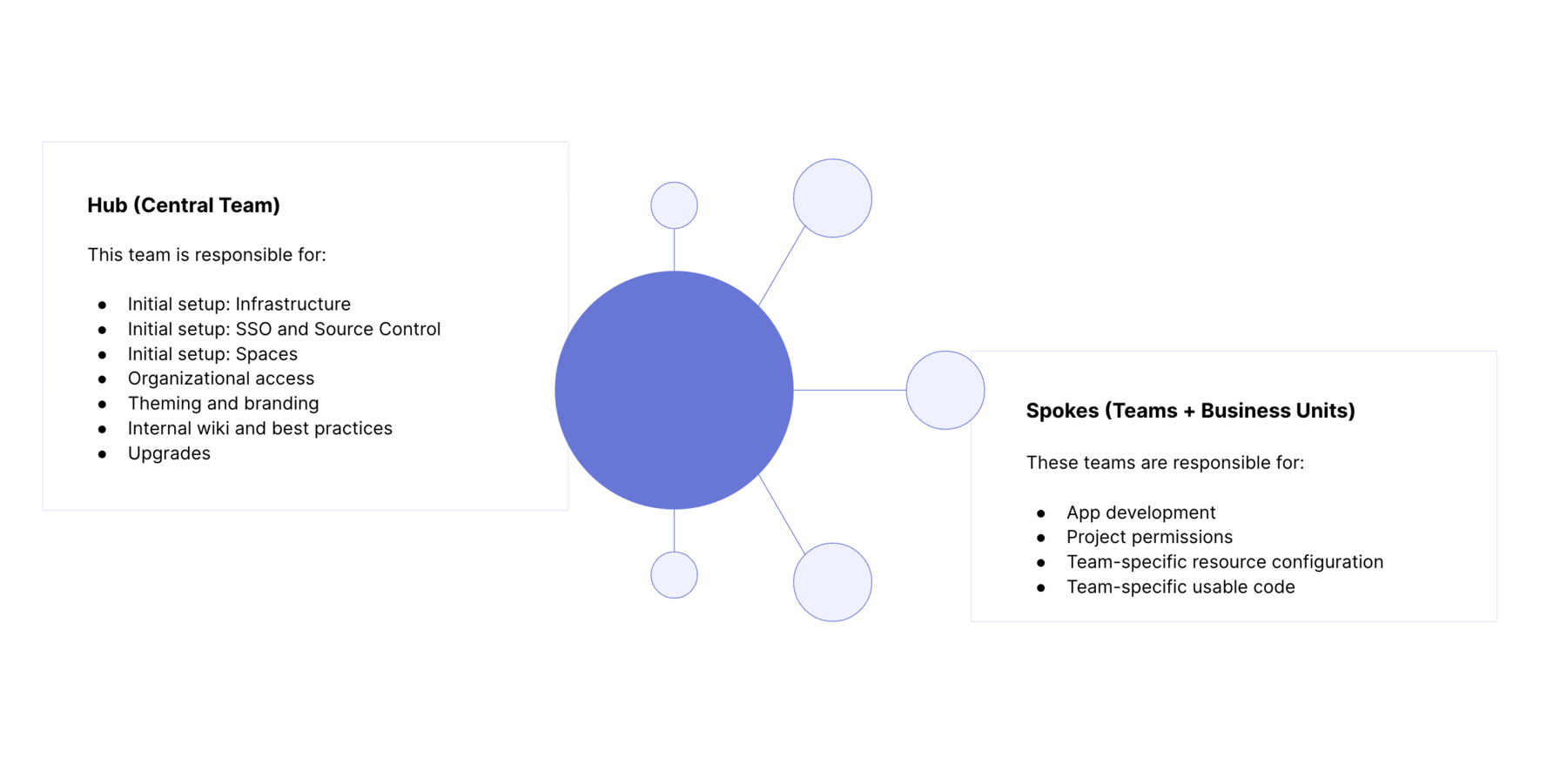
After deploying Retool, the hub is responsible for making sure that the spokes can build and use apps efficiently. Setting up the Hub requires identifying key stakeholders to manage Retool at the infrastructure and application level. To ensure smooth onboarding at scale, it's best to define your processes upfront.
Identify your Retool platform owners
Delegate ownership of Retool to those who can oversee the specific needs and requirements of each team. Platform owners are usually responsible for defining access processes, and centralizing information to help new teams get to value quickly.
Identify your infrastructure owners
If you're self-hosting Retool or connecting to sensitive data, appoint infrastructure owners who understand the technical aspects of Retool, including deployment, maintenance, and scalability.
Define your governance model
Establish a clear governance model that outlines rules, policies, and procedures for Retool development and usage. This includes:
- Developing knowledge of various use cases for Retool
- Reviewing the data sources connected to Retool, and their level of sensitivity
- Users groups who will be building and using Retool Apps and Workflows
- How new users and teams will onboard onto Retool
- Auditing, observability, and usage tracking features
Integrate with your identity provider
We recommend integrating Retool with an existing identity provider if you need to provision and manage many groups of stakeholders. With just-in-time (JIT) user provisioning enabled, users who exist in your identity provider are automatically provisioned Retool accounts upon signing into Retool.
As new teams and user groups are added, you can configure role-mapping between your identity provider and Retool as needed. New team members are automatically provisioned with Retool accounts (via SCIM or Group Push), streamlining the onboarding process.
Set up automations
Use the Retool API to automate the creation and provisioning of new users, permission groups, and Spaces for new use cases.
Define your development process
At scale and in production, having the right Retool app development process helps ensure a stable product for users. Source Control and Releases are two key features to enforce a development lifecycle that scales across your company.
If you're using Spaces, multiple teams can each have separate development workflows between development and production environments. See Spaces and multiple instances below.
Set up Source Control
Source Control allows organizations to manage changes to their Retool applications using pull requests on remote source control management (SCM) providers, such as GitHub and GitLab. Instead of making changes directly to an application, changes are made on a separate branch.
Source Control enables users to sync applications across multiple instances of Retool. A common approach is to have staging and production instances of Retool be configured as read-only, pulling changes from the staging and main branches. All development happens via branches in a development instance and code is merged into the main branch. See our recommended workflow for using Source Control in Retool.
Reviews and ownership
Using the hub-and-spoke model, the hub typically configures a standard Source Control setup across Retool instances, as well as the Spaces within them.
With Spaces, you can copy Source Control setup from your admin Space to a child space, making it easy to standardize development across teams. If teams have their own flows, you can also delegate administrative privileges to other users within a Space, and they can set up Source Control for their Spaces as well.
When the hub has configured the required access controls and permissions, it should not be heavily involved in the day-to-day development of apps, but may coordinate releases to production.
Versions and Releases
Releases lets you version and release app changes to your users. This method can also be used in conjunction with Source Control.
Although you can configure your application to use the main branch, you may still not want it to update every time the branch is updated. In these cases, you can create versioned releases and control when updates are available to your users.
Codify onboarding and best practices
As you're setting up Retool, it's important that teams can quickly onboard onto Retool and deliver value for users. It's useful to create an organization-specific onboarding guide on the following topics:
- Overview of the organizational structure of teams who own and build in Retool
- How to identify a Retool use case
- How to obtain a Retool account
- How to obtain access to resources for your use case (APIs, databases, and permissions)
- Useful resources and documentation on development (pointing to Retool documentation)
- Application promotion and release process
- How to help onboard operations teams
- How to build Retool apps (e.g., video of using the App editor to build a new app)
You can use the technical onboarding template to get started.
Reuse groups of components with modules
You can use modules to share groups of components across Retool apps. This encourages code reuse and delivers a more consistent end-user experience across your apps. Changes to a module are immediately reflected across all apps in which it is used. Modules also let you specify inputs and outputs, allowing you to centralize and reuse logic across different use cases.
Reuse queries
The Query Library enables you do create and reuse queries in the same way as modules function to reuse components. You can write, share, and control access to queries from the Query Library, which is important if you have many apps leveraging the same data source.
Any queries in individual apps should be moved into the Query Library if you find the same queries being written across apps. Queries within the Query Library also have permissions, so if you have complex or sensitive queries and want a specific team to own them, you can manage access through your organization settings.
Customize style with themes
You can create themes with custom color palettes that can be quickly applied to apps. Themes provide a way for builders to build apps that match their organization's existing brand guidelines.
Scale Retool to new use cases
Because Retool can be applied to solve a broad range of use cases, when a new use case comes up, it's important to understand its nature: what data these apps or workflows are accessing, isolation considerations, and change management processes.
Depending on the above, you can choose a combination of deploying a new Retool instance, Spaces, and permission groups to ensure teams are onboarded quickly with the right processes in place.
When to deploy a new Retool instance
If you're self-hosting Retool for data security or compliance reasons, you are likely running a multi-instance deployment with at least two instances, one representing a production and the other a non-production environment. If a new use case requires additional VPC isolation between production user groups due to sensitive data or isolated user pools, it's recommended you deploy an additional production instance.
You can set up Source Control to automatically sync and promote changes between instances and enable a Git-based review process for your application changes, as outlined above.
Spaces and multiple instances
To use Spaces with Source Control, ensure you migrate your apps to Toolscript.
Spaces drastically reduces the administrative overhead of onboarding new, isolated groups of users. You won’t need to spin up additional instances to ensure full separation of apps, resources, and users. If you are using Spaces and Source Control, you can use the following approach:
- Create two additional child Spaces. Create one on your new production instance, and another on your existing development instance. This keeps your development environment neat with no additional overhead.
- Connect Spaces to the same Git repository. Copy settings through the UI or use the Retool API to programmatically configure Source Control on each Space.
When to create a Space
Spaces provide access and isolation guarantees at the organizational level, while permission groups help you control project access. Spaces makes sense when the benefit of isolated development workflows and user groups outweighs the benefit of sharing.
For example, you might develop apps and workflows specific to your Sales organization to track account health, usage, and forecasted pipeline. These apps and workflows might be built on top of Salesforce and a data warehouse resource (e.g., Databricks, Snowflake, or BigQuery). If your DevOps team has a new Retool use case and wants to build apps to manage their deployment configuration on top of RDS using AWS APIs, it makes sense to create a new Space for them. This lets them build, deploy, and use Retool apps while managing users in a completely isolated setting. Assuming the organizations can use the same Retool instance, you would create Spaces on the same instance: sales.retool.mycorp.com and devops.retool.mycorp.com.
In this context, a Retool platform owner could delegate administrative responsibility to admins of each respective Space, while reusing the same SSO configuration. Because resources, queries, and even development processes are so separate between teams, there is little benefit to keeping these two organizations within the same Space.
You can automate Space creation and configuration using the Retool API.
When to use permission groups
In the above example, the Retool apps in sales.retool.mycorp.com could be used across Account Executives, Sales Operations, Sales Managers, and the leadership team. Depending on the size of the organization, certain teams and users within the Sales org could require privileged access to certain apps. In this case, creating permission groups per team is the recommended approach.
Keeping Sales-related use cases in the Sales Space allows you to more quickly build new applications:
- Resources, applications, and modules are already configured
- Teams have organizational context on which apps and queries are useful
- The development workflow is defined
Additionally, new users are more likely to find the applications that are relevant to them as they are provisioned into the Sales Space.