Connect to Amazon Bedrock
Connect to Amazon Bedrock and use their models for AI-powered apps and automations in Retool.
AI resource integrations are rolling out on cloud instances and will be available for self-hosted instances in a future release. Continue to use the Retool AI resource with Amazon Bedrock models if this feature isn't yet available for your organization.
Amazon Bedrock is a fully managed service that provides access to advanced AI models from leading AI companies. You can create an Amazon Bedrock resource so you can build AI-powered apps and workflows that leverage multiple AI models through a single service.
What you can do with Amazon Bedrock
With a Amazon Bedrock resource, you can interact with LLMs to perform various actions, including:
Text actions
| Action | Description |
|---|---|
| Generate text | Create original text content based on your prompt. Use for content generation, creative writing, code generation, and general-purpose text tasks. |
| Summarize text | Condense long-form content into concise summaries. Specify the input text and desired summary format. |
| Classify text | Categorize text into predefined categories. Provide the text to classify and the possible categories. |
| Extract entity from text | Extract specific information from unstructured text. Define what entities or data points to extract (names, dates, amounts, etc.). |
Chat actions
| Action | Description |
|---|---|
| Generate chat response | Create contextual responses in multi-turn conversations. The AI model considers previous messages to maintain conversation flow. |
Supported models
Amazon Bedrock provides access to foundation models from multiple AI providers through a single API. You can use any foundation model you have enabled in your AWS Bedrock console, including:
- All Claude models (Anthropic).
- All Llama models (Meta).
- All Command models (Cohere).
- All Mistral models.
- All Amazon Nova and Titan models.
- All AI21 Jamba models.
- Regional model variants.
Available models depend on which foundation models you've enabled in your AWS Bedrock console and your AWS region. Specify the model ID in your queries (e.g., us.anthropic.claude-sonnet-4-5-20250929-v1:0, us.amazon.nova-pro-v1:0). Refer to AWS Bedrock model access documentation for details on enabling models and finding model IDs.
Before you begin
Before creating an Amazon Bedrock resource, you need:
- Retool permissions: Ability to create and manage resources in your Retool organization.
- AWS account: An AWS account with Amazon Bedrock enabled.
- IAM credentials: AWS IAM access credentials with permissions to invoke Bedrock models.
- Model access: Enabled access to foundation models in your AWS Bedrock console.
Create an Amazon Bedrock resource
Create a resource to connect Retool to Amazon Bedrock and configure authentication. Once connected, you can then select it when writing queries to make use of its available models.
Follow these steps to create an Amazon Bedrock resource in Retool.
1. Create a new resource
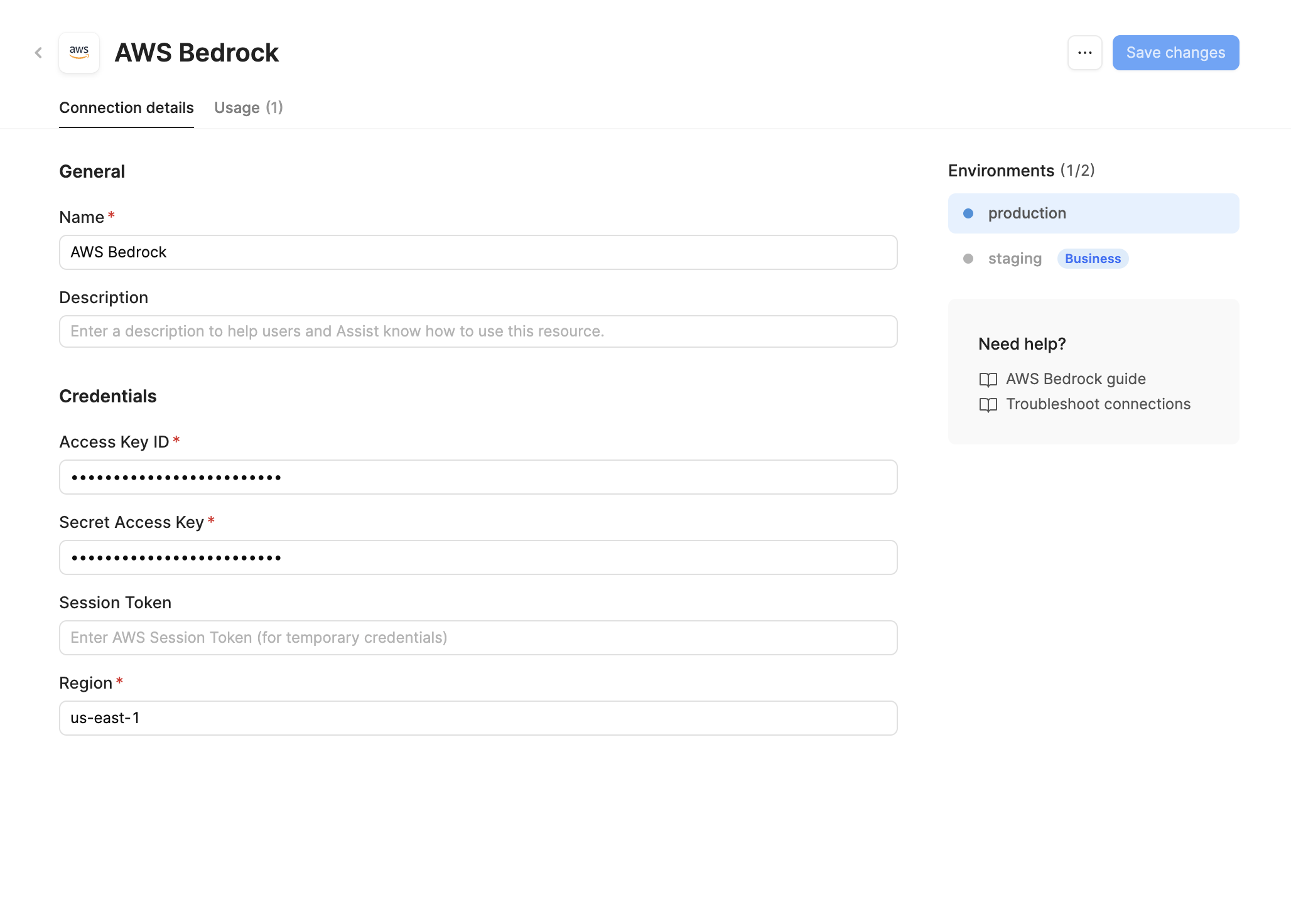
Navigate to Resources in the main navigation and click Create new > Resource. Search for Amazon Bedrock. Then, click the Amazon Bedrock tile to create a new resource.
2. Configure connection settings
Specify a name for the resource that identifies it within your organization. Include a description that can provide more context to users and Assist about how to use the resource.
3. Configure authentication
This resource requires you to provide your own API key. Retool-managed keys are not available for Amazon Bedrock.
Amazon Bedrock resources require AWS IAM credentials for authentication.
- Access Key ID: Your AWS IAM access key ID.
- Secret Access Key: Your AWS IAM secret access key.
- Session Token (optional): Temporary session token if using temporary credentials or assumed roles.
- Region: The AWS region where your Bedrock models are configured (e.g.,
us-east-1,us-west-2).
Retrieve your AWS credentials from the IAM Console. Ensure the IAM user or role has permissions to invoke Bedrock models.
Create dedicated IAM credentials for Retool with minimal required permissions. All credentials used with Retool are .
Recommended IAM policy:
{
  "Version": "2012-10-17",
  "Statement": [
    {
      "Effect": "Allow",
      "Action": [
        "bedrock:InvokeModel",
        "bedrock:InvokeModelWithResponseStream"
      ],
      "Resource": "*"
    }
  ]
}
4. Save the resource
Click Create resource to save your Amazon Bedrock resource. The resource is now available for use in apps and workflows.
AI resources do not have a Test connection button. Verify your configuration by creating a query and running it in your app or workflow.
Query Amazon Bedrock data
Create queries against your Amazon Bedrock resource to interact with foundation models in your Retool apps and workflows.
Create a query
In your Retool app or workflow, create a new query and select your Amazon Bedrock resource from the resource dropdown. Choose an action type to configure what you want the model to do.
Action types
Amazon Bedrock resources support the following action types:
Text actions
Process and generate text using foundation models' language understanding capabilities.
| Action | Description |
|---|---|
| Generate text | Create original text content based on your prompt. Use for content generation, creative writing, code generation, and general-purpose text tasks. |
| Summarize text | Condense long-form content into concise summaries. Specify the input text and desired summary format. |
| Classify text | Categorize text into predefined categories. Provide the text to classify and the possible categories. |
| Extract entity from text | Extract specific information from unstructured text. Define what entities or data points to extract (names, dates, amounts, etc.). |
Chat actions
Generate conversational responses based on message history and context.
| Action | Description |
|---|---|
| Generate chat response | Create contextual responses in multi-turn conversations. The AI model considers previous messages to maintain conversation flow. |
Configuration options
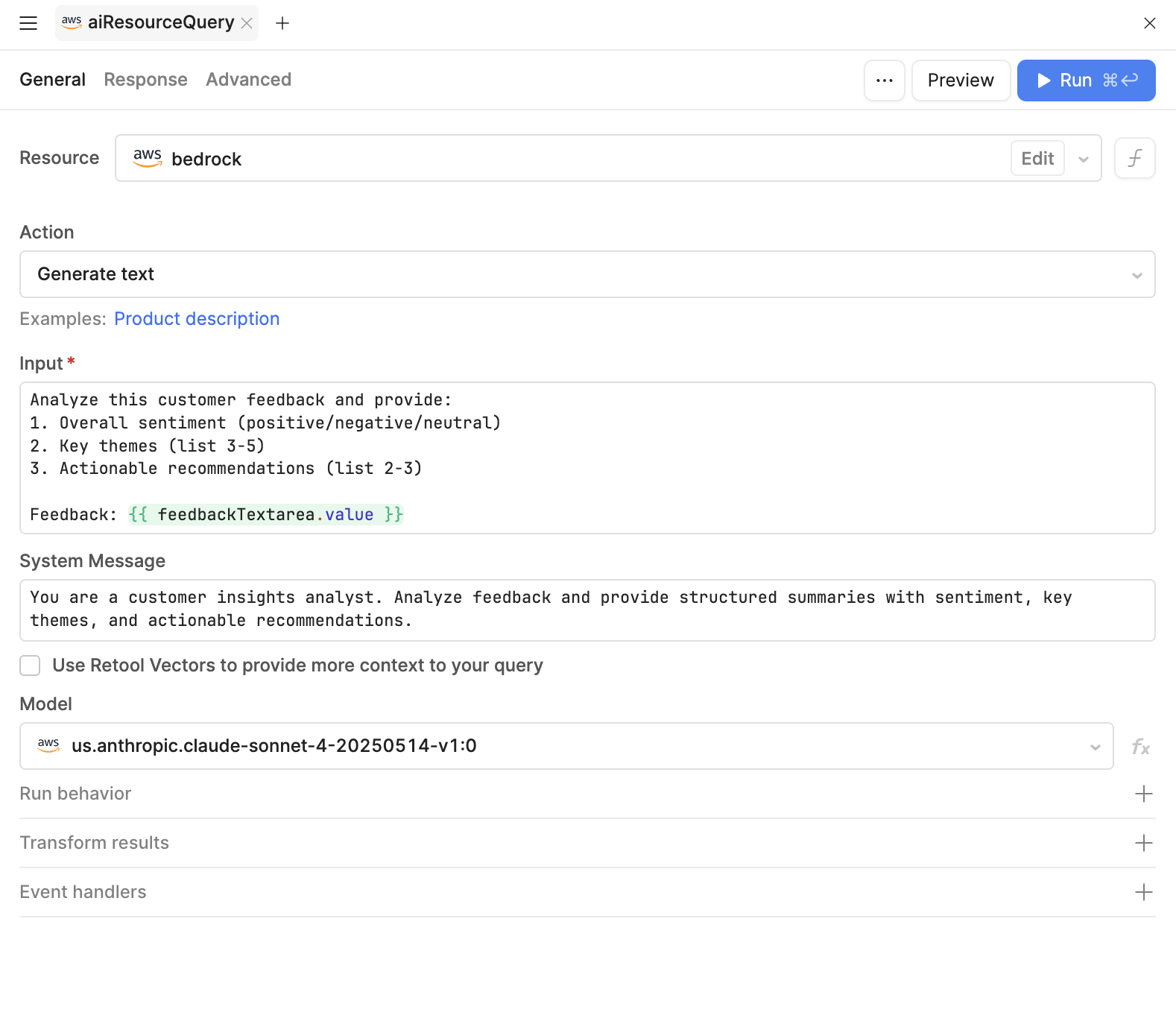
You can configure the following options when querying an Amazon Bedrock resource.
| Option | Description |
|---|---|
| Model | The foundation model to use. Bedrock provides access to models from multiple providers (Claude, Llama, Command, Nova, etc.). Refer to the Supported models section for available options. |
| Temperature | Determines the randomness in responses. Accepts a decimal number between 0.0 to 1.0 (or 2.0 for some models). Lower values are more focused and deterministic. Medium values are balanced. Higher values are more creative. Not all models support temperature control. |
| System message | Provides detailed instructions for the model's behavior. Use it to define the model's role, response format, or domain expertise. The system message only needs to be defined once and applies to all interactions. It's useful for keeping longer instruction sets separate from the prompt or other values. Available for models that support system messages. |
| Prompt | The main input or question for the model. Can use {{ }} dynamic expressions to reference component values or query data. |
Not all models provide support for controlling temperature. If you select a model that does not use this option, Retool removes it from the query editor.
You are a helpful SQL expert. Provide concise, accurate answers with code examples when relevant.
Analyze this feedback: {{ feedbackTextarea.value }}
Common use cases
The following examples demonstrate typical Amazon Bedrock integrations in Retool apps.
Summarize customer feedback
Create a query that analyzes customer feedback and extracts key insights.
Query example
| Setting | Value |
|---|---|
| Model | Claude 3.5 Sonnet |
| Temperature | 0.3 |
You are a customer insights analyst. Analyze feedback and provide structured summaries with sentiment, key themes, and actionable recommendations.
Analyze this customer feedback and provide:
1. Overall sentiment (positive/negative/neutral)
2. Key themes (list 3-5)
3. Actionable recommendations (list 2-3)

Feedback: {{ feedbackTextarea.value }}
Use this query with a Text Area component for input and a Text component to display the summary.
Generate SQL from natural language
Convert natural language questions into SQL queries for your database.
Query example
| Setting | Value |
|---|---|
| Model | Claude 3.5 Sonnet |
| Temperature | 0.2 |
You are a SQL expert. Convert natural language questions into PostgreSQL queries. Return only the SQL query without explanations. Use the following schema: Tables: customers (id, name, email, created_at), orders (id, customer_id, total, status, order_date), products (id, name, price, category)
{{ questionInput.value }}
Chain this query with a PostgreSQL query that executes the generated SQL to display results.
Extract structured data from text
Parse unstructured text and extract structured information in JSON format.
Query example
| Setting | Value |
|---|---|
| Model | Claude 3 Haiku |
| Temperature | 0.1 |
Extract structured information from the provided text and return ONLY valid JSON. No explanations or additional text.
Extract the following information from this invoice text and return as JSON:
- invoice_number
- date
- vendor_name
- total_amount
- line_items (array of {description, quantity, unit_price})

Invoice text:
{{ invoiceText.value }}
Use the response in a Table component or process it with JavaScript transformers.