Connect to Anthropic
Connect to Anthropic and use their models for AI-powered apps and automations in Retool.
Anthropic provides advanced AI models for natural language processing, code generation, analysis, and reasoning tasks. You can create an Anthropic resource so you can build AI-powered apps and workflows that leverage Claude's capabilities for text generation, data analysis, content creation, and more.
What you can do with Anthropic in Retool
After you create an Anthropic resource in Retool, you can:
- Generate, summarize, classify, and extract information from text using Claude's language models.
- Build conversational, multi-turn chat experiences with context-aware responses.
- Analyze images to generate captions, extract entities, or answer questions about visual content.
- Choose between a Retool-managed key or your own Anthropic API key.
Supported models
- Retool-managed key
- Bring your own key
The following models are available with Retool-managed keys:
| Model | Resource queries | Agent support |
|---|---|---|
| Claude Haiku 4.5 | ||
| Claude Opus 4.5 | ||
| Claude Opus 4.6 | ||
| Claude Opus 4.7 | ||
| Claude Opus 4.8 | ||
| Claude Opus 5 | ||
| Claude Opus 5.5 | ||
| Claude Sonnet 4.5 | ||
| Claude Sonnet 4.6 | ||
| Claude Sonnet 5 | ||
| Claude Sonnet 5.5 |
When you configure an Anthropic resource with your own API key, Retool interacts directly with the Anthropic API. You can use any Claude model you have access to through your Anthropic account, including:
- All current and future Claude models.
- Models with extended context windows.
- Custom fine-tuned models (if available).
- Beta or preview models.
Specify the model ID in your queries (e.g., claude-sonnet-4-5-20250929, claude-opus-4-1-20250805). Refer to Anthropic's model documentation for the complete list of available models and their identifiers.
To limit which models this resource can query, refer to Restrict available models.
Before you begin
Before creating an Anthropic resource, you need:
- Retool permissions: Ability to create and manage resources in your Retool organization.
- Anthropic API key (optional): An API key from your Anthropic Console account if you want to bring your own key. New Retool organizations automatically include an Anthropic resource with a Retool-managed key.
Create an Anthropic resource
Create a resource to connect Retool to Anthropic and configure authentication. Once connected, you can then select it when writing queries to make use of its available models.
Follow these steps to create an Anthropic resource in Retool.
Create a new resource
Navigate to Resources in the main navigation and click Create new > Resource and search for Anthropic. Then, click the Anthropic tile to create a new resource.
Configure connection settings
Specify a name for the resource that identifies it within your organization. Include a description that can provide more context to users about how to use the resource.
Configure authentication
Anthropic resources support two authentication options: Retool-managed keys or customer-provided keys (Bring Your Own Key).
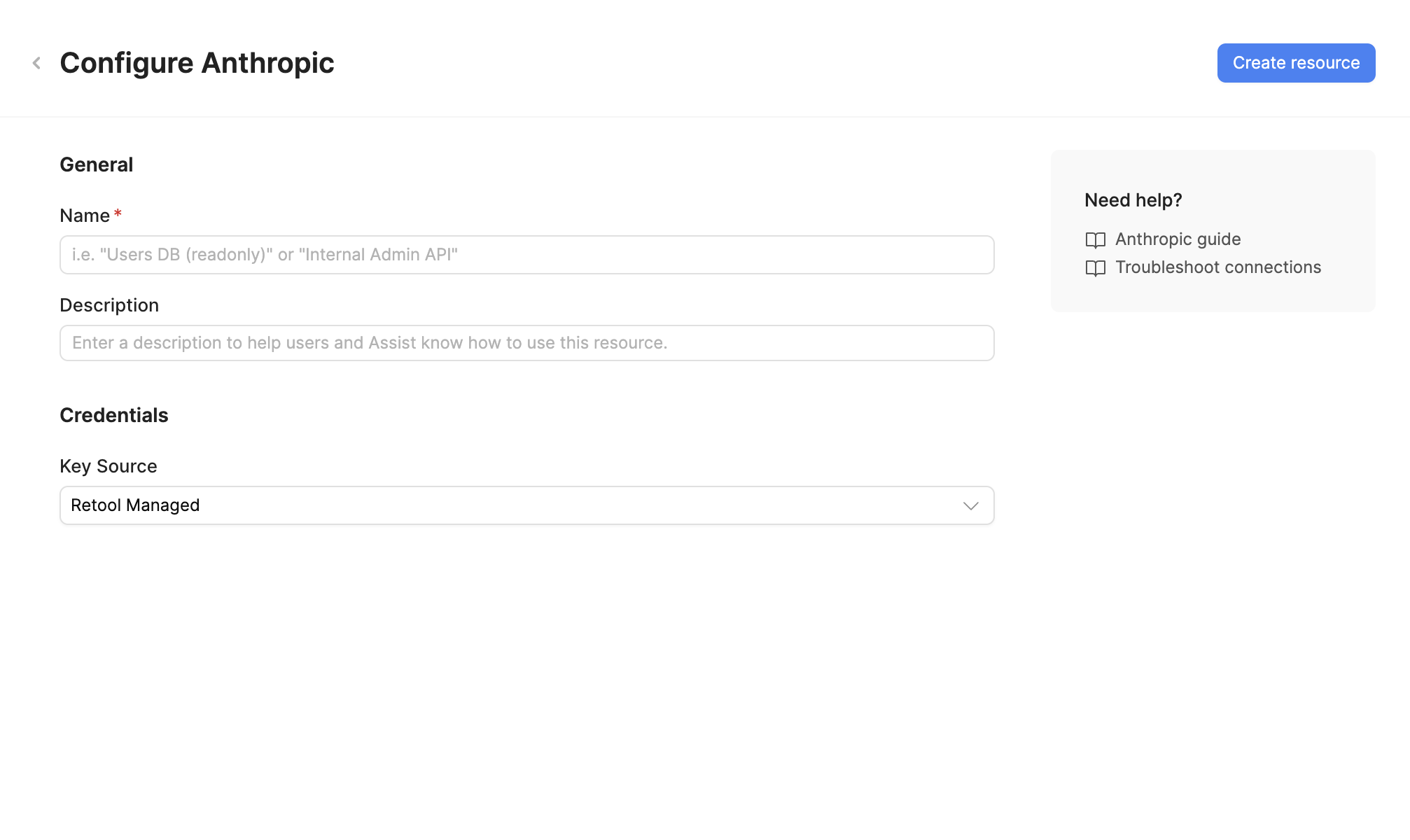
- Retool-managed
- Bring Your Own Key
Retool organizations include an Anthropic resource with a Retool-managed key by default. This allows you to use Claude models immediately without providing your own API key. Retool maintains a direct relationship with the AI provider and bills you directly for AI usage.
To use a Retool-managed key, set Key Source to Retool Managed.
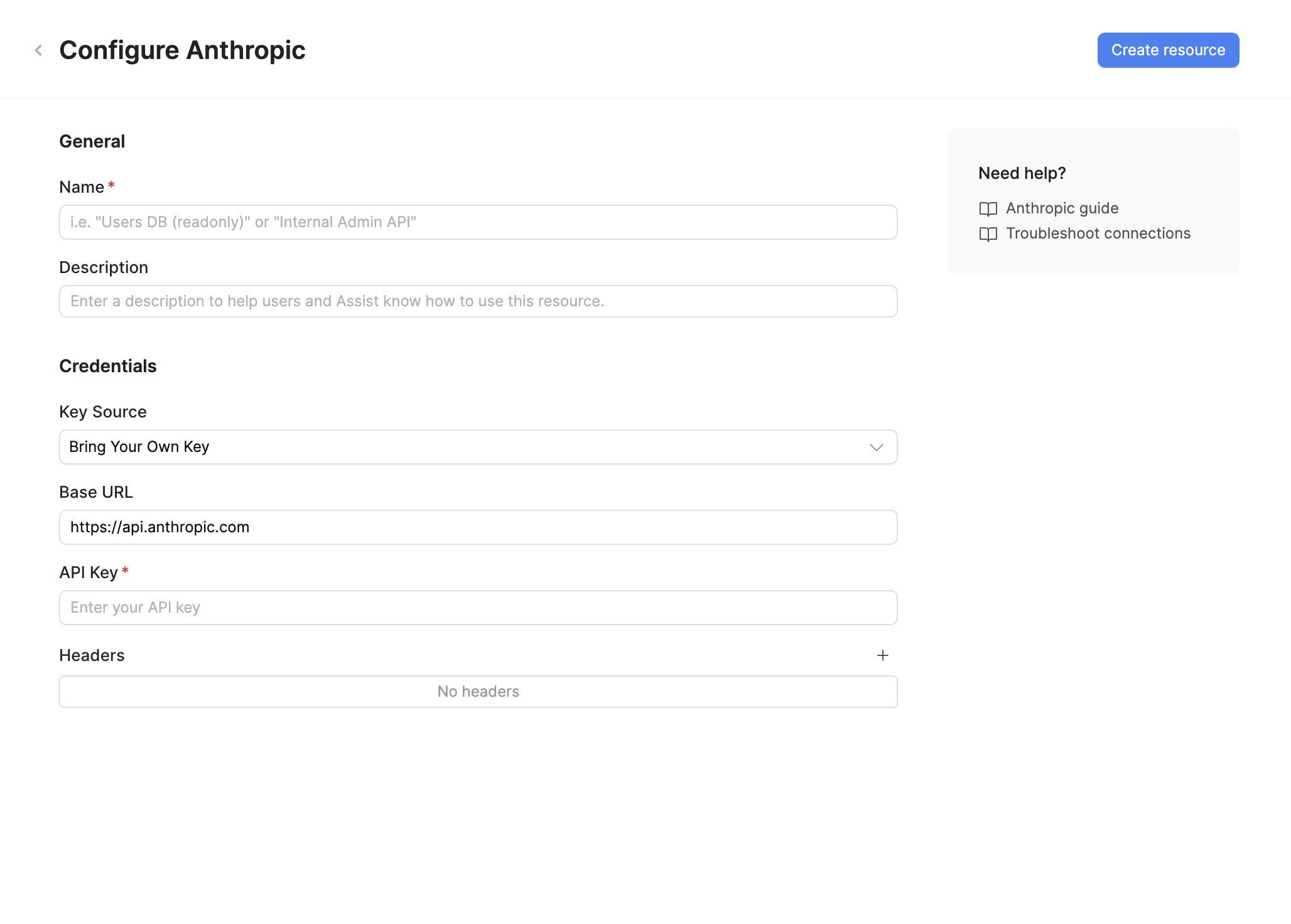
Retool uses customer-provided keys to interact with Anthropic. You are billed directly by the AI provider for any usage of the resource.
- Set Key Source to Bring Your Own Key.
- Base URL (optional): The Anthropic API endpoint. Default is
https://api.anthropic.com. Only change this if you're using a custom endpoint or proxy. - API Key: Your Anthropic API key from the Anthropic Console.
- Headers (optional): Custom HTTP headers to include with requests. Add headers as key-value pairs if required by your setup.
Retrieve your API key from the API Keys page in your Anthropic Console account.
Where possible, create dedicated API keys for Retool to best manage and revoke access without disruption. All API keys used with Retool are encrypted and stored securely.
Restrict available models
You can optionally limit access to one or more models provided by this resource. This can be useful for limiting access to models that have higher usage costs. Set this while creating the resource, or later by editing it.
- Click Advanced options and select the checkbox next to Restrict this resource to selected models. Allowed models shows the models available for use. All models are selected by default.
- Uncheck the box next to any models you want to disable. At least one model must be selected.
- Click Create resource or Save changes.
Once this setting is applied, users can only use a model that's enabled. If a user attempts to use a restricted model, Retool displays an error message that a restricted model is not allowed by this AI provider resource's model list.
If the resource uses a Retool-managed key, the available model list includes only models that are available when using the provided key.
Whenever you make changes to the list of available models, verify that the selected default models for Ask AI and the app builder are enabled. If not:
- Ask AI cannot be used until a different default model is selected.
- The app builder attempts to fall back to another model. If this is also unavailable, the agent cannot be used.
Save the resource
Click Create resource to save your Anthropic resource. The resource is now available for use in apps and workflows.
AI resources do not have a Test connection button. To verify your configuration, create a new app and ask the agent to test the resource for you.
Interact with Anthropic data
Once you've created an Anthropic resource, you can interact with Anthropic data using Retool.
Retool recommends using the app builder so you can use natural language to build React-based apps using AI.
- To use Anthropic models in the app builder, reference the resource in the prompt with
@, such as@Anthropic. Refer to the data and functions documentation to learn more. - For classic apps, workflows, and agents, refer to the AI queries documentation to learn how to write a resource query.
Best practices
Follow these best practices to keep your Anthropic usage secure and cost-efficient.
Security
- Rotate credentials regularly: Roll your Anthropic API key periodically from the Anthropic Console, and immediately if a key is ever exposed.
- Create separate API keys for Retool: Use a dedicated Anthropic API key for Retool so you can revoke or rotate access without disrupting other integrations.
- Use resource environments: Organizations on an Enterprise plan can configure multiple resource environments to maintain separate Anthropic API keys for production, staging, and development.
Manage token usage and cost
- Choose the smallest capable model: Use a faster, cheaper model (e.g. Claude Haiku) for simple tasks like classification or extraction, and reserve larger models for tasks that need deeper reasoning.
- Set output token limits: Configure a maximum output token limit appropriate to the task to avoid paying for unnecessarily long responses.
- Trim conversation history: For chat use cases, truncate or summarize older messages instead of sending the full history on every request. Anthropic bills for all input tokens, including message history.
- Monitor usage: Track token consumption and spend in the Anthropic Console to catch unexpected usage spikes early.
Related resources
Create a resource
Learn how to create and manage resources in Retool.
Resource environments
Configure separate credentials for production and non-production environments.
AI models
Learn about Retool-managed and self-managed AI model keys.
Retool community: Anthropic
Community discussions and solutions for Anthropic integrations.
Anthropic API reference
Official Anthropic API documentation.
Amazon Bedrock
Connect to Claude models through AWS instead of Anthropic directly.