Connect to OpenAI Platform
Connect the OpenAI Platform API to Retool and manage organization users, projects, and usage.
This integration connects to OpenAI's platform API for administrative operations, such as managing organization users and projects. Refer to the OpenAI integration guide instead if you want to use OpenAI's models to power AI apps, workflows, and agents.
The OpenAI Platform API lets OpenAI organization administrators manage their organization programmatically.
What you can do with the OpenAI Platform API in Retool
After you create an OpenAI Platform resource in Retool, you can:
- Retrieve and manage organization users and their roles.
- Retrieve and manage projects within your organization.
- Query organization usage and billing data.
- Automate organization administration tasks from other systems.
Before you begin
To connect the OpenAI Platform API to Retool, you need the following:
- Cloud
- Self-hosted
- OpenAI organization: An OpenAI organization with administrator access.
- Admin key: An admin key generated from your OpenAI account.
- Retool permissions: Ability to create and manage resources in your organization.
- OpenAI organization: An OpenAI organization with administrator access.
- Admin key: An admin key generated from your OpenAI account.
- Network access: Your Retool instance must be able to reach
api.openai.comover outbound HTTPS. - Retool permissions: Ability to create and manage resources in your organization.
Create an OpenAI Platform resource
Follow these steps to create an OpenAI Platform resource in Retool.
Create a new resource
In your Retool organization, navigate to Resources in the main navigation and click Create new → Resource. Search for OpenAI Platform and click the OpenAI Platform tile to begin configuration.
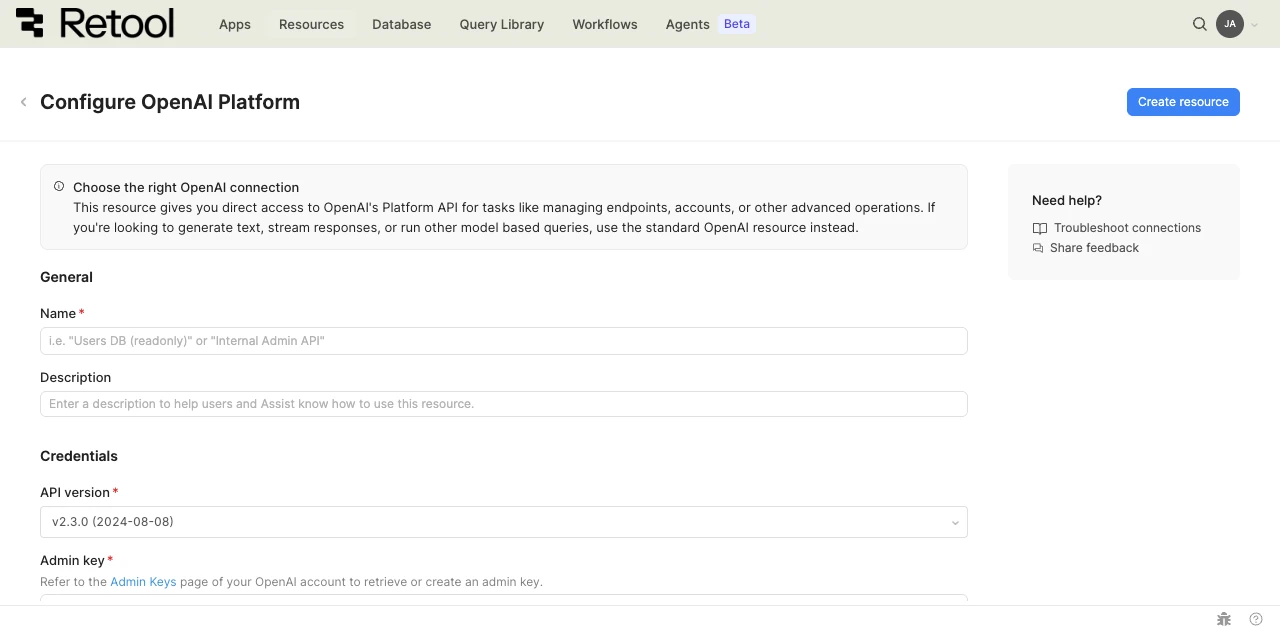
OpenAI Platform resource configuration form.
Configure general settings
Specify a name and description for the resource that indicates which OpenAI organization it connects to. The description provides more context to users about how to use the resource.
| Example name | Example description |
|---|---|
| OpenAI Platform (Admin) | Admin key used to manage organization users and projects. |
| OpenAI Platform (Usage reporting) | Read-only connection used to build a usage and billing dashboard. |
API version
Select the OpenAI Platform API version to use. Retool defaults to the most recent version, but you can select an earlier version if your integration depends on it.
v2.3.0 (2024-08-08) (DEFAULT)
Configure authentication
OpenAI Platform authenticates using an admin key.
Admin key
Paste an admin key generated from the Admin keys page of your OpenAI account.
sk-admin-1234567890abcdefghijklmnopqrstuvwxyz
- Cloud
Configure advanced options
Configure optional settings available under the Advanced options section of the resource configuration form.
Outbound region
If your organization uses outbound regions, select the region that should be used for requests to the OpenAI Platform API. This controls which geographic region your requests originate from.
Verify the connection
OpenAI Platform resources don't include a Test connection button. To confirm your resource is configured correctly, save the resource and run a simple query, such as listing organization users.
Save the resource
Click Create resource to save your OpenAI Platform resource. You can now use it in queries across your Retool apps and automations.
Interact with OpenAI Platform data
Once you've created an OpenAI Platform resource, you can interact with OpenAI Platform data using Retool.
The OpenAI Platform API isn't yet supported in the new app builder. Use a classic app, workflow, or agent instead.
For classic apps, workflows, and agents, refer to the REST API queries documentation to learn how to write a resource query.
Best practices
Follow these best practices to maintain the security of your OpenAI Platform resource.
- Restrict admin key access: Admin keys grant broad access to your OpenAI organization. Limit who can view or edit the resource in Retool.
- Rotate credentials regularly: Regenerate the admin key on a regular schedule, and immediately if a key is ever exposed.
- Use resource environments: Organizations on an Enterprise plan can configure multiple resource environments to maintain separate OpenAI Platform credentials for production, staging, and development.
Related resources
Create a resource
Learn how to create and manage resources in Retool.
Resource environments
Configure separate credentials for production and non-production environments.
OpenAI integration guide
Use OpenAI's models to power AI apps, workflows, and agents.
Retool community: OpenAI
Community discussions and solutions for OpenAI integrations.
OpenAI Platform API reference
Official OpenAI Platform API reference.