Cost Management
Retool Self-hosted provides customers the flexibility of deploying Retool into their public cloud provider. When budgeting for Retool, it is important to estimate and monitor those service charges. This document will review the use of AWS functionality to help estimate, tag, budget, explore and monitor.
Similar cost management functionality is available for Microsoft Azure and Google Compute Platform.
Example Retool Deployment
Retool Self-hosted in AWS, shown in the following diagram, focuses on using Amazon Kubernetes Service for deploying Retool containers. The significant cost drivers in this deployment are the compute and database services.
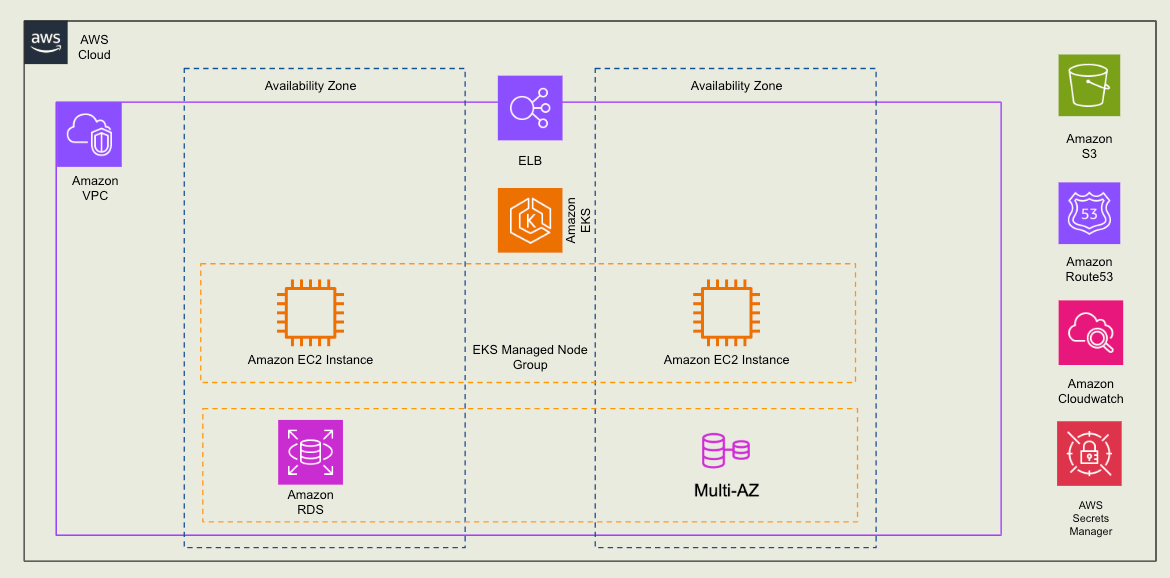
In this configuration, an AWS VPC with two availability zones is created. Within this VPC, an Amazon EKS cluster employs two Amazon EC2 instances in the managed node group that Amazon EKS controls. A Multi-AZ Elastic Load Balancer is created to forward incoming traffic to the Amazon EC2 instances. An Amazon RDS instance using Multi-AZ is created separately for the Retool Platform Database. The following sections describe the instance types/sizes recommended for a production medium configuration.
Amazon EC2 Managed Node Configuration
For the Amazon EC2 requirement, the following instance type/resource is recommended.
- Instance Count = 2
- Instance size = m5.xlarge (4 vCPU and 16 GB of RAM)
- Amazon EBS volume size = 150 GiB storage that can expand
Amazon RDS Configuration
Retool requires a PostgreSQL database to store apps, workflows, permission groups, and more. In this example, we are recommending the following instance type/resources.:
- Instance size = db.m6g.xlarge (4 vCPU and 16 GB of RAM)
- Configuration = multi-AZ enabled for failover
- Amazon RDS storage size = 80 GB storage that can expand
Amazon S3
Retool requires Amazon S3 to store apps that are developed and published.
- Single bucket that has an appropriate IAM policy to support read and write.
Other required services
Retool instances also require other AWS services, which are detailed in the Appendix: Example Estimate.
Estimating Costs
The following costs were calculated using Amazon Pricing Calculator that estimates costs but may not accurately reflect your actual monthly costs. These costs are meant for illustration purposes and users should be actively monitoring their accounts with AWS Billing and Cost Management.
With the information in the Example Deployment section, we can leverage the Amazon Pricing Calculator to estimate monthly/annual costs, initially focusing on EKS, EC2, and RDS. The following video demonstrates the use of the pricing calculator by walking through the Terraform Template configuration.
AWS Pricing Calculator Walkthrough
This video specified On-Demand instance types from the Ohio Region (us-east-2) for the EC2 managed nodes and the RDS instance. For customers planning on running Retool 24x7x365, it is best to consider AWS's savings options. The following section will cover these considerations.
Reducing Amazon EC2 and Amazon RDS costs
The Retool architecture leverages both EC2 and RDS instances. AWS provides two mechanisms we can employ to help discount the monthly runtime and database storage. Reserved Instances and Savings Plans allow customers to enter into a one —or three-year agreement, significantly reducing costs.
Reserved Instances
For Retool, we can consider reserved instances for both EC2 and RDS. Reserved instances contracts come in one—and three-year lengths. The longer the commitment, the higher the savings. Reserved instances allow you to specify an instance type, and when the instance is running, the agreed-upon discount is applied to the monthly bill. On average, one can save 60% on monthly costs.
Savings Plans
Savings plans provide flexibility to the RI approach, where you can change the EC2 instance within the family selected, such as m5.small, m5.medium, m5.large, etc. This allows the EC2 instance to be vertically scaled if the Retool instance requires more resources. On average, one can save 60-70% on monthly costs. Other benefits that Savings Plans provide are:
- Ability to apply across regions
- Ability to change tenancy
- Ability to change OS
NOTE: Saving plans do not support Amazon RDS, so Reserved Instances provide the current cost savings option.
The following video demonstrates accessing a Reserved Instance or Savings Plan estimates within the AWS Pricing Calculator.
Cost Comparison
The following table demonstrates the different cost options for EC2 and RDS with a 3-year commitment and the percent total savings from On Demand running in the us-east-2, Ohio region using the configuration outlined in the Amazon EC2 and Amazon RDS configuration above.
| EC2 On Demand | EC2 Standard Reserved | Compute Savings Plan | EC2 Instance Saving Plan |
|---|---|---|---|
| $300.80 per month | $141.66 per month | $162.10 per month | $141.66 per month |
RDS does not provide savings plans, but reserved instances are available with partial or full upfront payment. The figure below uses a full upfront payment to arrive at the highest discount.
| RDS On Demand | RDS Standard Reserved |
|---|---|
| $526.48 per month | $157.39 per month + upfront $3427.00 |
With these figures identified, let's compare an On Demand versus Savings Plan / Reserved Instance for percent difference.
| Plan Type | EC2 Costs | RDS Costs | Total Monthly Costs | Total 3-year Costs |
|---|---|---|---|---|
| On Demand | 300.80 USD | 526.48 USD | 827.28 USD | 29782.08 USD |
| Savings Plan + Reserved Instance | 141.66 USD | 157.39 USD | 299.05 USD | 10765.80 USD + $3427.00 USD (RDS Upfront) = 14192.80 USD |
We can calculate the percent savings by performing the following calculation:
(On Demand - Savings Plan)/(On Demand) x 100
Or:
($29782.08 - $14192.80)/(29782.08) * 100 = 52.3%
In effect, we are reducing our spending by over 50% through Savings Plans and RDS Reserved Instances.
Tagging Infrastructure
Once you have entered into a contract, it is recommended that you use Resource Tagging to help identify the EC2 instances, S3 bucket(s), ELB, RDS instance, and more as part of the Retool instance. The purpose of tags is to make it easier to leverage AWS tooling for operations and cost/billing management. This is done through filters where tags are employed to narrow search results. The following examples are tags for individual EC2 instances in separate AWS Accounts / VPCs, where Lower Environment is development and testing instances and Production is the production/customer-facing instance:
Account Retool Lower Environment- cost_center = development
- team = internal_tools
- environment = dev
- cost_center = development
- team = internal_tools
- environment = test
- cost_center = development
- team = internal_tools
- environment = production
In the above tags, the environment tag allows Cost Explorer users to filter on the development cost_center of the internal_tools team and independently filter on the environment using dev, test, and production environment values. Examine the following best practices for tagging in AWS.
Implement A Tag
Once we have identified tags we want to use to decorate our AWS infrastructure, you will have several implementation options. Terraform can be employed to create tags in the underlying AWS infrastructure; the following example demonstrates how to implement that. Additionally, one can use an admin user within the AWS Console and implement tags.
Terraform
Within a Terraform template, the following example shows how a tag can be set on an EC2 instance.
provider "aws" {
   region = "us-east-1"
 }

   resource "aws_instance" "example" {
   ami = "ami-0c55b159cbfafe1f0" # Replace with your desired AMI ID instance_type = "t2.micro"

   tags = {
     Cost_center = "development"
     Team = "internal_tools"
     Env = "production" }
}
AWS Admin Console
An administrator can access an EC2 instance and easily add tags within the AWS Admin Console. However, if the infrastructure is terminated, those tags are also terminated and must be manually reapplied. Therefore, the recommendation is always to use Infrastructure As Code (IaC) to manage your AWS resources.
The following video demonstrates how to access Tags and add one to an instance.
AWS Cost and Billing Management
The final step of operating Retool is to monitor the spending and set thresholds for the Retool instances running within Amazon EKS / EC2 / RDS.
AWS Budgets
AWS Budgets should specify a spending limit on a particular AWS Account with tagged infrastructure. Defining a threshold is critical to provide a warning/notification mechanism if costs exceed what you have estimated and observed within the AWS Billing and Management Console. The following link provides best practices for employing AWS Budgets.
The following video shows setting a budget based on the estimation defined previously.
Review Monthly Spend
With AWS Billing and Cost Management, Cost Explorer provides analytics on previous months' bills and current spending. Using this console, one can examine costs from many dimensions, dig into specific tagged infrastructure, individual or aggregated AWS Services, and more.
The estimates generated by the AWS Pricing Calculator should be reviewed with actual spending, if not all AWS services were identified in the estimate. This also allows the customer to identify further optimizations that can be performed on the Retool instance. Examples could include EBS storage, network costs, and more.
Monitoring Utilization
Retool Self-hosted Telemetry
agent/vector provides a powerful way to monitor the Retool Self-hosted instance(s) resource consumption. A customer can install an agent to forward data to Amazon S3 buckets or
custom sinks
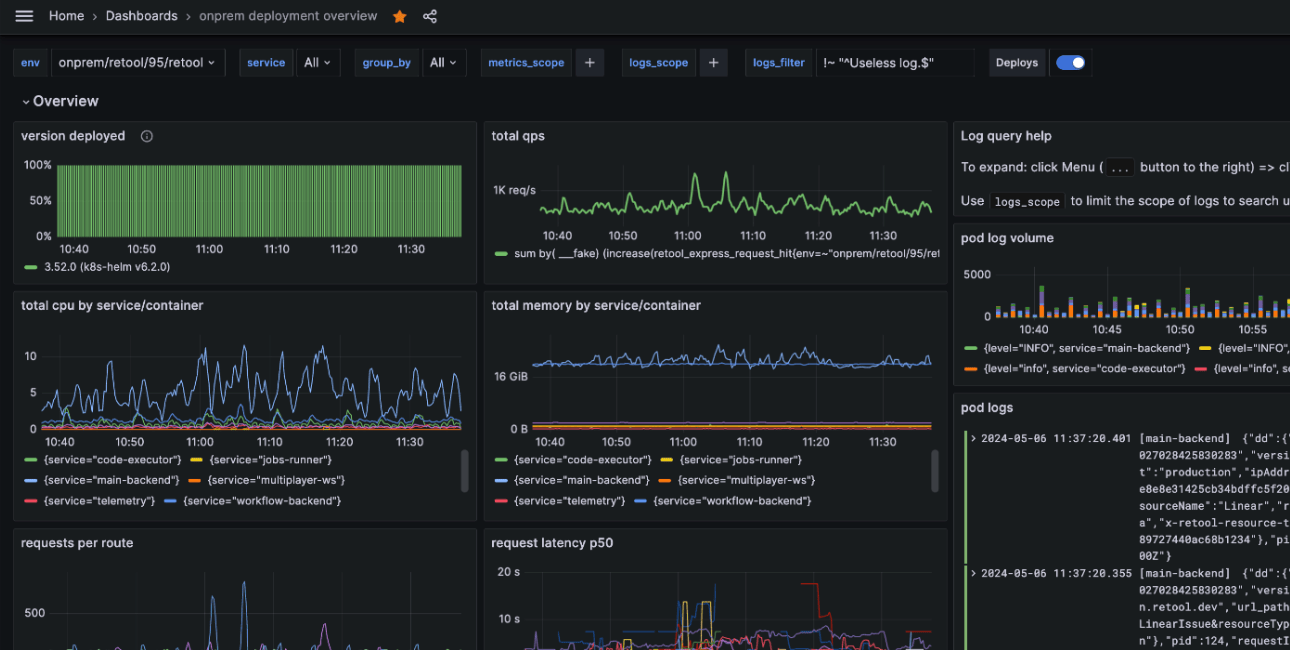
. Once the data has been stored, solutions like AWS CloudWatch or Prometheus can be employed to examine overall consumption helping with right-sizing your infrastructure. The following image shows an example of a console displaying various metrics.
Summary
Retool Self-hosted provides a flexible installation option for Enterprise customers who want to run within an established public cloud provider. The example demonstrates leveraging the AWS Pricing Calculator, Savings Plans, Reserved Instances, and AWS Billing and Cost Management tooling to estimate, reduce, and monitor costs.
Appendix
The information below is an estimate only and you should use the calculator to get the latest pricing information.
Example Estimate for a Small-size Production Instance
- Number of Retool Apps = 1-10
- Number of Retool Workflows = 1-15
The following table provides a deeper dive into additional costs such as VPC, EBS, and more. The following services are captured in this estimate and represent a single production cluster only over a 3 year window with a 3-year Reserved Instance pricing (partial upfront) for RDS and a 3-year EC2 Instance Savings Plan (no upfront).
| Name | Summary | Region | Upfront cost | Monthly Cost |
|---|---|---|---|---|
| Amazon VPC | Number of NAT Gateways (3) DT Inbound: Internet (1 TB per month), DT Outbound: Internet (1 TB per month), DT Intra-Region: (0 TB per month), Data transfer cost (92.16) | US East (Ohio) | 0.00 USD | 166.86 USD |
| Amazon EKS | Number of hybrid nodes (0 per month), Number of EKS Clusters (1) | US East (Ohio) | 0.00 USD | 73.00 USD |
| Amazon EC2 / EBS | Tenancy (Shared Instances), Operating system (Linux), Workload (Consistent, Number of instances: 4), 2 Karpenter(t3a.medium) and 2 (m7i.2xlarge), Pricing strategy (EC2 Instance Savings Plans 3yr No Upfront), Enable monitoring (disabled), EBS Storage amount (100 GB), DT Inbound: Not selected (0 TB per month), DT Outbound: Not selected (0 TB per month). | US East (Ohio) | 0.00 USD | 497.84 USD |
| Amazon S3 | Number of Requests (1,000,000) with 50GB of Storage | US East (Ohio) | 0.00 USD | 28.33 USD |
| Amazon Route53 | Hosted Zones (1), Additional Records in Hosted Zones (10), Basic Checks Within AWS (10) | US East (Ohio) | 0.00 USD | 10.91 USD |
| Amazon RDS for PostgreSQL | Storage amount (80 GB), Storage volume (General Purpose SSD (gp2)), Nodes (1), Instance Type (db.m6g.large), Utilization (On-Demand only) (100 %Utilized/Month), Deployment Option (Multi-AZ), Pricing Model (Reserved), Lease Offering Term (3yr), Purchase Option (Partial Upfront) | US East (Ohio) | 1713.00 USD* | 87.90 USD |
| Elastic Load Balancing | Number of Application Load Balancers (1) | US East (Ohio) | 0.00 USD | 39.79 USD |
| AWS Secrets Manager | Number of secrets (20), Average duration of each secret (30 days), Number of API calls (100 per month) | US East (Ohio) | 0.00 USD | 8.00 USD |
| Monthly Costs | 912.63 USD |
Taking the monthly costs and upfront costs, we can examine the year 1, 2 and 3 costs shown in the following table.
| Name | Upfront Costs | Annual Costs |
|---|---|---|
| Year 1 Costs | 1713.00 USD | 12664.56 USD (Includes upfront cost) |
| Year 2 Costs | 10951.56 USD | |
| Year 3 Costs | 10951.56 USD |
Upfront cost for the Amazon RDS instance means you pay $1713.00 when starting up the database to receive the 3-year Reserved Instance pricing of $87.90 per month.
Example Estimate for a Medium-size Production Instance
- Number of Retool Apps = 11-50
- Number of Retool Workflows = 16-30
The following table provides a deeper dive into additional costs such as VPC, EBS, and more. The following services are captured in this estimate and represent a single production cluster only over a 3 year window with a 3-year Reserved Instance pricing (partial upfront) for RDS and a 3-year EC2 Instance Savings Plan (no upfront).
| Name | Summary | Region | Upfront cost | Monthly Cost |
|---|---|---|---|---|
| Amazon VPC | Number of NAT Gateways (3) DT Inbound: Internet (1 TB per month), DT Outbound: Internet (1 TB per month), DT Intra-Region: (0 TB per month), Data transfer cost (92.16) | US East (Ohio) | 0.00 USD | 166.86 USD |
| Amazon EKS | Number of hybrid nodes (0 per month), Number of EKS Clusters (1) | US East (Ohio) | 0.00 USD | 73.00 USD |
| Amazon EC2 / EBS | Tenancy (Shared Instances), Operating system (Linux), Workload (Consistent, Number of instances: 4), 2 Karpenter(t3a.medium) and 2 (m8i.4xlarge), Pricing strategy (EC2 Instance Savings Plans 3yr No Upfront), Enable monitoring (disabled), EBS Storage amount (128 GB), DT Inbound: Not selected (0 TB per month), DT Outbound: Not selected (0 TB per month) | US East (Ohio) | 0.00 USD | 654.24 USD |
| Amazon S3 | Number of Requests (1,000,000) with 50GB of Storage | US East (Ohio) | 28.33 USD | |
| Amazon Route53 | Hosted Zones (1), Additional Records in Hosted Zones (10), Basic Checks Within AWS (10) | US East (Ohio) | 0.00 USD | 10.91 USD |
| Amazon RDS for PostgreSQL | Storage amount (80 GB), Storage volume (General Purpose SSD (gp2)), Nodes (1), Instance Type (db.m6g.xlarge), Utilization (On-Demand only) (100 %Utilized/Month), Deployment Option (Multi-AZ), Pricing Model (Reserved), Lease Offering Term (3yr), Purchase Option (Partial Upfront) | US East (Ohio) | 3,427.00 USD* | 157.39 USD |
| Elastic Load Balancing | Number of Application Load Balancers (1) | US East (Ohio) | 0.00 USD | 39.79 USD |
| AWS Secrets Manager | Number of secrets (20), Average duration of each secret (30 days), Number of API calls (100 per month) | US East (Ohio) | 0.00 USD | 8.00 USD |
| Monthly Costs | 1138.52 USD |
Taking the monthly costs and upfront costs, we can examine the year 1, 2 and 3 costs shown in the following table.
| Name | Upfront Costs | Annual Costs |
|---|---|---|
| Year 1 Costs | 3427.00 USD | 17089.24 USD (Includes upfront cost) |
| Year 2 Costs | 13662.24 USD | |
| Year 3 Costs | 13662.24 USD |
Upfront cost for the Amazon RDS instance means you pay $3427.00 when starting up the database to receive the 3-year Reserved Instance pricing of $409.76 per month.
Example Estimate for a Large-size Production Instance
- Number of Retool Apps = 51-100
- Number of Retool Workflows = 31-50
The following table provides a deeper dive into additional costs such as VPC, EBS, and more. The following services are captured in this estimate and represent a single production cluster only over a 3 year window with a 3-year Reserved Instance pricing (partial upfront) for RDS and a 3-year EC2 Instance Savings Plan (no upfront).
| Name | Summary | Region | Upfront cost | Monthly Cost |
|---|---|---|---|---|
| Amazon VPC | Number of NAT Gateways (3) DT Inbound: Internet (1 TB per month), DT Outbound: Internet (1 TB per month), DT Intra-Region: (0 TB per month), Data transfer cost (92.16) | US East (Ohio) | 0.00 USD | 166.86 USD |
| Amazon EKS | Number of hybrid nodes (0 per month), Number of EKS Clusters (1) | US East (Ohio) | 0.00 USD | 73.00 USD |
| Amazon EC2 / EBS | Tenancy (Shared Instances), Operating system (Linux), Workload (Consistent, Number of instances: 4), 2 Karpenter(t3a.medium) and 2(m8i.8xlarge), Pricing strategy (EC2 Instance Savings Plans 3yr No Upfront), Enable monitoring (disabled), EBS Storage amount (128 GB), DT Inbound: Not selected (0 TB per month), DT Outbound: Not selected (0 TB per month) | US East (Ohio) | 0.00 USD | 1281.18 USD |
| Amazon S3 | Number of Requests (1,000,000) with 50GB of Storage | US East (Ohio) | 0.00 USD | 28.33 USD |
| Amazon Route53 | Hosted Zones (1), Additional Records in Hosted Zones (10), Basic Checks Within AWS (10) | US East (Ohio) | 0.00 USD | 10.91 USD |
| Amazon RDS for PostgreSQL | Storage amount (80 GB), Storage volume (General Purpose SSD (gp2)), Nodes (1), Instance Type (db.m6g.2xlarge), Utilization (On-Demand only) (100 %Utilized/Month), Deployment Option (Multi-AZ), Pricing Model (Reserved), Lease Offering Term (3yr), Purchase Option (Partial Upfront) | US East (Ohio) | 6854.00 USD* | 296.38 USD |
| Elastic Load Balancing | Number of Application Load Balancers (1) | US East (Ohio) | 0.00 USD | 39.79 USD |
| AWS Secrets Manager | Number of secrets (20), Average duration of each secret (30 days), Number of API calls (100 per month) | US East (Ohio) | 0.00 USD | 8.00 USD |
| Monthly Costs | 1904.45 USD |
Taking the monthly costs and upfront costs, we can examine the year 1, 2 and 3 costs shown in the following table.
| Name | Upfront Costs | Annual Costs |
|---|---|---|
| Year 1 Costs | 6854.00 USD | 29707.40 USD (Includes upfront cost) |
| Year 2 Costs | 22853.40 USD | |
| Year 3 Costs | 22853.40 USD |
Upfront cost for the Amazon RDS instance means you pay $6854.00 when starting up the database to receive the 3-year Reserved Instance pricing of $296.38 per month.