Enable and configure apps for external users
Learn how to enable and customize the external app experience.
You can make an app available to external users as an external app within a controlled, branded environment. This allows you to customize the experience for external users, such as customers, vendors, and partners.
Retool does not currently support public links, which make your app available without authentication. This guide covers external apps, which require an authenticated user, but permit users outside your organization.
Enable external apps
In your organization settings, navigate to Settings > External apps, and click Enable external apps.
Set your internal domain list
You must specify an internal domain list order so that Retool can determine whether a user is internal or external (and bill accordingly). By default, the domains of all admins within your organization are included. Add additional domains as needed.
Once you agree to the terms, Retool automatically creates an External Users permission group. This group cannot be deleted, and users with domains outside of the internal domain list are automatically added to it.
Configure branding
Customize branding options for your organization, including the organization name, logo and favicon, and accent and header colors.
These options allow you to remove Retool branding and replace it with your own to customize the experience for both internal and external users. Click Configure branding and pages on the External apps page, or navigate to Settings > Branding to get started.
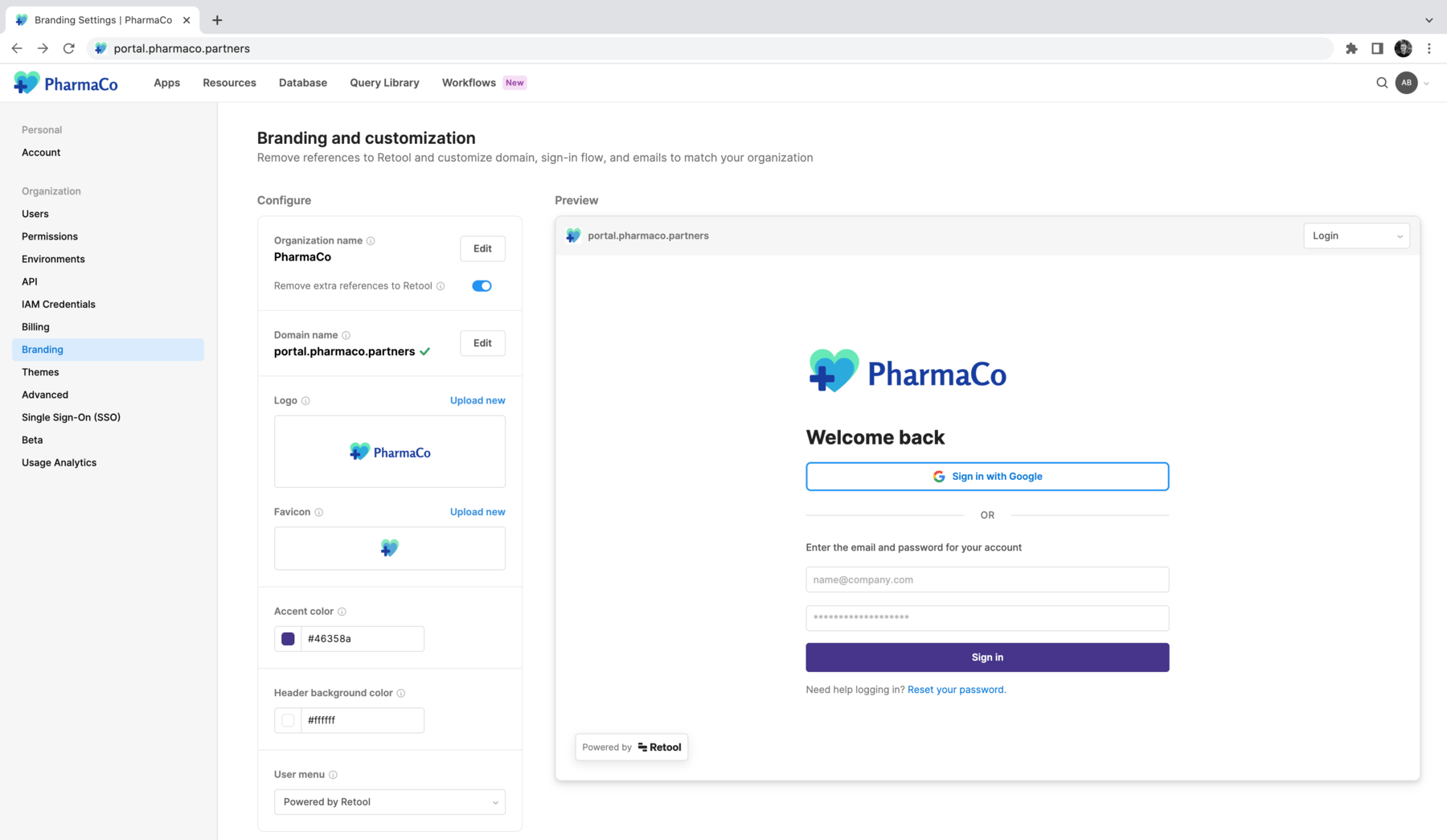
Set your organization name
On the Branding and customization page, click Edit to change your organization name. Next, enable Remove extra references to Retool. This replaces Retool with your organization's name throughout the product experience, such as on the login page.
Configure a custom domain
Use the following steps to configure a custom domain:
- Cloud
- Self-hosted
Cloud instances initially start with a URL in the format: [organization].retool.com. To change your Retool domain, first follow the instructions in the Configure a custom domain guide.
If you self-host Retool, configure your custom domain in your cloud provider's settings.
Navigate back to Settings > Branding, and click Edit in the Domain name section. Enter the domain name you configured. After your domain is verified, users can log into your organization at [mydomain.com]/auth/login.
Log out and back in using your custom domain, and continue.
Customize logo and favicon
You can replace Retool's logo and favicon with your own by uploading a logo image in .jpg or .png format, or a favicon in .ico format. You can also enable Show logo in app headers to automatically include your logo in the Header frame of all apps, if present.
Accent and header colors
Set the Accent color and Header background color to match your company branding. These colors apply to login pages, email pages, and the header for the app editing experience.
Customize emails
To remove all references to Retool in Retool Emails, enter a From name and a Reply-to address. Emails are sent from email.retool.com by default. You can alternatively set up Retool Events to send emails from your own email provider with Retool Workflows.
Create a theme
Create a default, organization-wide theme that applies to all apps in your organization.
Configure permissions
Configure permissions for external users by managing the External Users permission group, or by adding external users to other groups. By default, the External Users group has Use access to the External apps folder and all apps inside of it.
Refer to the external users documentation for more information.
Capabilities and limitations
The following tabs show a summary of the current capabilities of the app builder. Limitations describe functionality that isn't yet supported in apps but may exist in classic apps.
- Capabilities
- Limitations
- External users (who have email domains from outside your organization) can view published apps.
- Branding configuration.
- Configurable internal domain lists.
- Embedded apps in external websites or applications.
- Landing pages.
Some functionality is not currently supported:
- Public links to apps.
- Exported apps for use outside of Retool.
- Custom pages.
- User actions for logging in, resetting a password, and claiming an invitation. Apps can sign users out and list apps and folders using hooks.