Query REST APIs
Learn how to connect and query REST APIs in Retool.
You're viewing documentation for classic apps, which use Retool's original app editor. The AI app builder is the recommended way to build apps and where Retool focuses new development.
You can make requests to any REST or SOAP API. You can also use custom authentication to interact with private REST APIs.
Connect to a REST API
You can connect to a REST API in two ways:
- Create a resource to connect the API to Retool. This allows you to configure the API once so it's available as a resource anywhere in Retool. You can also configure additional authentication options, if required.
- Use the built-in REST API resource and manually construct API requests. This is useful if you only need to query an API temporarily and won't use it elsewhere. You must manually define API endpoints, authentication options, and any other parameters in each query.
Query a REST API
You can select a REST API resource in your Retool organization from the Resource field in the query editor. After selecting the resource, the configured API endpoint appears in the URL field. You can then specify the parameters and other options in the available fields.
To interact with a REST API that is not configured as a resource, select the REST API resource from the Resource field in the query editor. You manually define the API endpoint and other parameters in the available fields.
Guided mode
This section applies to classic apps, workflows, and agents only. If the resource has an API specification URL configured, new queries open in guided mode by default. Guided mode replaces the manual URL and parameter fields with an operation picker and parameter fields generated from the specification. You can switch an individual query to manual mode to build a request that isn't listed in the specification.
When you open a saved guided-mode query, Retool re-fetches the resource's specification and compares it to the version the query was saved with:
- Non-breaking changes, such as new parameters or fields, apply automatically. Removed or changed parameters or fields also apply automatically if the query didn't have a value set for them.
- Breaking changes show a warning banner instead of applying automatically. This happens when a parameter or field the query has a value for is removed, or its type changes.
The banner lists the affected fields by name and location so you can update the query manually. Spec change detection doesn't apply to manual-mode queries.
Clicking Test on a REST API query runs the query with your latest changes. Retool recommends testing your query on non-production data to avoid making unintended changes to your resource. Refer to Testing queries for more information.
Action types
Retool supports the following request methods for REST APIs:
- GET
- POST
- PUT
- PATCH
- DELETE
You specify the method to use by selecting an option in the Action type dropdown.
Queries using GET methods automatically run whenever any of their parameters change by default (e.g., input field value changes). Queries using POST, PUT, PATCH, and DELETE methods must be manually triggered by default. You can choose whether a query should run automatically or manually in the query editor; select Run query only when manually triggered or Run query automatically when inputs change in the dropdown menu.
Path and URL parameters
You can include additional path and URL parameters to any API request in the query editor. Path parameters can be included directly in your URL, and URL parameters can be added in the URL parameters section. Path and URL parameters can also read from values within curly braces ({{ }}).
When you specify URL parameters, Retool automatically appends them to the endpoint URL. Conversely, Retool detects any URL parameters added to the endpoint URL and populates the URL parameter fields.
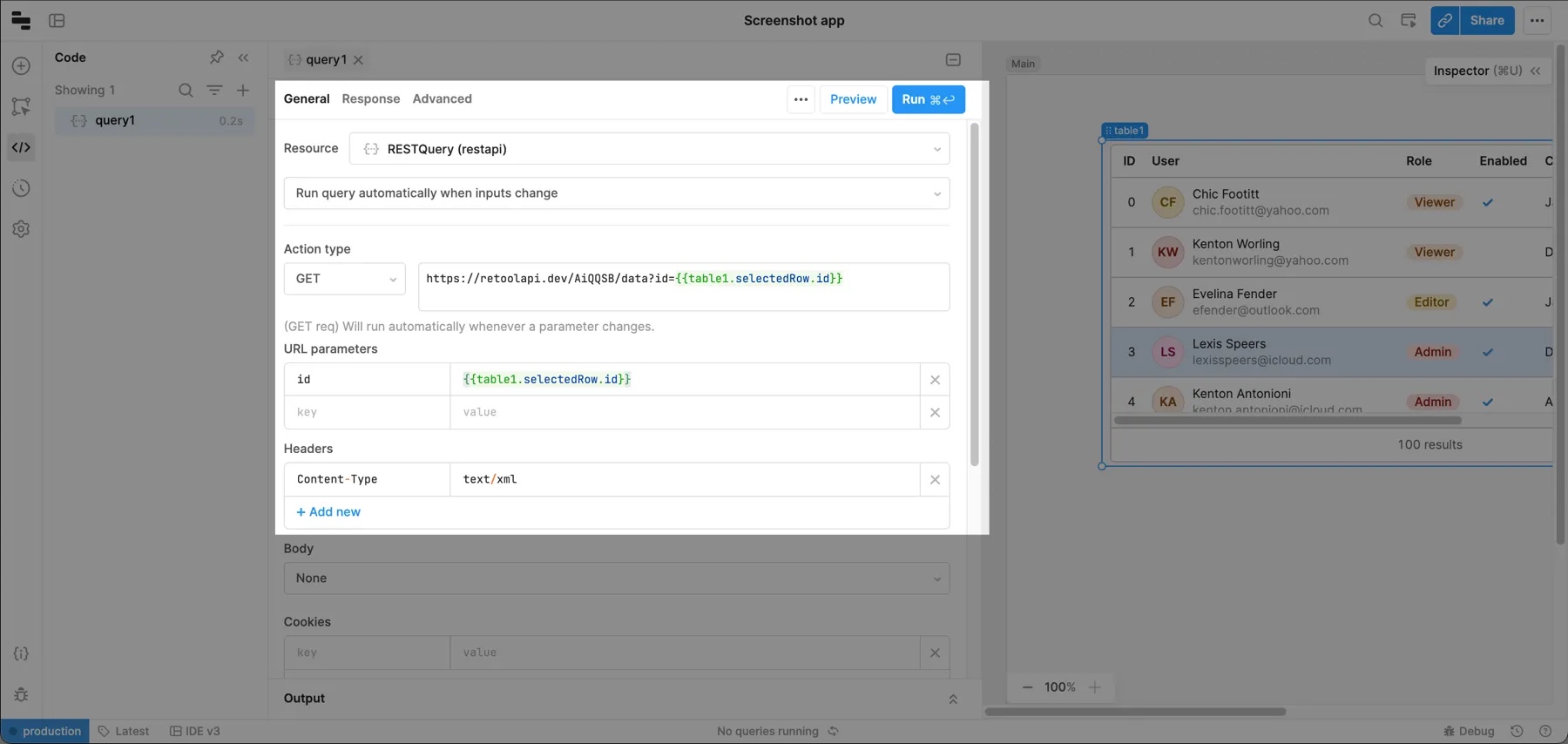
The following example shows a GET request which reads the currently selected row of a Table component and passes it as a URL parameter with a key of id.
Disable URL parameter sorting
URL parameters are automatically sorted alphabetically. To disable sorting, navigate to Settings > Beta and turn on the Disable URL Params Sorting setting.
Request headers
For REST APIs configured as a resource, you can set request headers on the resource's configuration page. Headers set on resource configuration pages are always included on any requests using that resource.
You can also add headers to any request using the Headers fields in the query editor. These headers are included in addition to any already configured for the resource.
Retool sanitizes any headers with keys that contain authorization, key, or password.
Retool passes through all headers by default, even if they are duplicates. To exclude duplicate headers, navigate to Settings > Beta, and toggle on the Remove duplicate headers (case-insensitive) settting.
Request bodies
You can send requests with JSON, raw, x-www-form-urlencoded, Form data, or binary bodies.
JSON
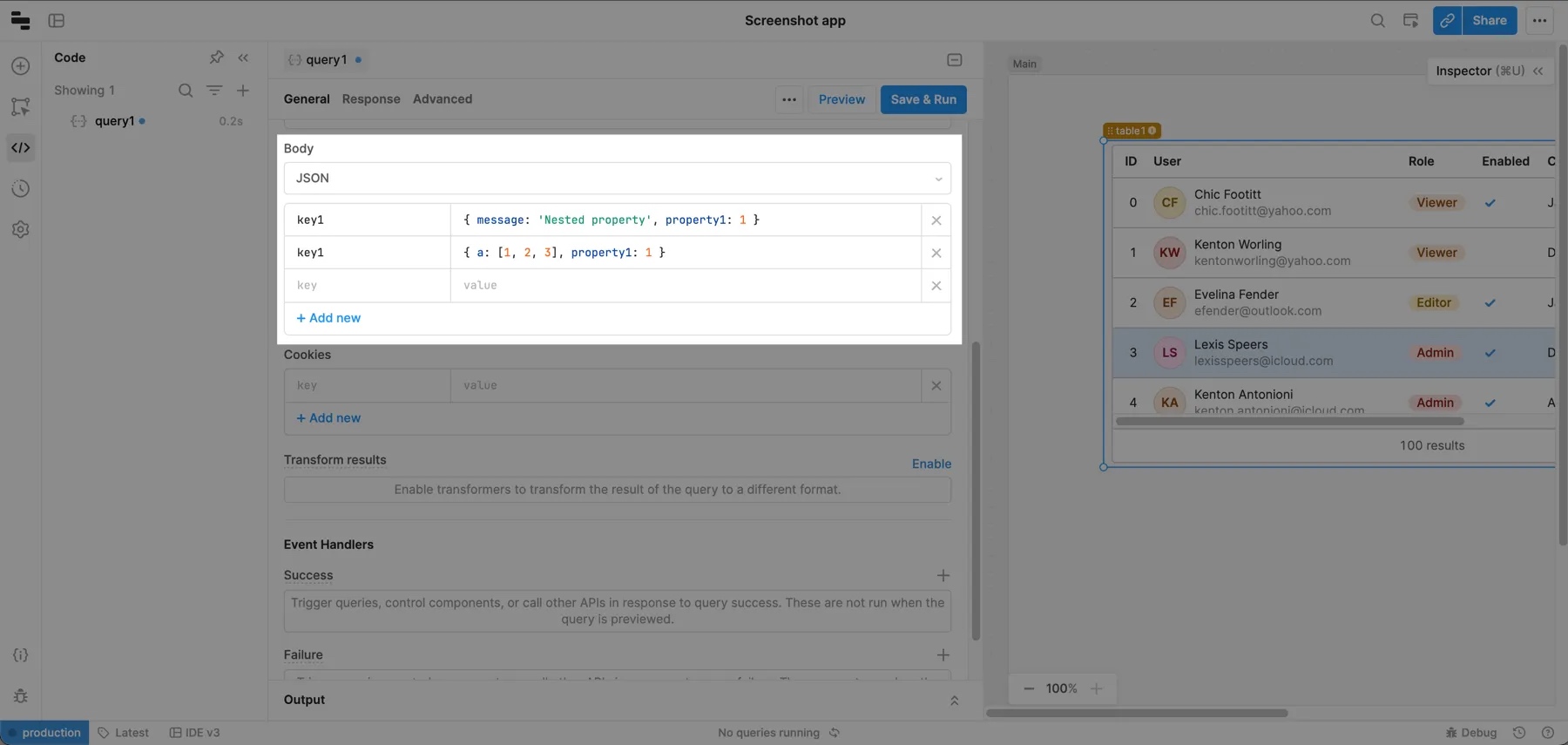
To construct a JSON request body, select JSON in the Body section of the query editor. You can then construct a JSON object using the key-value fields. A Content-Type: application/json request header is automatically added to requests using JSON body types. The JSON body also supports nested objects within a single key.
Raw
To send a request body without modifications, select Raw in the Body section of the query editor. For example, if you use the Raw body type and manually add a Content-Type: application/json header, you can send more complex JSON objects.
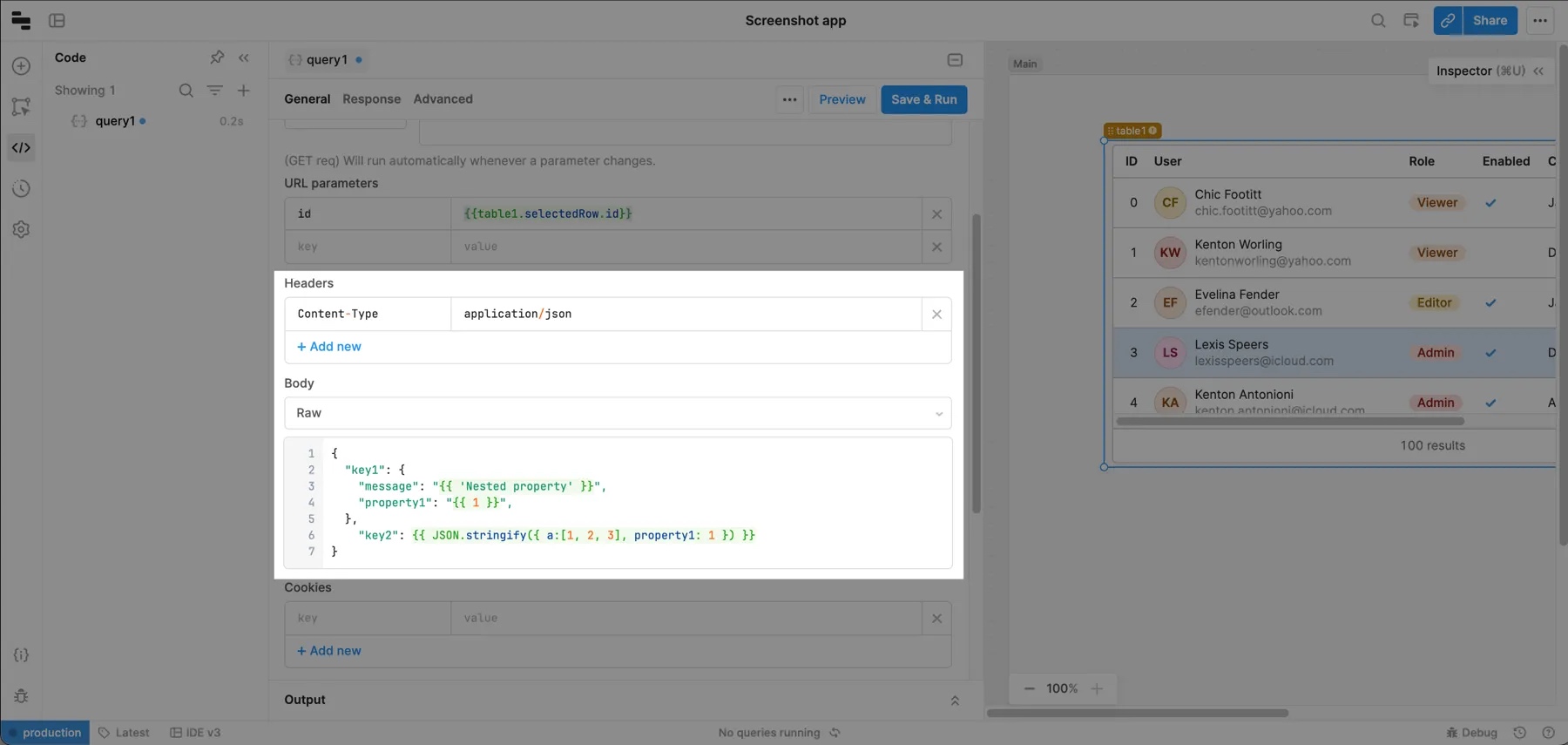
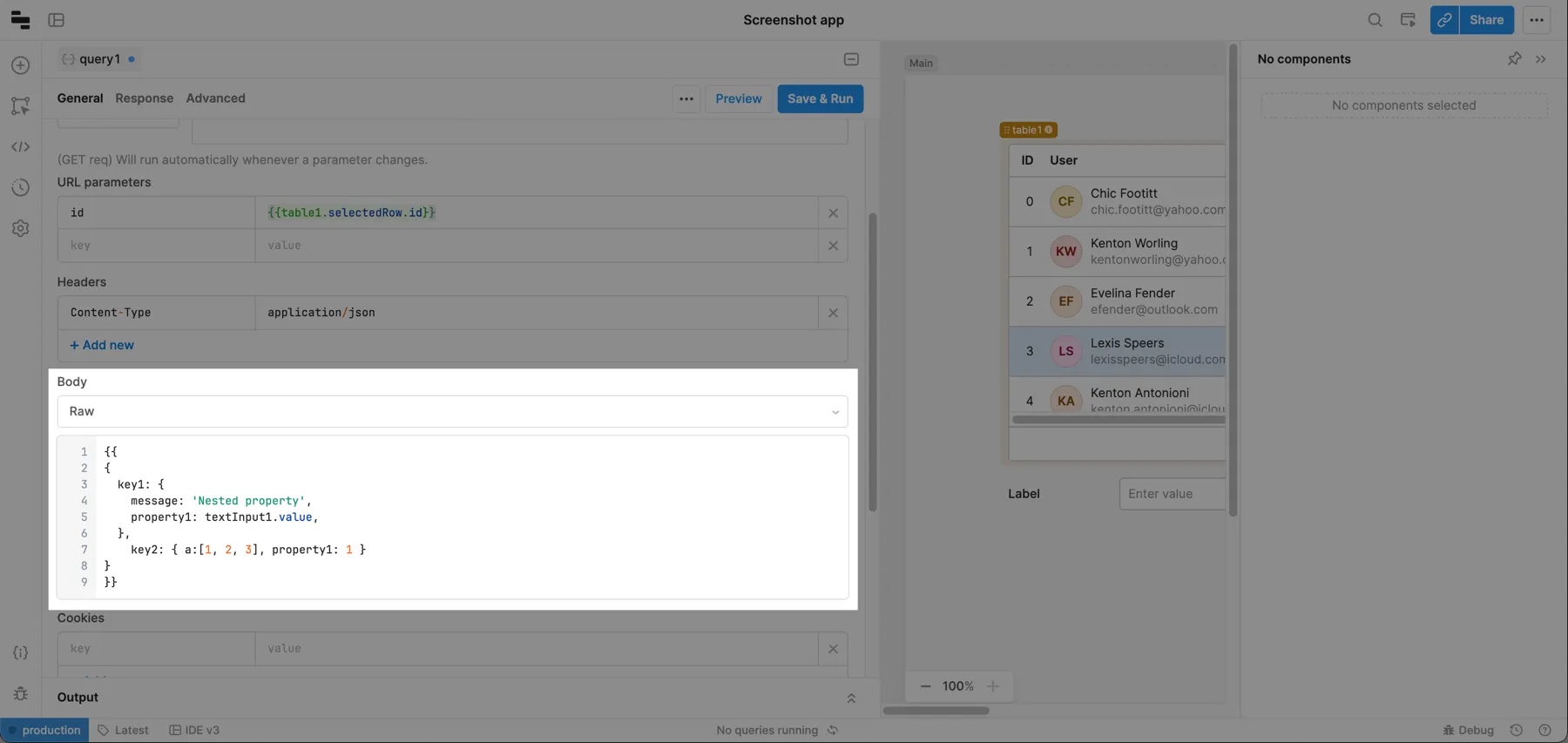
You can include JSON in raw request bodies with some additional formatting. You can either wrap the entire body in curly braces to construct the object dynamically or manually format values in the following ways:
- String values: Wrap values in curly braces
{{ }}with double quotes. - Boolean or number values: Do not wrap curly braces
{{ }}with double quotes. - Objects and arrays: Use
JSON.stringify()to convert to string values.
x-www-form-urlencoded
To send URL-encoded data, select x-www-form-urlencoded in the Body section of the query editor. Retool adds Content-Type: application/x-www-form-urlencoded to the request header.
Form data
See the guide to handling files in Retool to learn how Retool represents files.
To send form data in your request, select Form data in the Body section of the query editor. A Content-Type: multipart/form-data header is added to the request.
To upload a file using form data, set a key to file, select the File upload type, and set the value to the file to upload. The .value property on File Input, File Button, and File Dropzone components has the correct schema for file uploads. For example, set value to {{ fileInput.value }} to upload a file as form data.
Binary
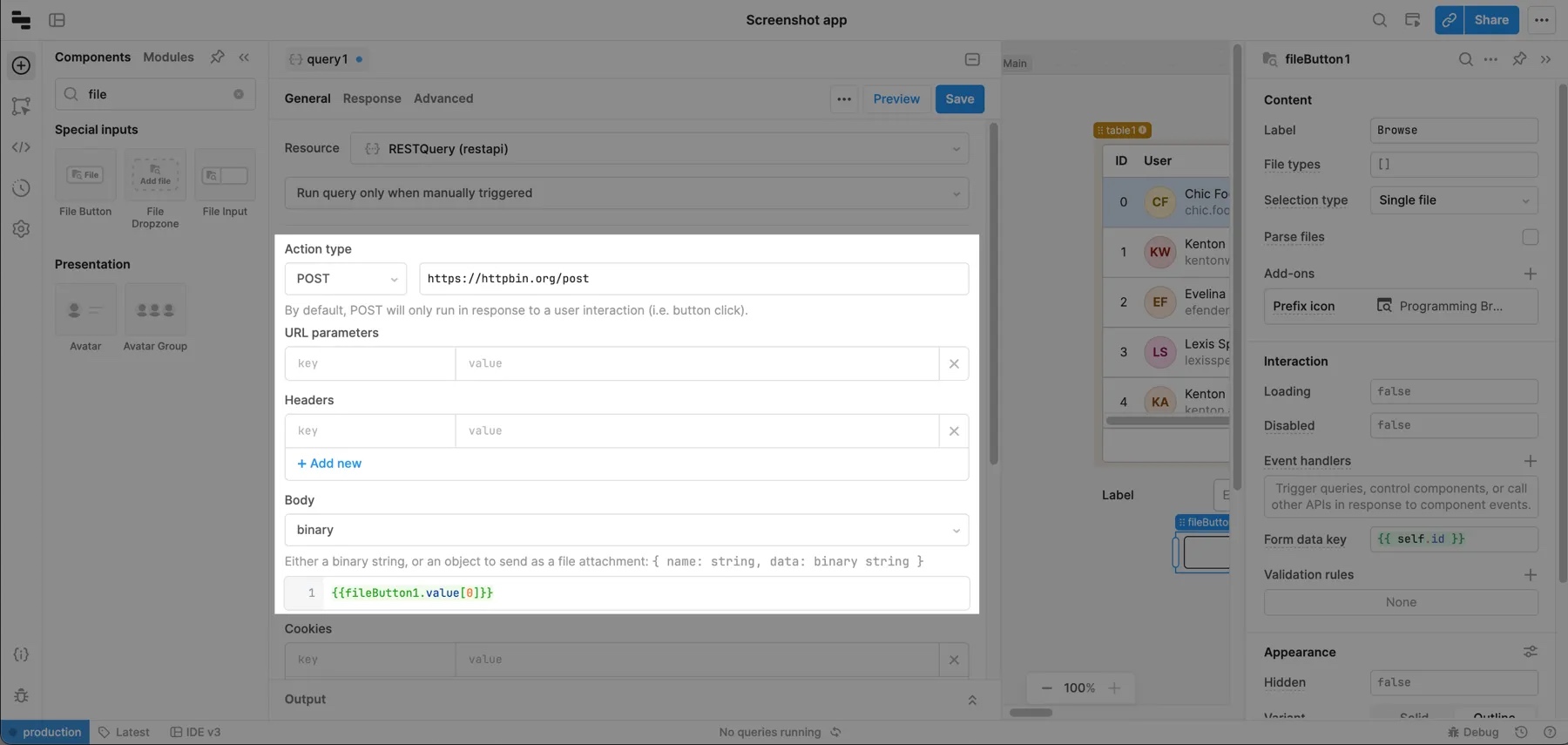
To send data that can't be formatted as form data—for example, an image, audio, or video—select binary in the Body section of the query editor.
The following examples passes the File button upload value as binary data.
Cookies
You can configure REST API resources to use cookies-based authentication for REST API resource support cookies for API authentication. You can also add cookie headers to API requests using the Cookies key-value field in the query editor.
OpenAPI deepObject body encoding
REST API resources created using an OpenAPI 3.0 specification can include request body fields that use the deepObject encoding style. When an OpenAPI operation declares encoding: { style: "deepObject" } on an application/x-www-form-urlencoded request body, Retool serializes nested object properties as bracket-notation keys at the root of the body.
For example, a body field at shipping.address.line1 is serialized as:
shipping[address][line1]=...
The deepObject encoding only applies to application/x-www-form-urlencoded request bodies on REST resources created using OpenAPI specs. It does not change the behavior of query parameters or JSON request bodies, and does not affect REST resources created manually.
Connect to a SOAP API
You can also use a REST API resource to connect to a SOAP API. To perform SOAP requests:
- Use the POST HTTP method.
- Use the Raw body type.
- If you use WSDL, provide the path to the WSDL in the resource's base URL or the query's URL path.
SOAP requests must also include the following header.
| Key | Value |
|---|---|
Content-Type | text/xml |
If you use a SOAP 1.1 service, also include a SOAPAction header with an appropriate value. You may need additional headers depending on your SOAP API's requirements; refer to your SOAP API specification for details. The name of the SOAP method is usually provided in the SOAP body but may need to be provided in a header instead.