Connect to SendGrid
Connect SendGrid to Retool and send transactional and marketing email, manage contacts, and track email activity.
SendGrid is an email delivery platform for sending transactional and marketing email. Connect SendGrid to Retool to build tools that send email, manage contacts and lists, and monitor email activity.
What you can do with SendGrid in Retool
After you create a SendGrid resource in Retool, you can:
- Send email: Send transactional and marketing email, including messages built from dynamic templates.
- Manage contacts: Create, update, and organize contacts and contact lists.
- Track activity: Retrieve email activity, statistics, and suppressions such as bounces and spam reports.
Before you begin
To connect SendGrid to Retool, you need the following:
- Cloud
- Self-hosted
- SendGrid API key: An API key from your SendGrid account with permissions for the operations you plan to perform.
- Retool permissions: Edit all permissions for resources in your organization.
- SendGrid API key: An API key from your SendGrid account with permissions for the operations you plan to perform.
- Retool permissions: Edit all permissions for resources in your organization.
Create a SendGrid resource
Follow these steps to create a SendGrid resource in Retool.
1. Create a new resource
In your Retool organization, navigate to Resources in the main navigation and click Create new → Resource. Search for SendGrid and click the SendGrid tile to begin configuration.
2. Configure general settings
Specify a name and description for the resource that indicates which SendGrid account it connects to. The description provides more context to users about how to use the resource.
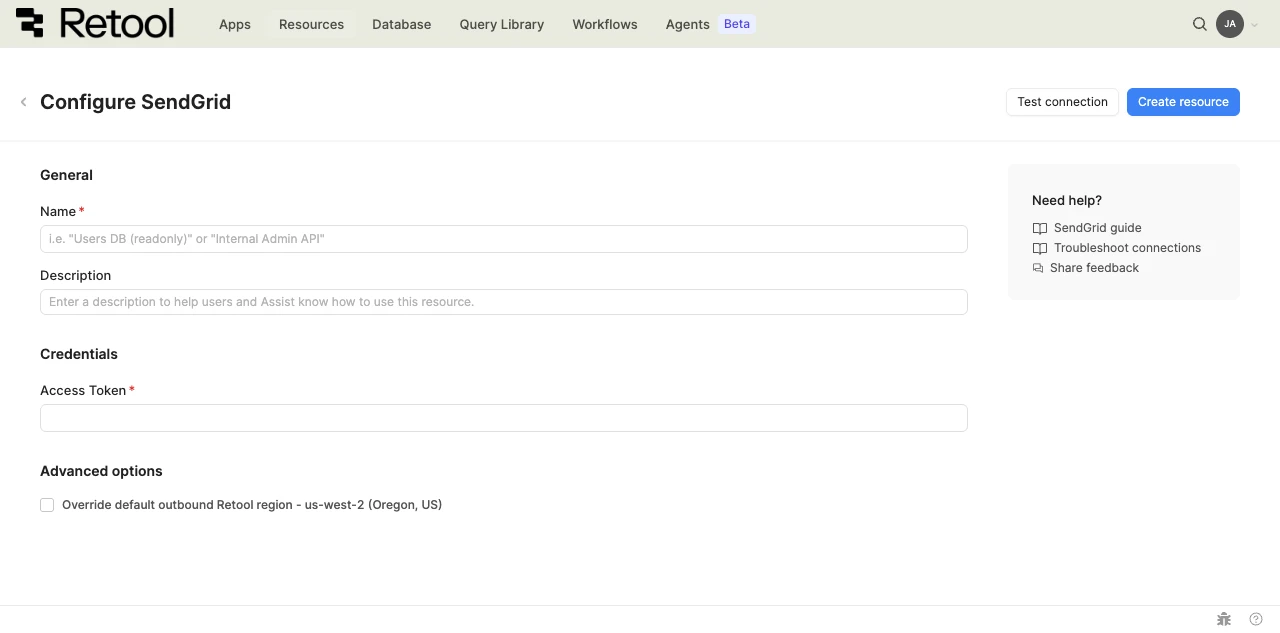
SendGrid resource configuration form.
Resource name and description
Choose a name and description that indicate which SendGrid account the resource connects to.
| Example name | Example description |
|---|---|
| SendGrid | SendGrid account for sending transactional and marketing email. |
| SendGrid Notifications | SendGrid resource scoped to an API key used only for order and account notifications. |
3. Configure authentication
SendGrid uses API key authentication. Provide a SendGrid API key to authenticate requests.
- Cloud
- Self-hosted
Access token
Provide a SendGrid API key. Create or manage keys from SendGrid's API keys settings.
{{ retoolContext.environment.sendGridApiKey }}
Retool encrypts the Access Token field automatically. Avoid pasting API keys into query bodies or other places where they could be exposed; reference them through configuration variables if you need to use the same key value elsewhere.
Access token
Provide a SendGrid API key. Create or manage keys from SendGrid's API keys settings.
{{ retoolContext.environment.sendGridApiKey }}
Retool encrypts the Access Token field automatically. Avoid pasting API keys into query bodies or other places where they could be exposed; reference them through configuration variables if you need to use the same key value elsewhere.
4. Configure advanced options
- Cloud
Outbound region
If your organization uses outbound regions, select the region that should be used for requests to SendGrid. This controls which geographic region your requests originate from.
5. Test the connection
Click Test connection to verify Retool can connect to your SendGrid account. A successful test confirms the API key is valid and has the necessary permissions.
If the connection test fails, verify:
- API key validity: The API key is correct and hasn't been revoked.
- API key permissions: The API key has permissions for at least one operation, since SendGrid restricted access keys can otherwise return permission errors.
6. Save the resource
Click Create resource to save your SendGrid resource. The resource is now available to use in apps, workflows, and agent tools across your Retool organization.
Interact with SendGrid data
Once you've created a SendGrid resource, you can interact with SendGrid data using Retool.
Retool recommends using the new app builder so you can use natural language to build React-based apps using AI.
- To use SendGrid data in the app builder, reference the resource in the prompt with
@, such as@SendGrid. Refer to the data and functions documentation to learn more. - To use SendGrid data in a classic app, workflow, or agent, write a resource query. Refer to the SendGrid query tutorial to learn more.
Best practices
Follow these best practices to maintain the security of your SendGrid resource.
- Use HTTPS only: Always connect to APIs over HTTPS to encrypt data in transit and protect authentication credentials.
- Apply least privilege: Use restricted access API keys scoped to only the permissions a given use case requires, rather than full access keys.
- Rotate credentials regularly: Follow SendGrid's recommendations for API key rotation, and revoke unused keys.
- Use resource environments: Organizations on an Enterprise plan can configure multiple resource environments to maintain separate API keys for production, staging, and development.
Related resources
Create a resource
Learn how to create and manage resources in Retool.
Twilio
Connect Twilio to send SMS and other messages from Retool.
SMTP
Send email from Retool using an SMTP server.
Configuration variables
Store sensitive values securely for use in queries and apps.
Retool community: SendGrid
Community discussions and solutions for SendGrid integrations.
SendGrid API reference
Official reference for SendGrid's v3 API.