AI Spend Management
How platform owners and CoE leads can monitor, control, and forecast AI credit and token spend on Retool
As more teams build on Retool, AI use grows with them. More builders, larger apps, and more AI-powered workflows all draw on the same monthly allocation of AI credits or consume BYOK tokens from your model provider account. Without a plan, organizations usually find out about their AI spend the day builders can no longer prompt.
This resource is for platform owners and Center of Excellence (CoE) leads responsible for running Retool at scale. It covers how AI spend works on Retool, what drives it, how to see it, how to control it, and how to build an operating rhythm so AI usage grows predictably.
This resource covers AI credit and token spend. For the infrastructure costs of running Retool Self-hosted (compute, database, storage), refer to Cloud Cost Management.
What does AI power in Retool?
Retool uses AI Models for building Apps, Queries, Agents, running AI logic in Agents, and executing AI Actions in Apps, Workflows, and Agent Custom Tools.
App Building
Retool App Builder provides its core building experience via a chat-based interaction. Builders can select model providers during this process.
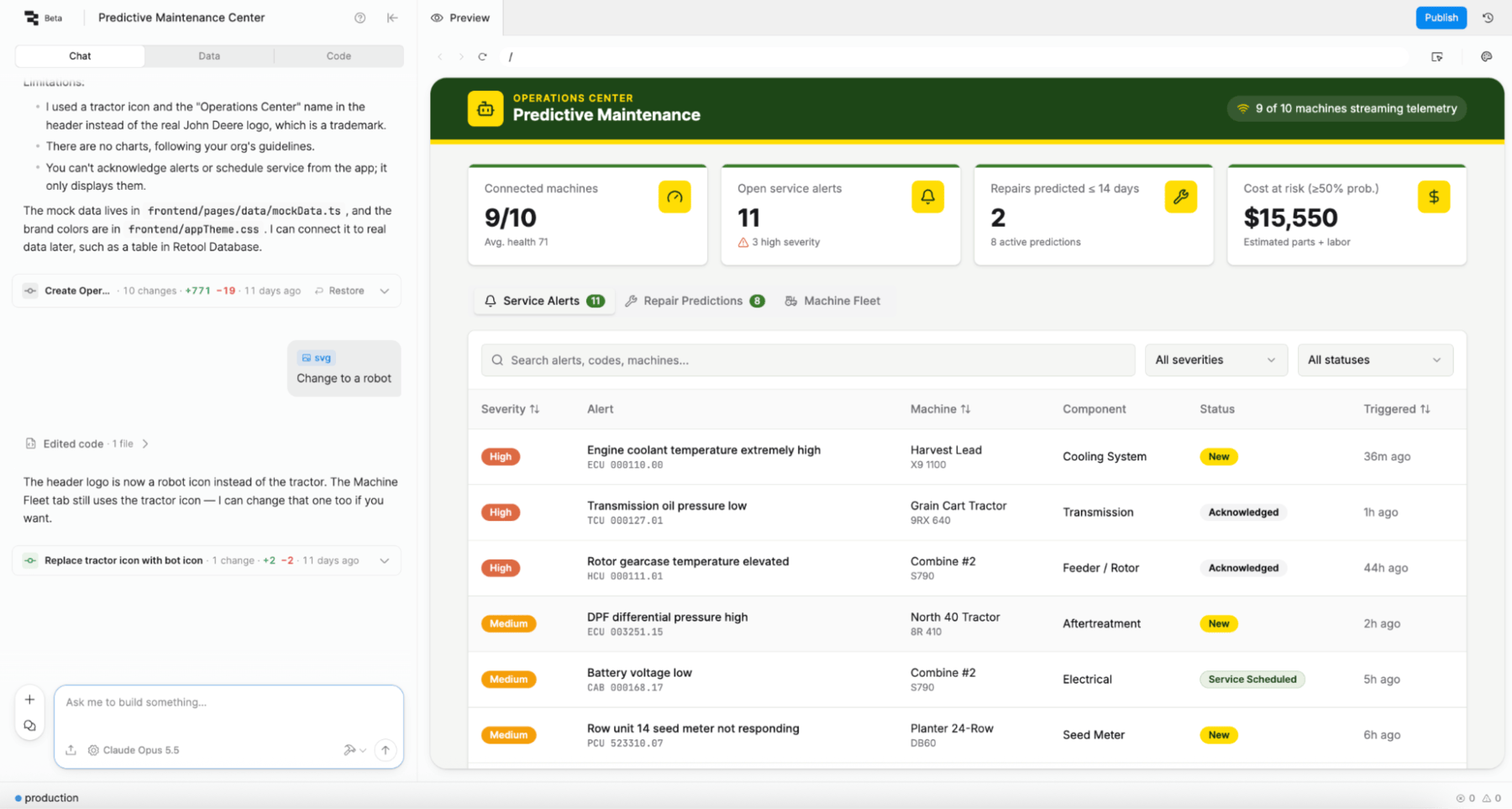
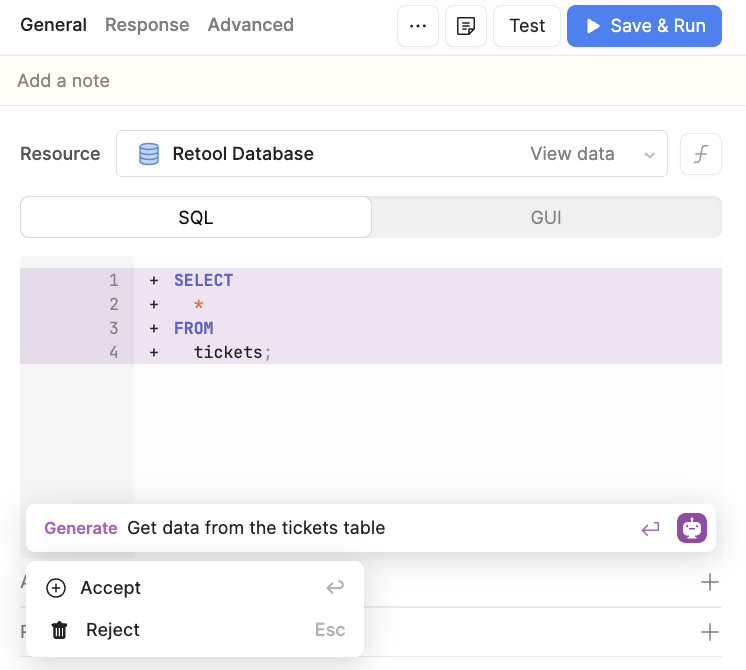
Ask AI
Query Builder in Retool Classic supports asking AI to help in generating SQL and JavaScript within the Query Editor.
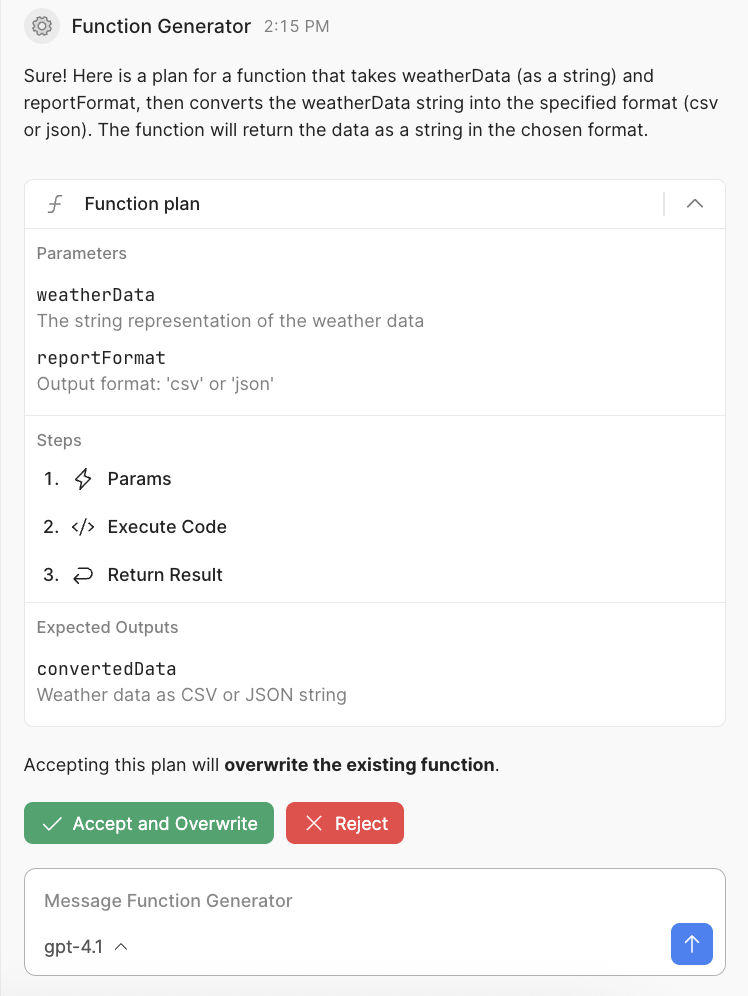
Agent Building
Retool Agent Builder uses AI prompts to help define the Agent Configuration and Custom Tools creation.
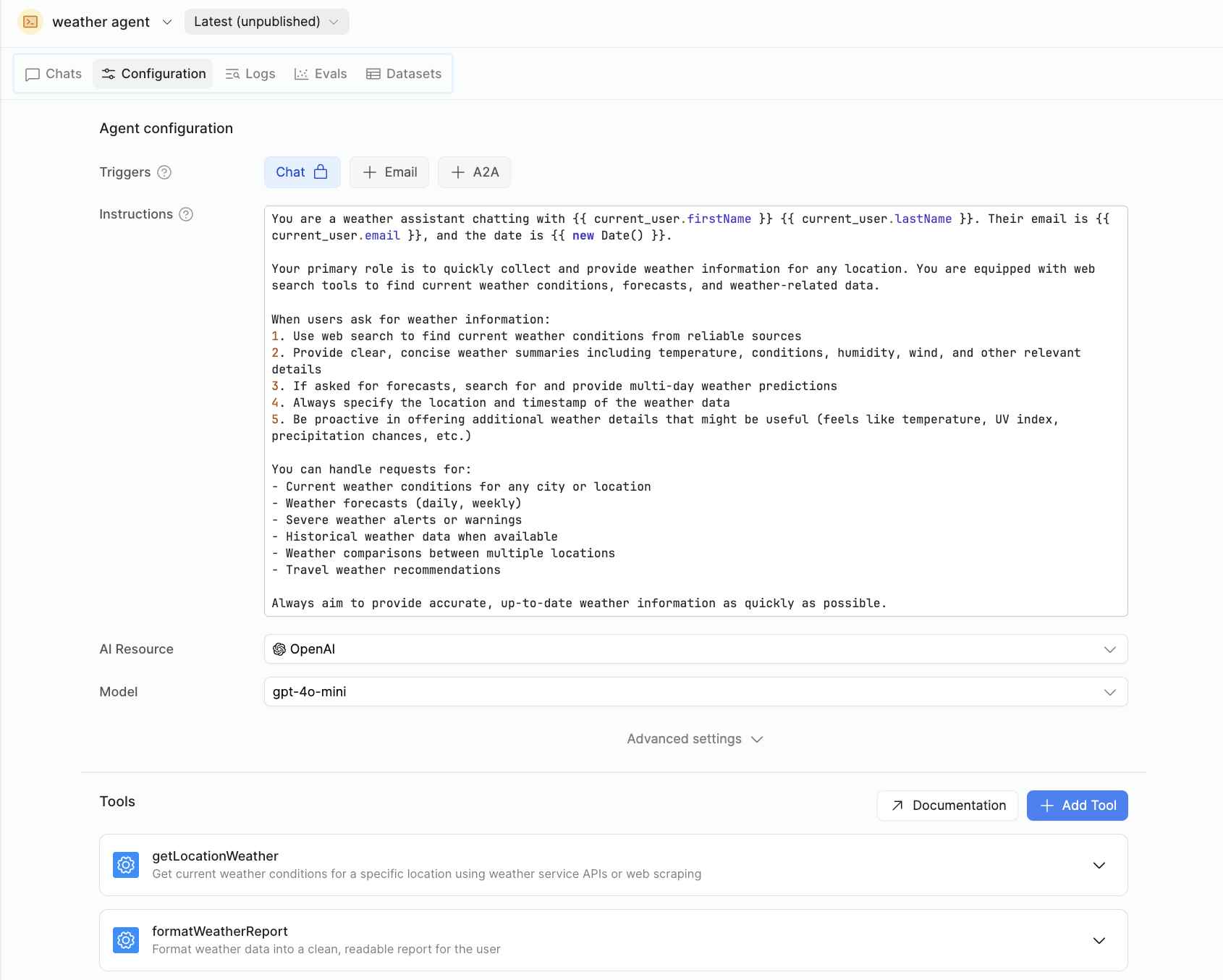
Agents
Retool Agents employ AI Models to execute pre-defined configuration and tool selection.
AI Actions
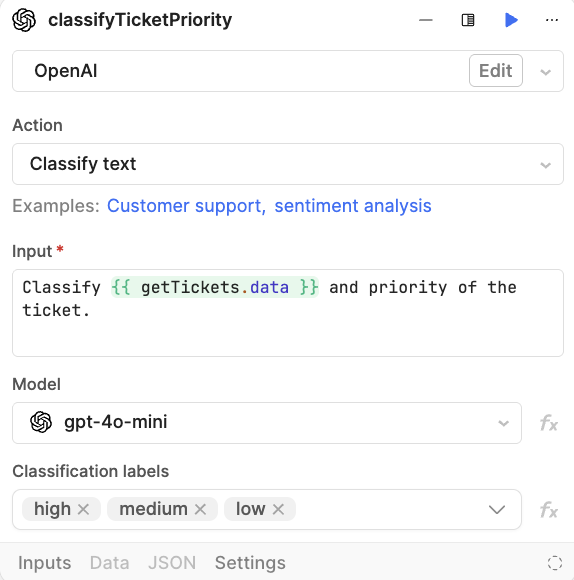
Apps, Workflows, Agent Custom Tools can employ AI Actions, including summarization, generation, classification, and more. For example, classifying support tickets' priority based on content within the ticket.
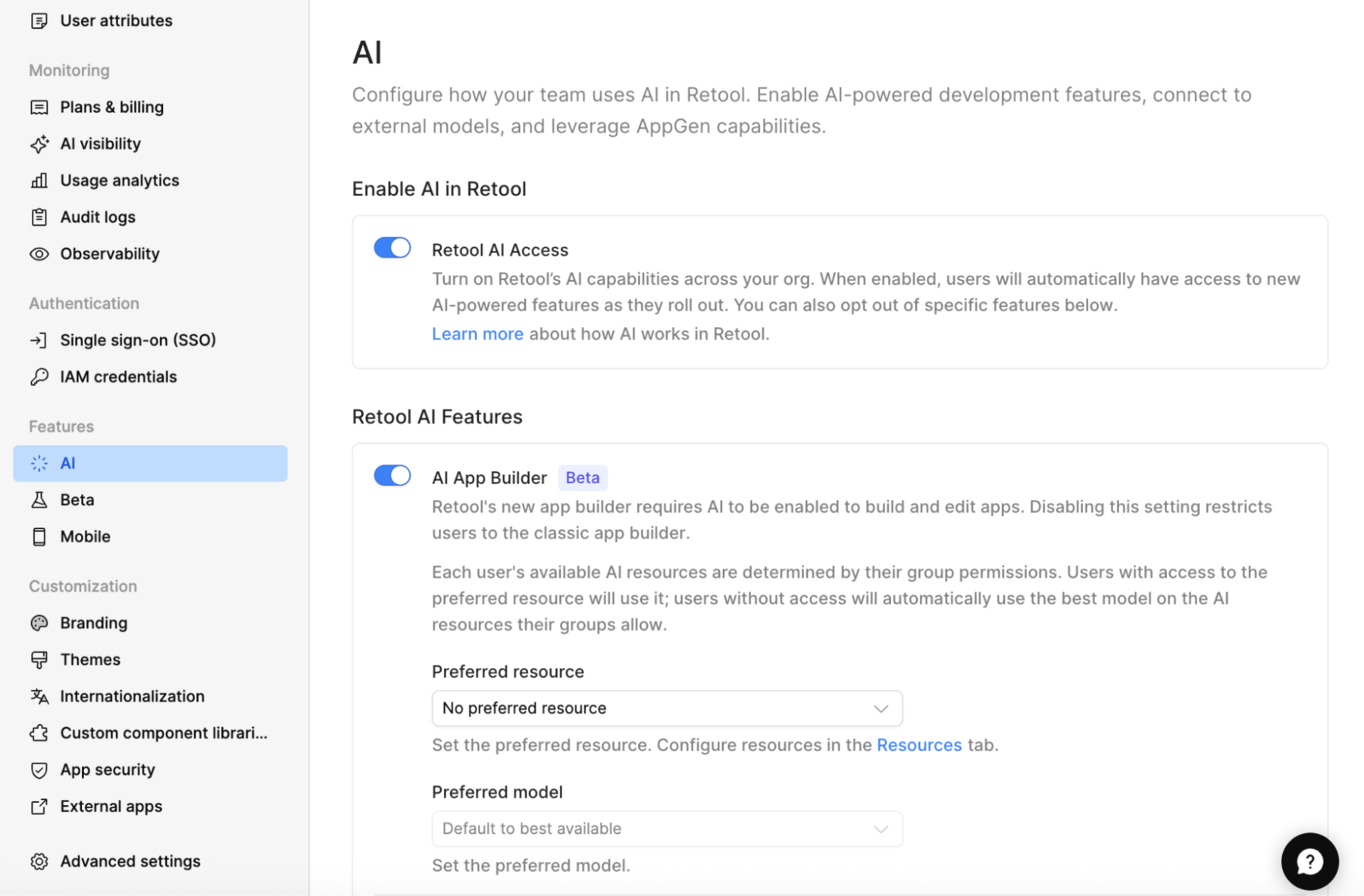
Access to these features/settings is enabled/disabled under Settings > AI.
What AI spend options do I have?
Retool supports two options for your AI spend. The first is Retool-managed keys, and the second is Bring your own key (BYOK), where you use your existing API key with a model provider. The following table provides additional details.
Two ways to pay for AI
| Retool-managed keys | Bring your own key (BYOK) | |
|---|---|---|
| Who provides the model | Retool | Your organization's provider account (for example, OpenAI, Anthropic, Azure OpenAI, Bedrock) |
| How usage is measured | AI credits | Tokens, billed by your provider |
| Where you see usage | AI Monitoring page, Retool managed keys view | AI Monitoring page, BYOK view, plus your provider's console |
| Limits | Your plan's monthly credits plus any purchased credits | Your provider's quotas and budgets |
| Availability | All plans | Enterprise |
How are Retool Managed Credits consumed?
Retool provides two monthly pools, starting with what each builder is provided, the organization next, and finally you can acquire additional credits that are added to the organization pool. Builders will consume their credits first, then roll into the organization, and finally additional credits.
| Pool Type | Description | Example |
|---|---|---|
| Builder | Credits provided to a named builder (e.g., Alice cannot use Bob's credits) | 200 Credits per builder* |
| Organization | Credits provided to an organization | 4,000 Credits per org* |
| Additional Purchased | Additional Credits purchased | 1,000 Additional Credits* |
* The Credit Pool
- Credits reset at the start of each billing cycle and don't roll over.
- Purchased credit packs add to your available credits and have their own expiry dates.
- When you use up your available credits, AI-powered building pauses until the next cycle or until you add more credits. There's no automatic overage billing. Builders can still edit code by hand, and published apps keep running.
How do I track AI spend?
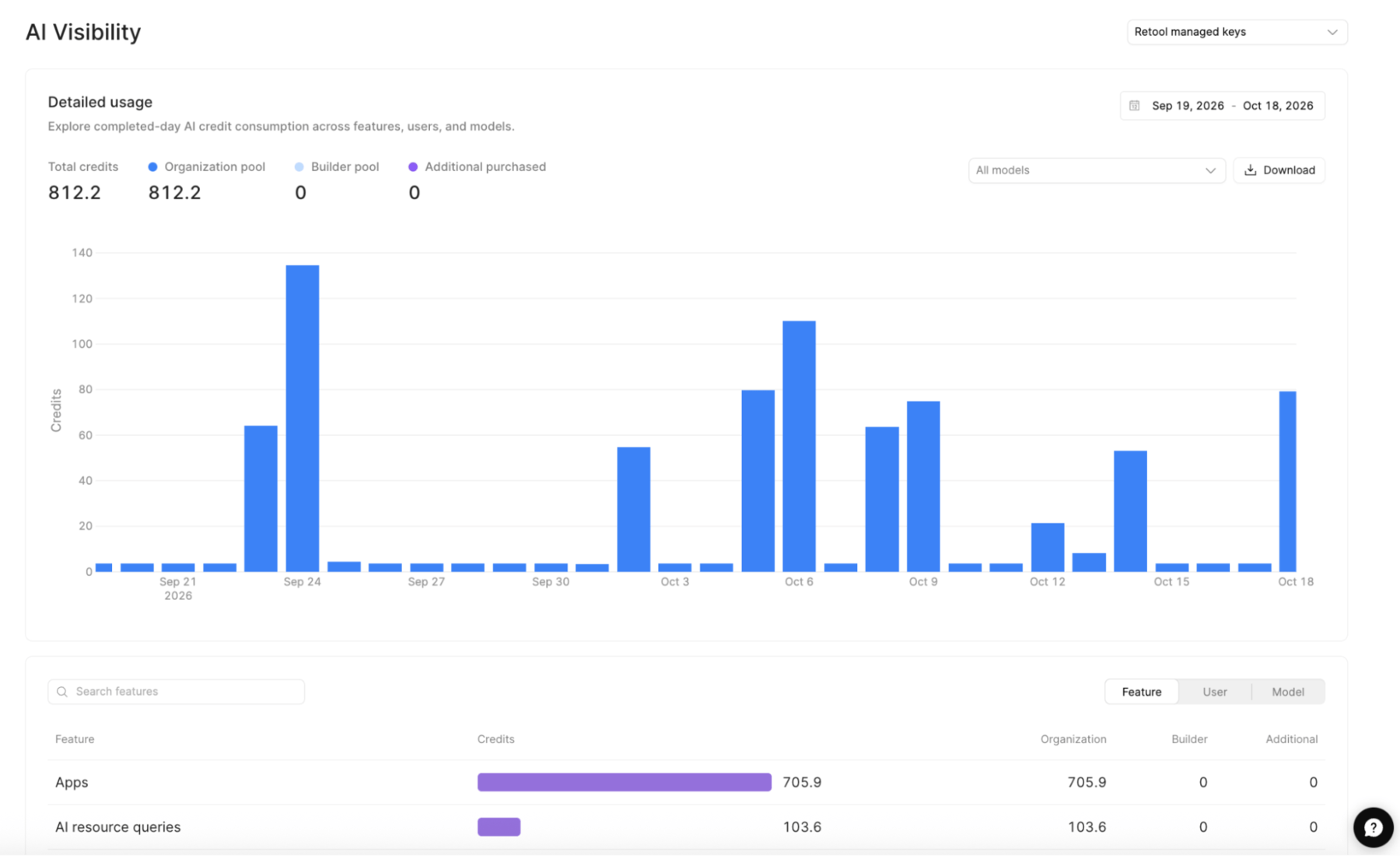
Now that you have identified a selected payment option, it is important to keep track of the AI usage. For Team/Business plans leverage Plans & Billing. For Enterprise plans, Retool Admins can use the AI Monitoring dashboard in Settings. Both Retool Managed AI Credits and BYOK token consumption are visible at the Retool Feature, User, and Model.
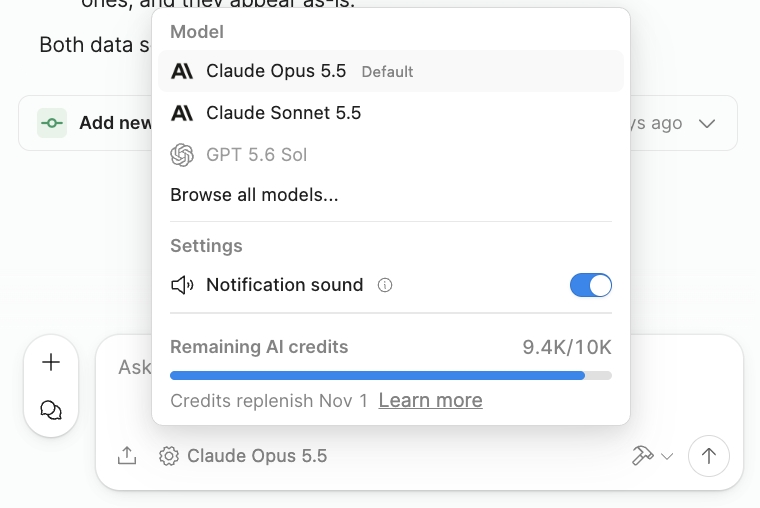
Retool Builders have access to the Retool Model selection and monitoring of AI Credits pool spend via Chat > Settings.
How do I control AI spend?
Retool provides several options for controlling spend.
Credit exhaustion
When using Retool Managed AI Credits, if the total allotment allocated is exceeded (builder, organization, additional), Retool will disable the ability to build or execute on the platform. If using BYOK, cost controls are up to your model provider's enterprise features, as provided in the following links.
Configure AI Settings
Within Settings > AI, the admin can specify the AI App Builder default provider and default model, which impacts the credit/token spend.
Configure AI Resource Permissions
Access to AI Resources is governed in Retool and provides a key mechanism to define access to the AI provider and model(s). Apply this access at the group level so that members of the group inherit it.
To start, an AI Resource must exist that identifies the provider and model. Select Resources > Create new > Resource > AI > (model provider). The following image shows an Anthropic resource where we enable under Advanced Options > Restrict this resource to select models.
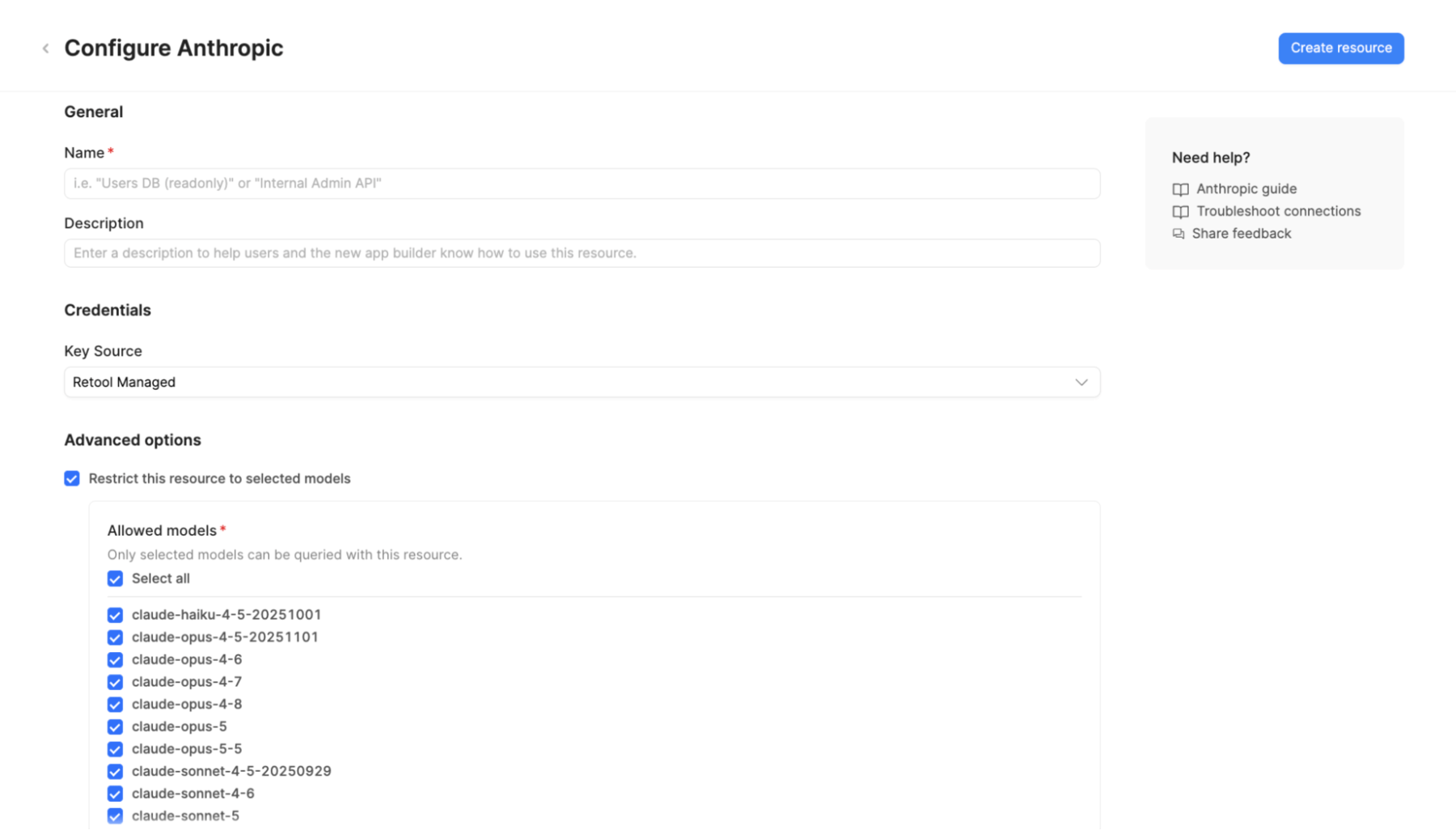
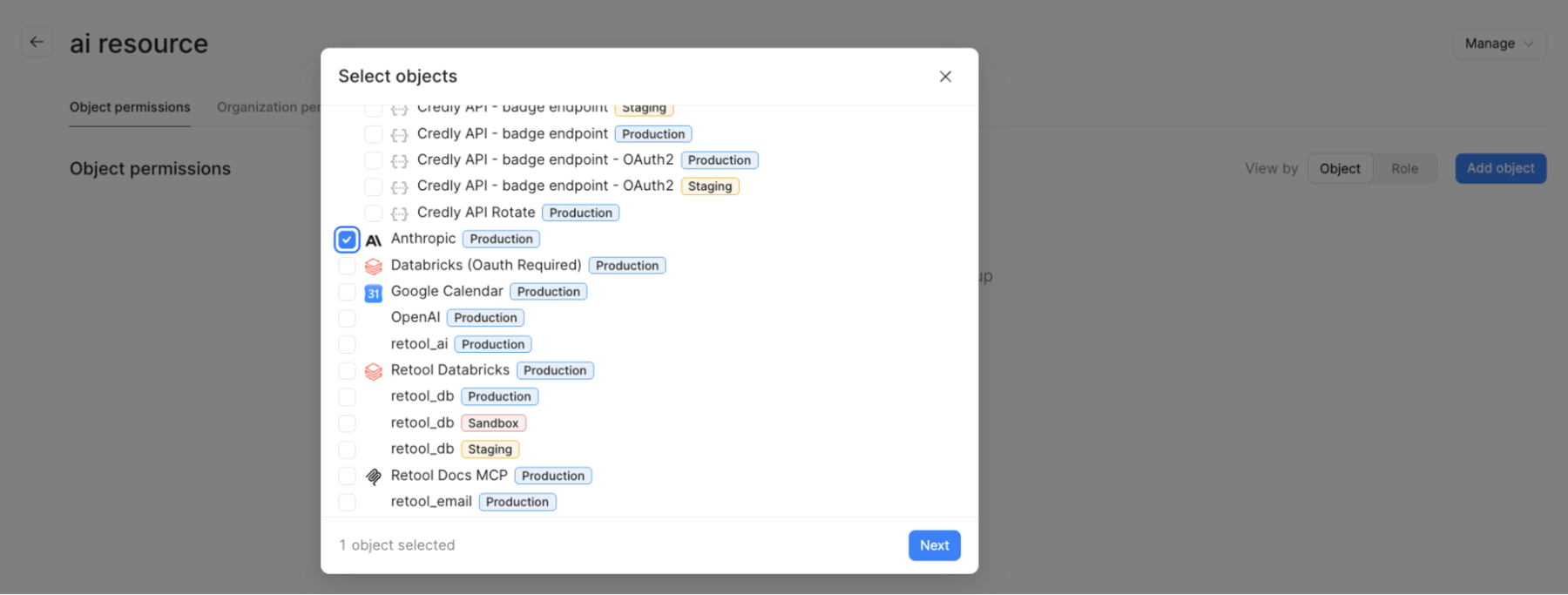
When configuring the AI Resource, the admin can specify the supported models. Once a resource is configured, you can then provide permissions to this resource in Settings > User management > Groups. Create a group and then define an Object Permissions where you can add Resource(s) and the specific AI Resource that you defined.
Enable Spend Controls
User Limits
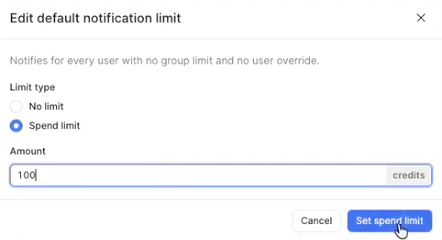
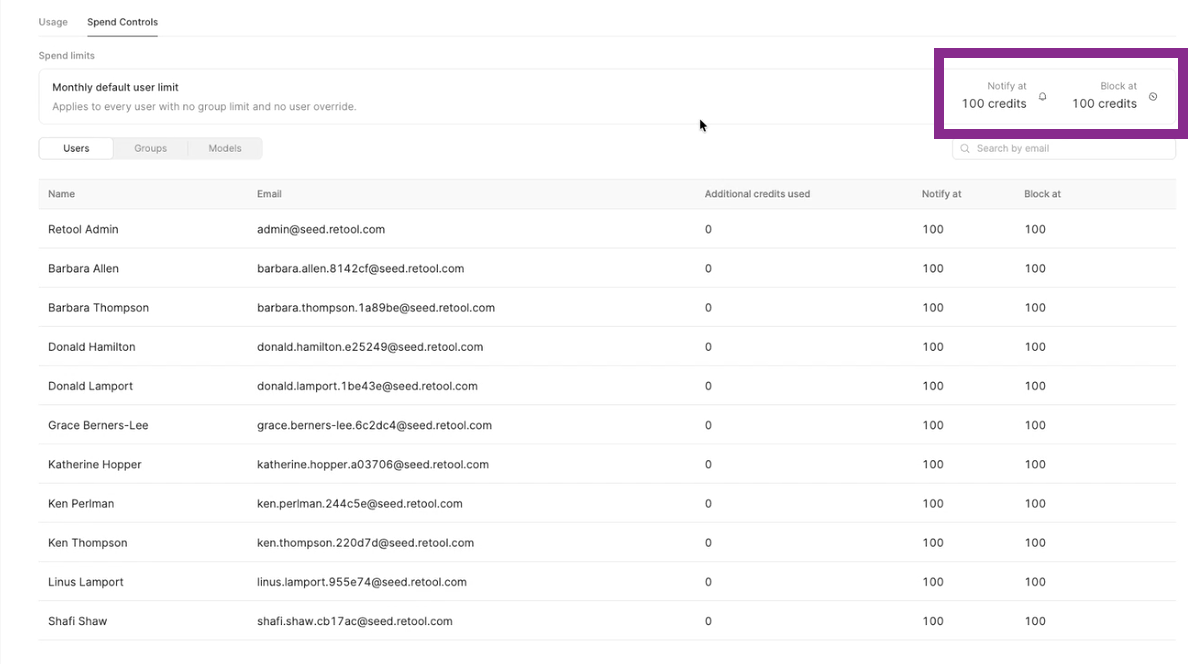
Retool provides spend controls, available in Monitoring > AI Monitoring > Spend Controls. For individual users, spend controls allow you to set thresholds for notification and blocking access. For notifications, the admin can select Notify and then update the threshold a notification should be sent at:
To specify when to block access, select Block and enter a credit amount.
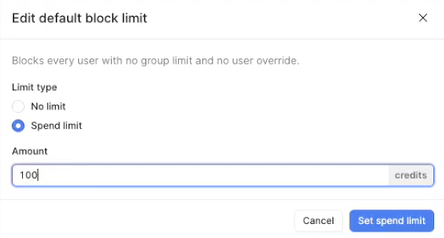
The notification and block limits are displayed.
Group Limits
General user limits can be overridden by group limits. For example, a user working in a team that uses AI regularly may need to have a higher cap of 200 credits.
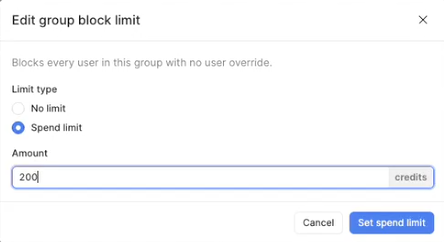
Updating the Dev Group to 200 credits for instance overrides the default user setting for members of that group. In this case, their limit becomes 200 credits.

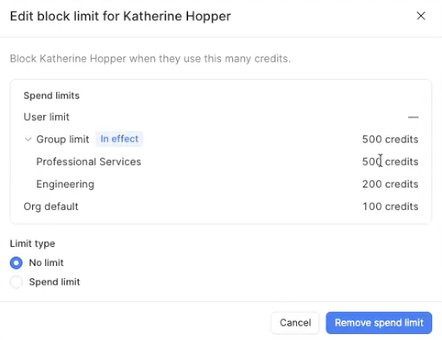
If the administrator has any questions, they can examine the user and details to understand what overrides are occurring, leading to the increased AI credit limit.
Model Limit
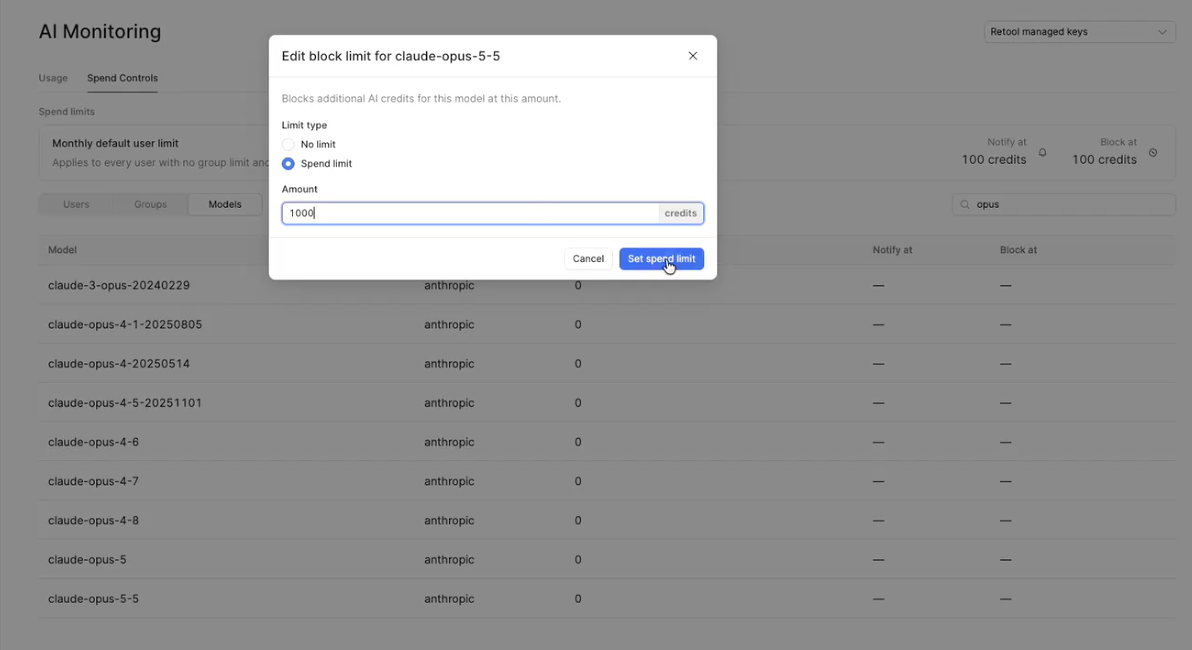
Within spend control you can access model limits, search on the model(s) of interest and then institute model limits against those (e.g., claude-opus-5-5).
Notifications
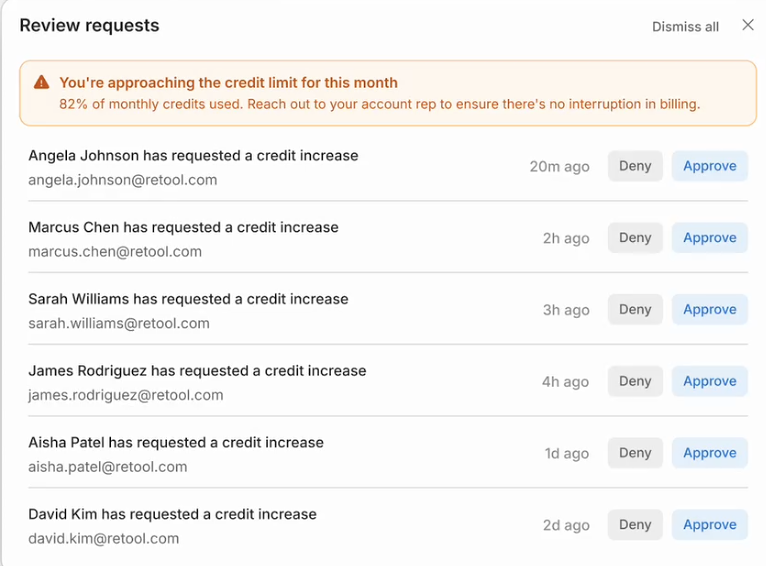
Notifications based on previous limits will appear with Retool Home as well as in the App Builder so you are aware.
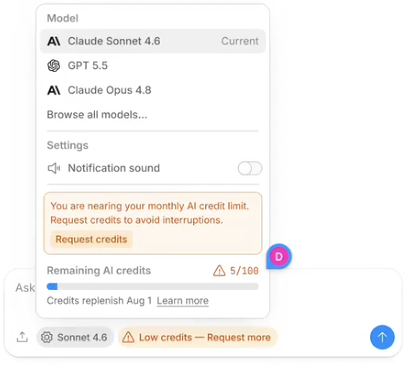
If you select Request credits, the Retool admin is notified and can then take action.
App Building Practices
How Builders create apps in Retool App Builder can impact the spend during the build process. The lab App Spend Management covers this topic in more detail; however, the following table provides some high-level best practices.
| Practice | Why it saves credits |
|---|---|
| Use Plan mode for multi-step work | Fixes misunderstandings before code is written |
| One feature per prompt | Less rework than one large prompt |
| @-mention resources and components | The agent doesn't have to search for them |
| Use Select to Edit for component changes | Focuses the agent on one component |
| Make small changes in the Code tab | Uses no credits |
| Start a new thread for each feature and after publishing | Drops the history of earlier work |
| Use lighter models for simple edits | Simple changes don't need the most capable model |
| Stop after two failed attempts | Retry loops are expensive. Read the code or reframe the request. |
How can I plan my AI spend?
A common issue in organizations is that newly adopted AI tooling is exceeding allocated funds for the organization, teams, or individuals. The million-dollar question is how much we provide at each of these levels and how to govern this.
The following sections provide recommendations to get started.
Designing your limits
Use the following items to help establish limits:
- Start with notification limits only. Run them for one or two cycles to learn your real usage patterns before blocking anyone.
- Set limits by group, not by person. Align groups with teams or cost centers so limits match how you budget. Users in multiple groups will get the highest spend limit amongst the groups. Use individual limits for exceptions.
- Give new builders a smaller allocation while they complete prompting training, then raise it.
- Protect production teams. Keep headroom for teams that maintain business-critical apps, so an exploratory project can't exhaust the pool they depend on.
- Limit expensive models deliberately. Reserve the most capable models for groups that need them.
- Add blocking limits last, and only where the business impact of pausing is understood.
Recommended training
- Retool University lab: App Spend Management (hands-on, builder audience)
- Retool University lab: AI Monitoring (admin audience)
- Retool docs: Token management and prompting best practices for apps
Consider making the builder lab a prerequisite for builder access, and naming AI champions within each team who model good practices and help others.
Operating rhythm
The following section helps identify actions you can perform regularly.
Weekly (during rollout or high-growth periods)
- Check credits remaining against days left in the cycle.
- Look for unusual spikes by user or model.
Monthly review
| Question | Where to look | Action if the answer is concerning |
|---|---|---|
| Did we run out, or come close? | AI Monitoring page, Billing | Forecast next cycle and buy credits ahead of time, or tighten limits. |
| Which users and teams used the most? | AI Monitoring page, by user | Confirm the work justified it. Offer coaching where usage looks like rework. |
| Which models drove spend? | AI Monitoring page, by model | Steer routine work to lighter models. |
| Which features drove spend? | AI Monitoring page, by feature | Separate build-time spend from AI in production apps and workflows. They need different owners and budgets. |
| BYOK: is cache write high relative to cache read? | AI Monitoring page, BYOK view | Long or interrupted threads may be missing the cache. Reinforce thread practices. |
| Are new builders ramping efficiently? | By user, filtered to recent builders | Revisit training and starting allocations. |
Forecasting
A simple forecast is enough to avoid surprises:
Projected monthly usage = (credits used so far / days elapsed) x days in cycle
Days of credits left    = credits remaining / average daily usage
Adjust for known events: new teams onboarding, major new builds, or hackathons. Build in headroom for initial builds, which use more credits than ongoing maintenance.
Signals that call for action
- Credits projected to run out before the end of the cycle.
- One user or team accounting for a disproportionate share without a matching project.
- A sharp rise in usage on the most capable models.
- Builders reporting they're blocked.
When to add credits
Add credits when forecasts show sustained demand from valuable work, not to cover rework. Self-serve plans can buy credit packs under Settings > Billing. Enterprise organizations should contact their Retool account team, ideally before a cycle when growth is expected.
Maturity model
As you start your journey with Retool, the following maturity model can be used to track your progress in governing spend.
| Level | Description | What success looks like |
|---|---|---|
| 1. Reactive | No one owns AI spend. The organization finds out about limits when builders are blocked. | n/a |
| 2. Visible | An owner reviews the AI Monitoring page monthly. Builders know where to see credit signals in the editor. | No surprise exhaustion. Top users and models are known. |
| 3. Managed | Builders complete prompting training. Usage is reported by team. Notification limits are set by group. Credit purchases are forecast. | Spend tracks plan within a reasonable margin. Builders rarely hit limits unexpectedly. |
| 4. Optimized | Usage data feeds showback or chargeback. Model access is tiered. Limits are reviewed each quarter. AI cost is part of solution design reviews. | Cost per delivered app falls over time while adoption grows. |
Rollout checklist
The following is an example checklist you can use to help improve your maturity state.
- Name an owner for AI spend in the CoE or AI Working Group.
- Decide which workloads use Retool-managed keys and which use BYOK.
- Confirm who has access to the AI Monitoring page and Billing.
- Review which models are available to builders.
- Add the builder lab to onboarding before granting builder access.
- Share where builders can see credit signals, and what to do when credits run low.
- Publish an internal guide on who to contact for more credits.
- Schedule a monthly AI spend review.
- Set up a usage export or dashboard through the API (Enterprise).
- Define groups, start with notification limits, and review after two cycles.
- Include MCP and external-agent builders in reviews.
FAQ
Do people using our apps consume AI credits? Not for the app itself. AI is used while building. Apps or workflows that call AI features at runtime (for example, an AI resource query) do use AI, and that usage appears by feature on the AI Monitoring page.
What happens when we run out? AI-powered building pauses until the next billing cycle or until more credits are added. Builders can still edit code directly, and published apps keep running.
Can a builder see how much they've personally used? Builders view the organization's remaining credits and the cost of each response. Admins can view usage by user on the AI Monitoring page.
Do Code tab edits use credits? No. Only prompts to the agent use credits.
Does building through Retool's MCP server use credits? Yes, when using Retool-managed keys. Prompts sent from an external AI tool through Retool's MCP server use your builder, group, or organization credits, even though the in-editor signals aren't shown there. Enterprise organizations using BYOK are billed by their provider instead and do not consume Retool AI credits.
Will spend controls be available on self-hosted? Yes, starting with notifications and followed by spend controls. Check the release notes for your version.
Does BYOK usage count against our Retool credits? No. BYOK usage is billed by your provider and appears in the BYOK view of the AI Monitoring page.
Summary
AI spend on Retool grows with your builder community, and the drivers are predictable: context size, thread length, model choice, and builder habits. Platform owners who make spend visible, train builders, and adopt spend controls as they arrive can scale AI adoption without surprises.
Appendix
Glossary
| Term | Meaning |
|---|---|
| AI credit | Retool's unit for measuring AI usage on Retool-managed keys |
| Token | The unit of text an AI model processes |
| BYOK | Bring your own key: AI usage through your organization's own provider account |
| Context | Everything sent to the model with a prompt, including app files, schemas, and conversation history |
| Thread | A conversation with the app builder agent |
| Cache read / cache write | Tokens reused from, or stored to, the provider's prompt cache (BYOK metrics) |
| Notification limit | A spend limit that triggers notifications but doesn't stop usage |
| Blocking limit | A spend limit that stops AI use for a scope when reached |
Related resources
- Retool docs: AI credit / BYOK token monitoring
- Retool docs: AI credit packs
- Retool docs: Prompting best practices for apps
- Retool docs: Token Management
- CoE: Cloud Cost Management (self-hosted infrastructure)
- CoE: Well-Architected Framework, Cost management pillar
- Retool University: Monitor AI Consumption in Retool