Connect to REST API
Connect REST APIs to Retool and build internal tools, admin panels, and workflows.
Create a REST API resource to connect Retool to any HTTP-based API. Retool supports connecting to almost any API using REST API. If a native integration exists for your API, such as Stripe or Salesforce, use it instead for a more seamless experience.
What you can do with REST API
- Make HTTP requests: Send GET, POST, PUT, PATCH, and DELETE requests to any REST API.
- Guided query creation: Import an OpenAPI or Swagger specification for endpoint autocompletion.
- Multiple auth methods: Authenticate with Bearer tokens, Basic auth, OAuth 2.0, AWS Signature V4, and more.
- Custom headers and cookies: Add custom headers, cookies, and request parameters for complete control over API requests.
Before you begin
To connect a REST API to Retool, you need the following:
- Cloud
- Self-hosted
- API credentials: API keys, OAuth credentials, or other authentication method required by the API.
- Retool permissions: Edit all permissions for resources in your organization.
- API credentials: API keys, OAuth credentials, or other authentication method required by the API.
- Network access: API must be accessible from your Retool instance's network. For internal APIs, configure an SSH tunnel if needed.
- Retool permissions: Edit all permissions for resources in your organization.
Create a REST API resource
Follow these steps to create a REST API resource in Retool.
Create a new resource
In your Retool organization, navigate to Resources in the main navigation and click Create new → Resource. Search for REST API and click the REST API tile to begin configuration.
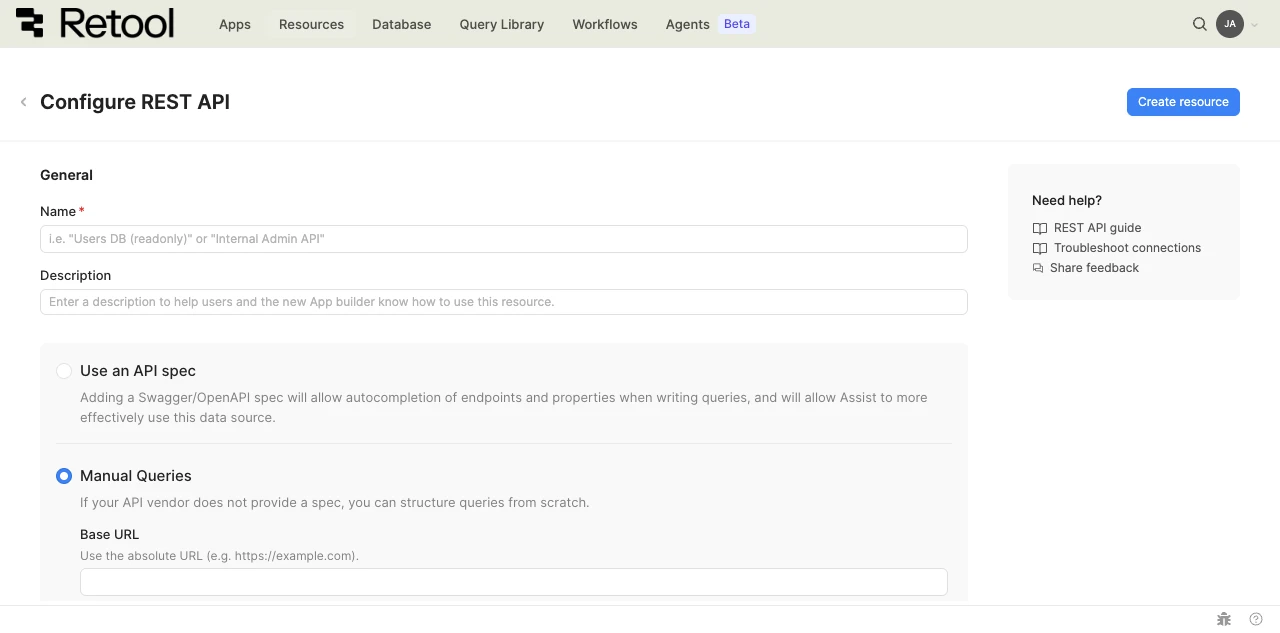
REST API resource configuration form.
Resource name and description
Specify a name for the resource that indicates which API it connects to. Include a description that can provide more context to users about how to use the resource.
| Example Name | Example Description |
|---|---|
| OpenWeatherMap API | A REST API resource for the OpenWeatherMap weather data service. |
| Internal customer API | A REST API resource for our internal customer management API. |
Query mode
Choose between two query modes for your REST API resource.
- Use an API spec
- Manual queries
Spec URL
Import an OpenAPI or Swagger specification to enable guided query creation with endpoint autocompletion.
https://api.example.com/openapi.json
https://api.example.com/swagger.yaml
https://petstore.swagger.io/v2/swagger.json
After entering the URL, click Load spec to fetch and validate the specification. Retool parses the specification, extracts available endpoints, and uses them to generate query fields. Users can also manually create endpoints or parameters that aren't included in the specification.
Server URL
If your spec defines multiple server URLs, select the appropriate server for your environment from the dropdown. Retool auto-populates the server URL if the spec defines only one.
Server variables
If your selected server URL includes variables, provide a value for each one. Server variables let you switch between environments or API versions without changing the resource configuration.
Base URL
Manually configure the base URL without importing a specification. Use this mode if your API doesn't provide an OpenAPI/Swagger spec or you prefer manual configuration. Query paths are appended to this base URL.
https://api.openweathermap.org/data/2.5
https://api.example.com/v2
https://internal-api.company.com/api
URL parameters and headers
Add global URL parameters and headers as key-value pairs. These apply to every request made with this resource.
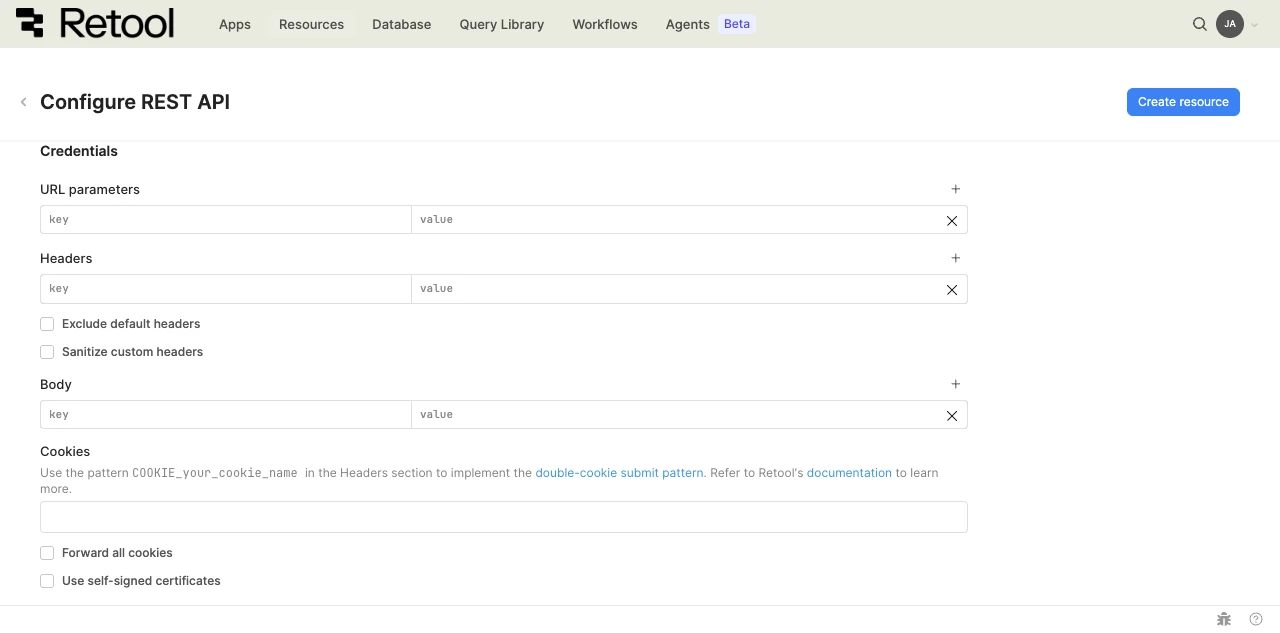
REST API credentials settings.
- Exclude default headers: Remove Retool's default headers from requests.
- Sanitize custom headers: Redact specific custom header values from logs and the Debug Tools console.
- Body: Add key-value pairs included in the body of every request.
- Cookies: Forward specific cookies, or enable Forward all cookies. Forwarding cookies that are pre-set on the domain Retool runs on requires a self-hosted instance with the
FORWARDABLE_SAME_DOMAIN_COOKIES_ALLOWLISTenvironment variable set. To implement the double-cookie submit pattern, add a header with theCOOKIE_your_cookie_nameprefix instead. Refer to Cookie-based APIs for setup steps. - Use self-signed certificates: Allow connections to APIs using self-signed SSL certificates.
Configure authentication
REST API supports multiple authentication methods based on your API requirements.
| Authentication method | Use cases |
|---|---|
| Auth0 Client Credentials | Auth0 for identity and access management. Retool handles OAuth flow and token management automatically. |
| AWS Signature V4 | AWS-hosted APIs requiring signed requests (API Gateway). Retool signs each request using AWS Signature Version 4. |
| Azure Identity | Azure-hosted APIs that use Azure Identity credentials. |
| Basic authentication | Username and password credentials sent with each request. Retool encodes credentials as base64 in the Authorization header. Common for simple APIs. |
| Bearer token | Static API token authentication. Retool sends the token as Authorization: Bearer {token}. |
| Custom | Custom authentication logic not covered by standard methods, such as multi-step flows. Add custom headers and authentication workflow using JavaScript. Test connection disabled for custom auth. |
| Custom Authorization Header | APIs that require a raw, nonstandard value in the Authorization header. Retool sends the value you provide without applying a scheme prefix. |
| Digest authentication | Digest authentication (RFC 2617). Uses MD5 hashing for improved security over Basic auth. |
| Google Service Account | Google service account authentication for Google Cloud services. Upload a JSON key file for automatic JWT generation and token refresh. |
| None | Public endpoints or custom authentication via headers. Add authentication tokens as custom headers. |
| OAuth 1.0 | Legacy OAuth 1.0 authentication (older services). Retool signs requests using the OAuth 1.0a signature method. |
| OAuth 2.0 | User authentication via OAuth 2.0. Use Authorization Code Grant for user credentials, Authorization Code Grant with PKCE for public clients that don't use a client secret, or Client Credentials for server-to-server authentication with automatic token refresh. |
| Session-based Deprecated | Session cookies for authentication. Configure a login endpoint and Retool maintains session cookies across requests. |
Select an authentication method from the Authentication dropdown and provide the required credentials. Retool encrypts credential fields (API keys, tokens, client secrets) automatically.
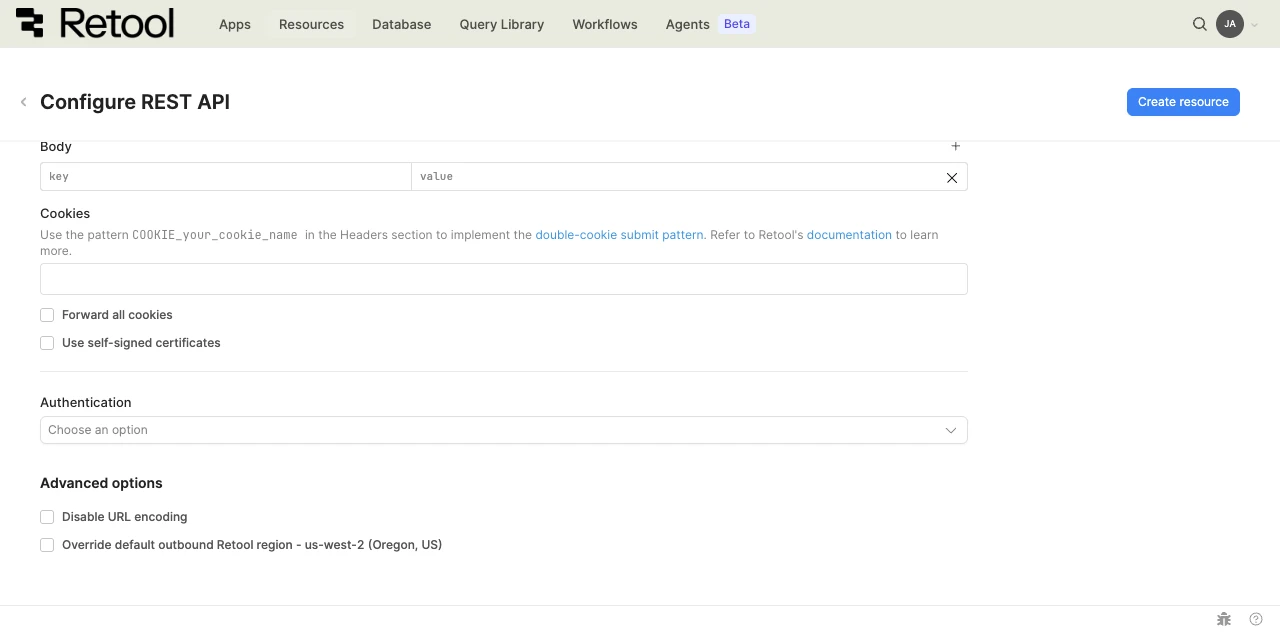
REST API authentication and advanced options.
Configure advanced options
- Disable URL encoding: Turn off automatic encoding of URL parameters, which some APIs require.
- Cloud
- Override default outbound Retool region: If your organization uses outbound regions, select the region that should be used for requests to this API.
Test the connection
Click Test connection to verify Retool can connect to your REST API. A successful test confirms the base URL is accessible and authentication credentials are valid. If it fails, check the following:
- Base URL: Confirm it's correct and accessible from Retool.
- Authentication credentials: Confirm they're valid and not expired.
- IP allowlisting: For Cloud organizations, confirm the API accepts requests from Retool's IP addresses.
- Custom headers: Confirm they're formatted correctly.
After testing the connection, click View in console to open the Debug Tools console. The console displays the request and response details, which is helpful for diagnosing authentication or network issues.
Save the resource
Click Create resource to save your REST API resource. The resource is now available to use in apps, workflows, and agent tools across your Retool organization.
Interact with REST API data
Once you've created a REST API resource, you can query it in Retool.
Switch to the new app builder to build with REST API data using natural language prompts.
- In the app builder, prompt the app building agent with
@and your resource name to generate queries against it. - In classic apps, workflows, and agents, write queries using the REST API query editor.
Connect to a SOAP API
You can also use a REST API resource to connect to a SOAP API. Configure the request body with SOAP XML and set appropriate headers, including Content-Type: text/xml. Refer to the REST API query guide for details.
Best practices
Follow these best practices to maintain the security of your REST API resource.
- Use configuration variables: Store API keys and tokens in configuration variables or Retool secrets rather than hardcoding them.
- Use HTTPS only: Always connect to APIs over HTTPS to encrypt data in transit and protect authentication credentials.
- Rotate credentials regularly: Follow your API provider's recommendations for credential rotation and key management.
- Validate SSL certificates: Keep SSL certificate verification enabled unless absolutely necessary for development environments.
- Use resource environments: Organizations on an Enterprise plan can configure multiple resource environments to maintain separate configurations for production, staging, and development.
- Apply least privilege: Use API keys with minimal required permissions. Create separate keys for different environments.
Related resources
Query REST API data
Learn how to query REST API resources in classic apps, workflows, and agents.
GraphQL
Connect to GraphQL APIs with type-safe queries.
Authentication methods
Learn about the authentication methods available for API resources.