Connect to JDBC
Connect any JDBC-compatible database to Retool using a custom or Retool-bundled driver.
JDBC is a Java API for connecting to relational databases. Create a JDBC resource to connect Retool to any database with a JDBC driver, including databases that don't have a native Retool integration.
What you can do with JDBC in Retool
After you create a JDBC resource in Retool, you can:
- Query data with SQL, including joins, aggregations, and subqueries.
- Insert, update, and delete records with SQL statements.
- Connect databases that don't have a native Retool integration by supplying your own JDBC driver.
- Run scheduled JDBC queries in Retool Workflows.
- Build dashboards and apps that display JDBC query results in charts, tables, and other components.
- Give Retool Agents typed, structured access to JDBC queries as custom tools.
If Retool has a native integration for your database, use it instead for a more seamless setup experience.
Before you begin
To connect JDBC to Retool, you need the following:
- Cloud
- Self-hosted
- A supported driver: Cloud organizations can connect using one of Retool's bundled JDBC drivers (DB2, ClickHouse, Trino, Ingres, or Hive).
- Credentials: A connection string with any credentials your database requires.
- Retool permissions: Ability to create and manage resources in your organization.
- A JDBC driver: Any JDBC driver
.jarfile for your database, added to your Retool instance. - Credentials: A connection string with any credentials your database requires.
- Retool permissions: Ability to create and manage resources in your organization.
Create a JDBC resource
Follow these steps to create a JDBC resource in your Retool organization.
Create a new resource
In your Retool organization, navigate to Resources in the main navigation and click Create new → Resource. Search for JDBC and click the JDBC tile to begin configuration.
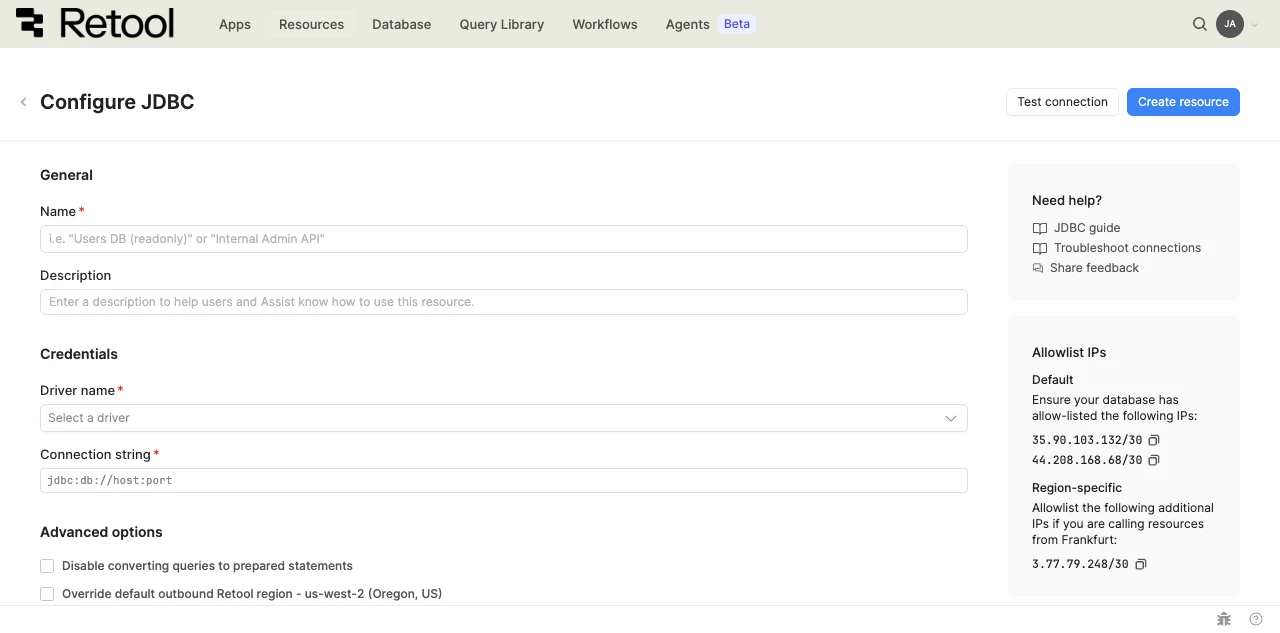
JDBC resource configuration form.
Configure general settings
Specify a name and description for the resource that indicates which database it connects to. The description provides more context to users about how to use the resource.
| Example name | Example description |
|---|---|
| Analytics warehouse (JDBC) | A JDBC connection to the analytics data warehouse using the Trino driver. |
| Legacy Vertica (JDBC) | A JDBC connection to the legacy Vertica database using a custom driver. |
Configure resource credentials
Configure the connection settings for your JDBC resource.
- Cloud
- Self-hosted
Driver name
Select one of Retool's bundled drivers: DB2, ClickHouse, Trino, Ingres, or Hive. Retool automatically populates a schema query for the selected driver.
Connection string
Provide a JDBC connection string that includes your database's host, port, and credentials.
jdbc:trino://host:443/catalog
Driver name
Enter the fully qualified driver class name for your JDBC driver, such as org.postgresql.Driver or com.vertica.jdbc.Driver.
Connection string
Provide a JDBC connection string that includes your database's host, port, and credentials.
jdbc:db://host:port
Schema query
A SQL query that returns column and table metadata, used to populate Retool's schema browser. Retool provides a default query that works for most databases exposing a standard information_schema, but some databases require a database-specific query.
Default schema query
SELECT
  c.column_name as column_name,
  c.data_type as data_type,
  c.table_name as table_name,
  c.table_schema as table_schema
FROM
  information_schema.columns c
  JOIN (
    SELECT
      table_name
    FROM
      information_schema.tables
    WHERE
      table_schema != 'information_schema'
    LIMIT
      3000
  ) AS t ON t.table_name = c.table_name
ORDER BY
  c.table_name
Bring your own JDBC driver
To connect a database that isn't one of Retool's bundled drivers, add your own JDBC driver .jar file to your self-hosted instance.
- Kubernetes with Helm
- Docker
Follow the Mount volumes steps to enable the PersistentVolumeClaim and set the security context, using jdbc in place of protos as the volume subdirectory:
kubectl cp jdbc/ my-retool-7c4c89798-fqbh7:/retool_backend/pv-data/jdbc
Then set JDBC_DIRECTORY_PATH instead of PROTO_DIRECTORY_PATH in values.yaml.
env:
  JDBC_DIRECTORY_PATH: "/retool_backend/pv-data/jdbc"
Reset the security context and run the helm upgrade command again to apply the change.
-
Create the
/retool_backend/jdbcdirectory and add the JDBC.jarfile, plus any dependencies it requires. -
Update
compose.yamlto mount the JDBC directory for theapi,db-connector, anddb-ssh-connectorcontainers.compose.yaml./jdbc:/retool_backend/jdbc -
Update
docker.envto include the path to the JDBC directory.docker.envJDBC_DIRECTORY_PATH=/retool_backend/jdbc -
Run
sudo docker compose up -dto restart Retool.
Example: connect a deprecated Vertica resource via JDBC
Retool is deprecating the dedicated Vertica resource type. Self-hosted organizations can keep querying Vertica after removal using a JDBC resource:
-
Download the Vertica JDBC driver from Vertica and add the
.jarfile to your JDBC driver directory, following the Kubernetes with Helm or Docker steps above. -
Create a JDBC resource with the following settings:
Field Value Driver name com.vertica.jdbc.DriverConnection string jdbc:vertica://HOSTNAME:5433/DATABASE?user=USERNAME&password=PASSWORD&DisableCopyLocal=trueSchema query select table_name, column_name, data_type, table_schema from columnsInclude
DisableCopyLocal=trueon the connection string. -
Open each app and workflow query that uses the Vertica resource, point it at the new JDBC resource, and test it.
Retool doesn't migrate Vertica resources or their query references automatically. JDBC resources also don't support Retool-managed SSH tunnels. If your Vertica resource uses one, or you have a large number of Vertica queries and need help finding them, contact Retool Support.
Configure advanced options
Configure optional settings available under the Advanced options section of the resource configuration form.
Disable converting queries to prepared statements
By default, Retool uses prepared statements for JDBC queries, which improves performance and prevents SQL injection. Disable this option only if your driver or database doesn't support prepared statements.
- Cloud
Outbound region
If your organization uses outbound regions, select the region that should be used for requests to your database. This controls which geographic region your requests originate from.
Test the connection
Click Test connection to verify Retool can connect to your database. If the test succeeds, you see a success message. If it fails, check the following:
- Driver name: Verify the driver class name is correct and, for self-hosted instances, that the driver
.jarfile is in the configured JDBC directory. - Connection string: Verify the host, port, and credentials in your connection string are correct.
- Network access: Ensure your database accepts connections from Retool's IP addresses or your self-hosted instance's network.
After testing the connection, click View in console to open the Debug Tools console. The console displays detailed information about the test, including the test query executed, execution time, and error details if the test fails.
Save the resource
Click Create resource to save your JDBC resource. You can now use it in queries across your Retool apps and automations.
Interact with JDBC data
Once you've created a JDBC resource, you can interact with JDBC data using Retool.
Retool recommends using the new app builder so you can use natural language to build React-based apps using AI.
- To use JDBC data in the app builder, reference the resource in the prompt with
@, such as@Analytics warehouse (JDBC). Refer to the data and functions documentation to learn more. - For classic apps, workflows, and agents, refer to the SQL queries documentation to learn how to write a resource query.
Best practices
Follow these best practices to maintain the security of your JDBC resource.
- Store credentials securely: Retool encrypts your JDBC connection string automatically, so you don't need to route it through a separate secrets store.
- Use a read-only user for read-heavy resources: Create a dedicated database user with only the permissions a resource actually needs, and use a read-only user for resources that only query data.
- Keep driver
.jarfiles up to date: Outdated drivers can carry unresolved security vulnerabilities. Check your database vendor's site periodically for a newer stable driver. - Use resource environments: Organizations on an Enterprise plan can configure multiple resource environments to maintain separate JDBC credentials for production, staging, and development.
Related resources
Create a resource
Learn how to create and manage resources in Retool.
Vertica resource type deprecation
Learn how to migrate a Vertica resource to JDBC.
Resource environments
Configure separate credentials for production and non-production environments.
Connect to OracleDB
Connect to Oracle AI Database using Retool's native OracleDB integration.
Retool community
Community discussions and solutions for connecting resources to Retool.
JDBC API documentation
Official JDBC API documentation.